Direct Connect – DX
- AWS Direct Connect is a network service that provides an alternative to using the Internet to utilize AWS cloud services
- DX links your internal network to an AWS Direct Connect location over a standard Ethernet fiber-optic cable with one end of the cable connected to your router, the other to an AWS Direct Connect router.
- Connections can be established with
- Dedicated connections – 1 Gbps, 10 Gbps, 100 Gbps, and 400 Gbps capacity.
- Hosted connection – Speeds of 50, 100, 200, 300, 400, and 500 Mbps can be ordered from any APN partners supporting AWS DX. Also, supports 1, 2, 5, 10 & 25 Gbps with selected partners.
- Virtual interfaces can be created directly to public AWS services ( e.g. S3) or to VPC, bypassing internet service providers in the network path.
- DX locations in public Regions or AWS GovCloud (US) can access public services in any other public Region.
- Each AWS DX location enables connectivity to all AZs within the geographically nearest AWS region.
- DX supports both the IPv4 and IPv6 communication protocols.
- Direct Connect provides direct Layer 3 network connectivity to the AWS global network through connectivity provider partners. Partner offerings include various connectivity types at OSI Layer 1 through Layer 3, including dark fiber, wavelength, metro Ethernet, or MPLS.
Direct Connect Advantages
- Reduced Bandwidth Costs
- All data transferred over the dedicated connection is charged at the reduced data transfer rate rather than Internet data transfer rates.
- Transferring data to and from AWS directly reduces the bandwidth commitment to the Internet service provider
- Consistent Network Performance
- provides a dedicated connection and a more consistent network performance experience than the Internet which can widely vary.
- Network traffic remains on the AWS global network and never touches the public internet, reducing the chance of hitting bottlenecks or unexpected increases in latency.
- AWS Services Compatibility
- is a network service and works with all of the AWS services like S3, EC2, and VPC
- Private Connectivity to AWS VPC
- Using DX Private Virtual Interface a private, dedicated, high bandwidth network connection can be established between the network and VPC
- Elastic
- can be easily scaled to meet the needs by either using a higher bandwidth connection or by establishing multiple connections.
Direct Connect Anatomy
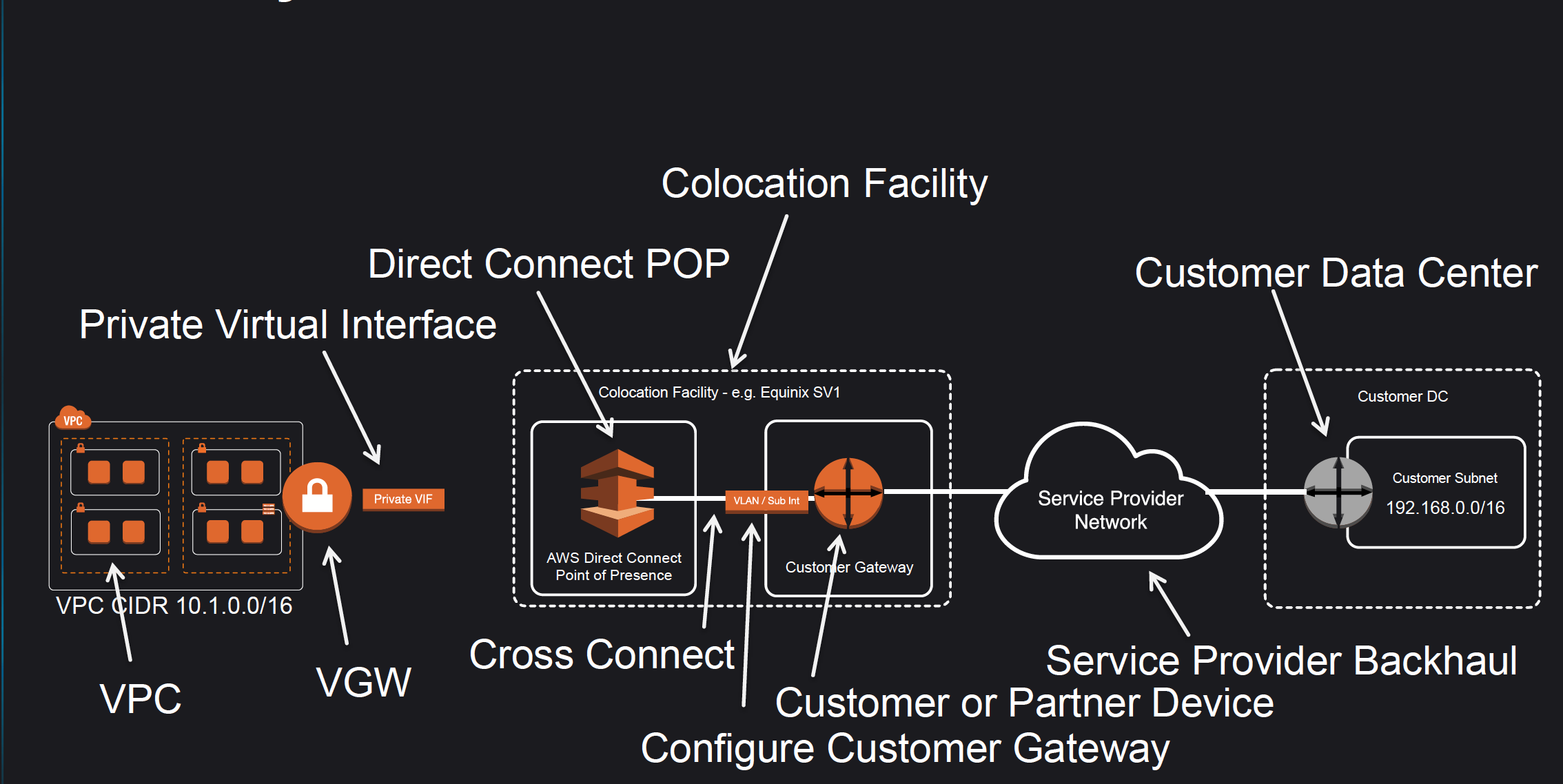
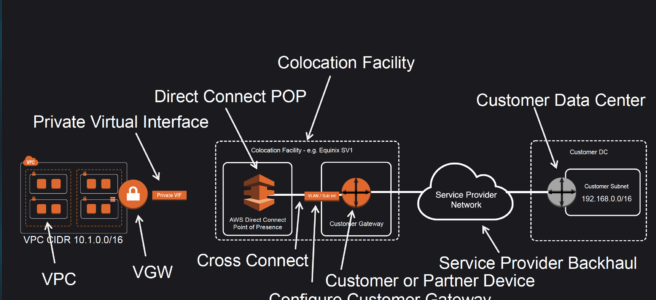
- Amazon maintains AWS Direct Connect PoP across different locations (referred to as Colocation Facilities) which are different from AWS regions.
- As a consumer, you can either purchase a rack space or use any of the AWS APN Partners which already have the infrastructure within the Colocation Facility and configure a Customer Gateway
- Connection from the AWS Direct Connect PoP to the AWS regions is maintained by AWS itself.
- Connection from the Customer Gateway to the Customer Data Center can be established using any Service Provider Network.
- Connection between the PoP and the Customer gateway within the Colocation Facility is called Cross Connect.
- Once a DX connection is created with AWS, an LOA-CFA (Letter Of Authority – Connecting Facility Assignment) would be received.
- LOA-CFA can be handover to the Colocation Facility or the APN Partner to establish the Cross Connect
- Once the Cross Connect and the connectivity between the CGW and Customer DataCenter are established, Virtual Interfaces can be created
- AWS Direct Connect requires a VGW to access the AWS VPC.
- Virtual Interfaces – VIF
- Each connection requires a Virtual Interface
- Each connection can be configured with one or more virtual interfaces.
- Supports, Public, Private, and Transit Virtual Interface
- Each VIF needs a VLAN ID, interface IP address, ASN, and BGP key.
- To use the connection with another AWS account, a hosted virtual interface (Hosted VIF) can be created for that account. These hosted virtual interfaces work the same as standard virtual interfaces and can connect to public resources or a VPC.
Direct Connect Network Requirements
- Single-mode fiber with
- a 1000BASE-LX (1310 nm) transceiver for 1 gigabit Ethernet,
- a 10GBASE-LR (1310 nm) transceiver for 10 gigabits,
- a 100GBASE-LR4 for 100 gigabit Ethernet, or
- a 400GBASE-LR4 for 400 gigabit Ethernet.
- 802.1Q VLAN encapsulation must be supported
- Auto-negotiation for a port must be disabled so that the speed and mode (half or full duplex) cannot be modified and should be manually configured
- Border Gateway Protocol (BGP) and BGP MD5 authentication must be supported
- Bidirectional Forwarding Detection (BFD) is optional and helps in quick failure detection.
Direct Connect Connections
- Dedicated Connection
- provides a physical Ethernet connection associated with a single customer
- Customers can request a dedicated connection through the AWS Direct Connect console, the CLI, or the API.
- support port speeds of 1 Gbps, 10 Gbps, 100 Gbps, and 400 Gbps.
- Native 400 Gbps connections provide higher bandwidth without the operational overhead of managing multiple 100 Gbps connections in a link aggregation group (available at select locations since July 2024).
- supports multiple virtual interfaces (current limit of 50)
- Hosted Connection
- A physical Ethernet connection that an AWS Direct Connect Partner provisions on behalf of a customer.
- Customers request a hosted connection by contacting a partner in the AWS Direct Connect Partner Program, which provisions the connection
- Support port speeds of 50 Mbps, 100 Mbps, 200 Mbps, 300 Mbps, 400 Mbps, 500 Mbps, 1 Gbps, 2 Gbps, 5 Gbps, 10 Gbps, and 25 Gbps
- 25 Gbps hosted connections (announced April 2024) fill the gap between 10 Gbps and 100 Gbps options, enabling right-sized connectivity without compromising performance.
- 1 Gbps, 2 Gbps, 5 Gbps, 10 Gbps, or 25 Gbps hosted connections are supported by selected partners.
- supports a single virtual interface
- AWS uses traffic policing on hosted connections and excess traffic is dropped.
Direct Connect Virtual Interfaces – VIF
- Public Virtual Interface
- enables connectivity to all the AWS Public IP addresses
- helps connect to public resources e.g. SQS, S3, EC2, Glacier, etc which are reachable publicly only.
- can be used to access all public resources across regions
- allows a maximum of 1000 prefixes. You can summarize the prefixes into a larger range to reduce the number of prefixes.
- does not support Jumbo frames.
- Private Virtual Interface
- helps connect to the VPC for e.g. instances with a private IP address
- supports
- Virtual Private Gateway
- Allows connections only to a single specific VPC with the attached VGW in the same region
- Private VIF and Virtual Private Gateway – VGW should be in the same region
- Direct Connect Gateway
- Allows connections to multiple VPCs in multiple regions.
- Virtual Private Gateway
- allows a maximum of 100 prefixes. You can summarize the prefixes into a larger range to reduce the number of prefixes.
- supports Jumbo frames with 9001 MTU
- provides access to EC2 instances, Private IPs, and VPC Interface Endpoints.
- does not provide access to VPC DNS resolver and VPC Gateway Endpoints
- Transit Virtual Interface
- helps access one or more VPC Transit Gateways associated with Direct Connect Gateways.
- supports up to 4 Transit VIFs per dedicated connection.
- supports a maximum of 200 prefixes per Transit Gateway association to a Direct Connect Gateway.
- supports Jumbo frames with 8500 MTU
VIF Rate Limiters (New – June 2026)
- VIF Rate Limiters allow you to set a maximum bandwidth allocation for individual VIFs on a dedicated connection.
- Helps prevent network congestion caused by unexpected traffic spikes on a VIF (“noisy neighbor” problem) which can consume all available bandwidth and impact other VIFs.
- Supported only on Dedicated connections (hosted connections are automatically rate-limited to purchased capacity).
- Can be applied to VIFs of any type: private, public, and transit.
- Each dedicated connection supports up to 10 rate limiters (increase via Service Quotas).
- Rate limiting applies to traffic both ingressing and egressing the AWS network.
- Bandwidth options range from 50 Mbps up to the connection’s capacity (up to 1.6 Tbps when using a LAG).
- VIFs without a Rate Limiter are considered Unlimited and can use up to 100% of the connection capacity.
- Oversubscription is supported – you can allocate bandwidth to VIFs in excess of the underlying connection’s capacity.
- CloudWatch metrics for monitoring: VirtualInterfacePolicedPpsIngress, VirtualInterfacePolicedPpsEgress, VirtualInterfacePolicedBpsIngress, VirtualInterfacePolicedBpsEgress.
Direct Connect SiteLink
- SiteLink is a feature of AWS Direct Connect that enables site-to-site connectivity between Direct Connect locations, bypassing AWS Regions.
- Data travels over the shortest path on the AWS global network backbone between Direct Connect locations without entering any AWS Region.
- Enables organizations to use the AWS global network as a private backbone to connect their distributed locations (offices, data centers).
- The SiteLink feature is off by default and can be turned on or off at any time using the AWS Management Console, CLI, or APIs.
- Requires connections at two or more AWS Direct Connect locations.
- SiteLink interconnects locations worldwide and offers built-in redundancy and resiliency.
- Provides uninterrupted connectivity even during public internet outages or high-traffic periods.
- SiteLink-enabled VIFs incur additional SiteLink hourly and data transfer charges.
Direct Connect Redundancy
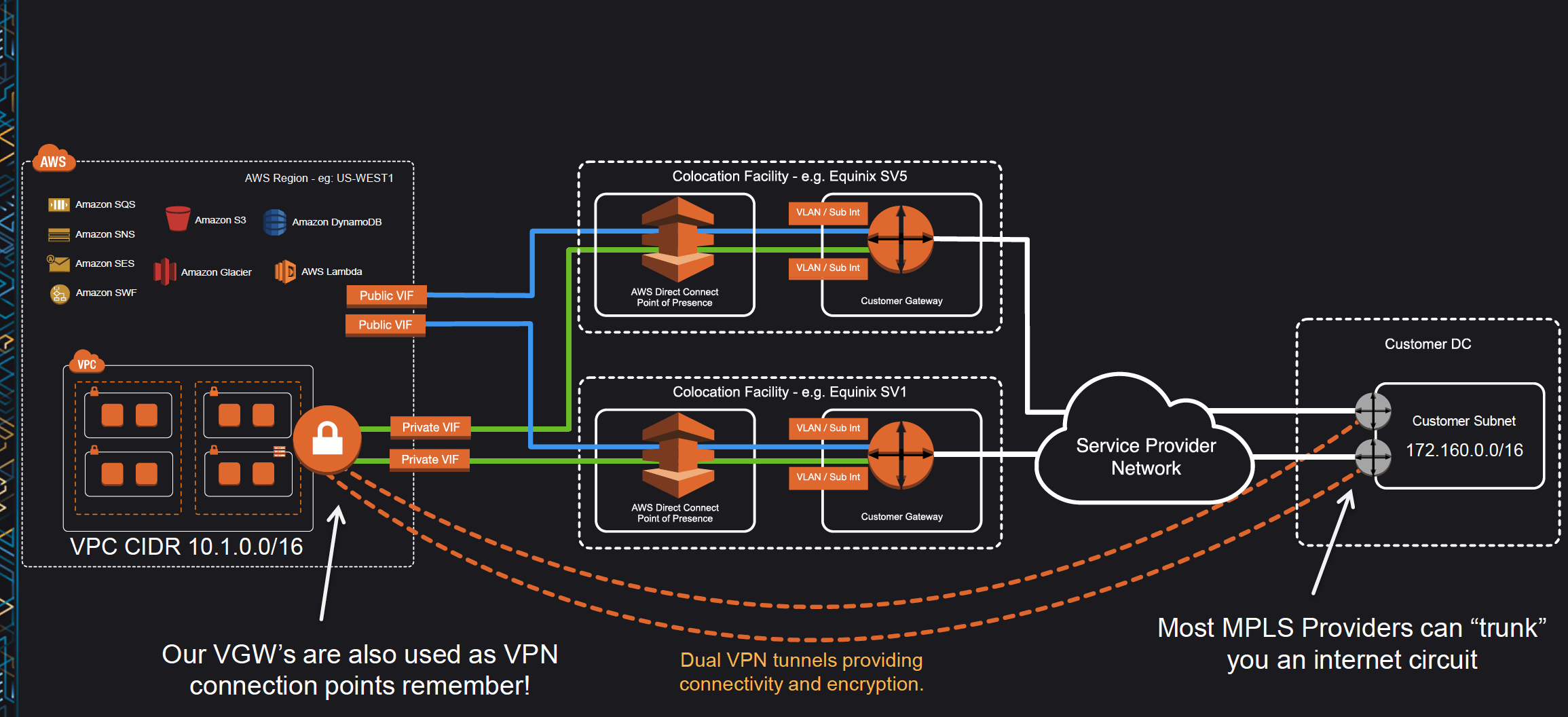
- Direct Connect connections do not provide redundancy and have multiple single points of failures w.r.t to the hardware devices as each connection consists of a single dedicated connection between ports on your router and an Amazon router.
- Redundancy can be provided by
- Establishing a second DX connection, preferably in a different Colocation Facility using a different router and AWS DX PoP.
- IPsec VPN connection between the Customer DC to the VGW.
- For Multiple ports requested in the same AWS Direct Connect location, Amazon itself makes sure they are provisioned on redundant Amazon routers to prevent impact from a hardware failure
High Resiliency – 99.9%
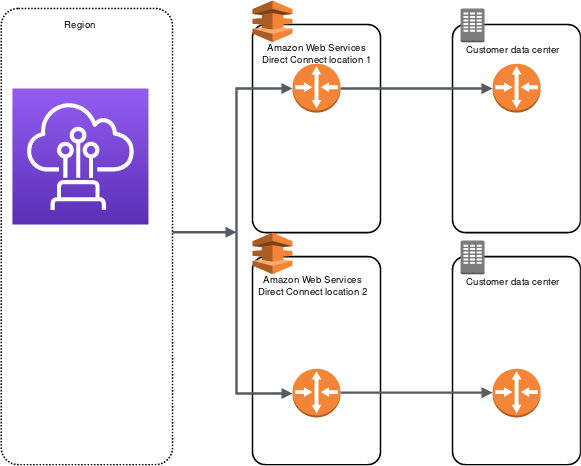
- High resiliency for critical workloads can be achieved by using two single connections to multiple locations.
- It provides resiliency against connectivity failures caused by a fiber cut or a device failure. It also helps prevent a complete location failure.
Maximum Resiliency – 99.99%
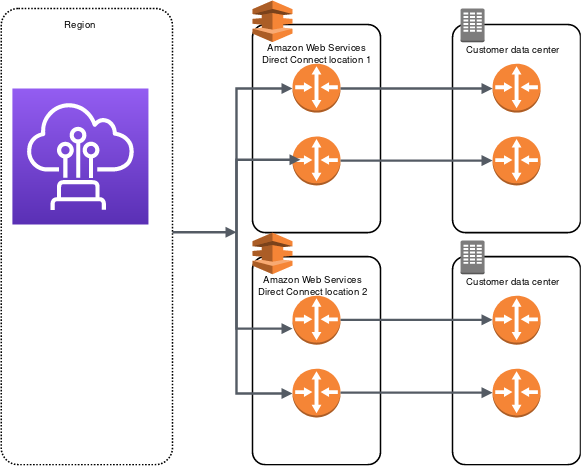
- Maximum resiliency for critical workloads can be achieved using separate connections that terminate on separate devices in more than one location.
- It provides resiliency against device, connectivity, and complete location failures.
Direct Connect LAG – Link Aggregation Group
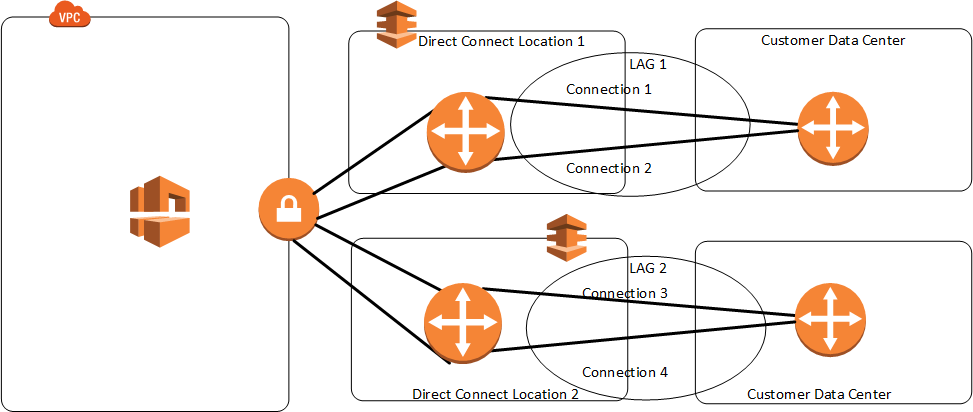
- A LAG is a logical interface that uses the Link Aggregation Control Protocol (LACP) to aggregate multiple connections at a single AWS Direct Connect endpoint, treating them as a single, managed connection.
- LAG can combine multiple connections to increase available bandwidth.
- LAG can be created from existing or new connections.
- Existing connections (whether standalone or part of another LAG) with the LAG can be associated after LAG creation.
- LAG needs following rules
- All connections must use the same bandwidth and port speed.
- All connections must be dedicated connections.
- Maximum of four connections in a LAG when port speed is 1 Gbps or 10 Gbps, or two connections when port speed is 100 Gbps or 400 Gbps.
- Each connection in the LAG counts toward the overall connection limit for the Region.
- All connections in the LAG must terminate at the same AWS Direct Connect endpoint.
- Multi-chassis LAG (MLAG) is not supported by AWS.
- LAG doesn’t make the connectivity to AWS more resilient.
- LAG connections operate in Active/Active mode.
- LAG supports attributes to define a minimum number of operational connections for the LAG function, with a default value of 0.
- VIF Rate Limiters are fully supported on VIFs created on LAGs, with the feature being aware of the LAG’s combined capacity.
Direct Connect Failover
- Bidirectional Forwarding Detection – BFD is a detection protocol that provides fast forwarding path failure detection times. These fast failure detection times facilitate faster routing reconvergence times.
- When connecting to AWS services over DX connections it is recommended to enable BFD for fast failure detection and failover.
- By default, BGP waits for three keep-alives to fail at a hold-down time of 90 seconds. Enabling BFD for the DX connection allows the BGP neighbor relationship to be quickly torn down.
- Asynchronous BFD is automatically enabled for each DX virtual interface, but will not take effect until it’s configured on your router.
- AWS has set the BFD liveness detection minimum interval to 300, and the BFD liveness detection multiplier to 3
- It’s a best practice not to configure graceful restart and BFD at the same time to avoid failover or connection issues. For fast failover, configure BFD without graceful restart enabled.
- BFD is supported for LAGs.
Direct Connect Monitoring
- AWS Direct Connect supports Amazon CloudWatch for monitoring connections and virtual interfaces.
- Connection-level Metrics: ConnectionState metric monitors connection health.
- VIF-level Metrics: Includes throughput (bps), packet rate (pps) for both ingress and egress.
- BGP Monitoring Metrics (New – March 2026):
- VirtualInterfaceBgpStatus – Reports BGP session state (1 = up, 0 = down), enabling detection when sessions fail.
- VirtualInterfaceBgpPrefixesAccepted – Tracks prefixes received from your on-premises network, allowing proactive alarms before reaching prefix limits that would cause BGP sessions to enter idle state.
- VirtualInterfaceBgpPrefixesAdvertised – Tracks routes advertised from AWS to on-premises, helping detect silent route withdrawals.
- These BGP metrics eliminate the need to poll the Direct Connect API, build custom Lambda functions, or rely solely on on-premises network management tools for BGP telemetry.
Direct Connect Security
- Direct Connect does not encrypt the traffic that is in transit by default. To encrypt the data in transit that traverses DX, you must use the transit encryption options for that service.
- DX connections can be secured
- with IPSec VPN to provide secure, reliable connectivity.
- with MACsec to encrypt the data from the corporate data center to the DX location.
- MAC Security (MACsec)
- is an IEEE standard that provides data confidentiality, data integrity, and data origin authenticity.
- provides Layer 2 point-to-point encryption over the cross-connect to AWS, operating between two Layer 3 routers.
- Supported on 10 Gbps, 100 Gbps, and 400 Gbps Dedicated Connections.
- For 10 Gbps connections, supports both GCM-AES-256 and GCM-AES-XPN-256 cipher suites.
- delivers native, near line-rate, point-to-point encryption ensuring that data communications between AWS and the data center, office, or colocation facility remain protected.
- removes VPN limitation that required the aggregation of multiple IPsec VPN tunnels to work around the throughput limits of using a single VPN connection.
- MACsec on Partner Interconnects (New – July 2025): MACsec encryption is now supported on partner-owned interconnects terminated on supported physical devices, extending encryption beyond customer-owned dedicated connections.
Direct Connect Gateway
Refer blog post @ Direct Connect Gateway
Direct Connect and AWS Cloud WAN Integration
- AWS Cloud WAN now supports direct attachment of Direct Connect gateways to a Cloud WAN core network (announced November 2024).
- Eliminates the need to deploy an intermediate Transit Gateway to interconnect Direct Connect-based networks with Cloud WAN.
- Supports automatic route propagation between AWS and on-premises networks using BGP.
- Simplifies global hybrid network connectivity and management.
- Provides a unified global network policy framework, segmentation capabilities, dynamic route propagation, and monitoring through a centralized dashboard.
Direct Connect vs IPSec VPN Connections
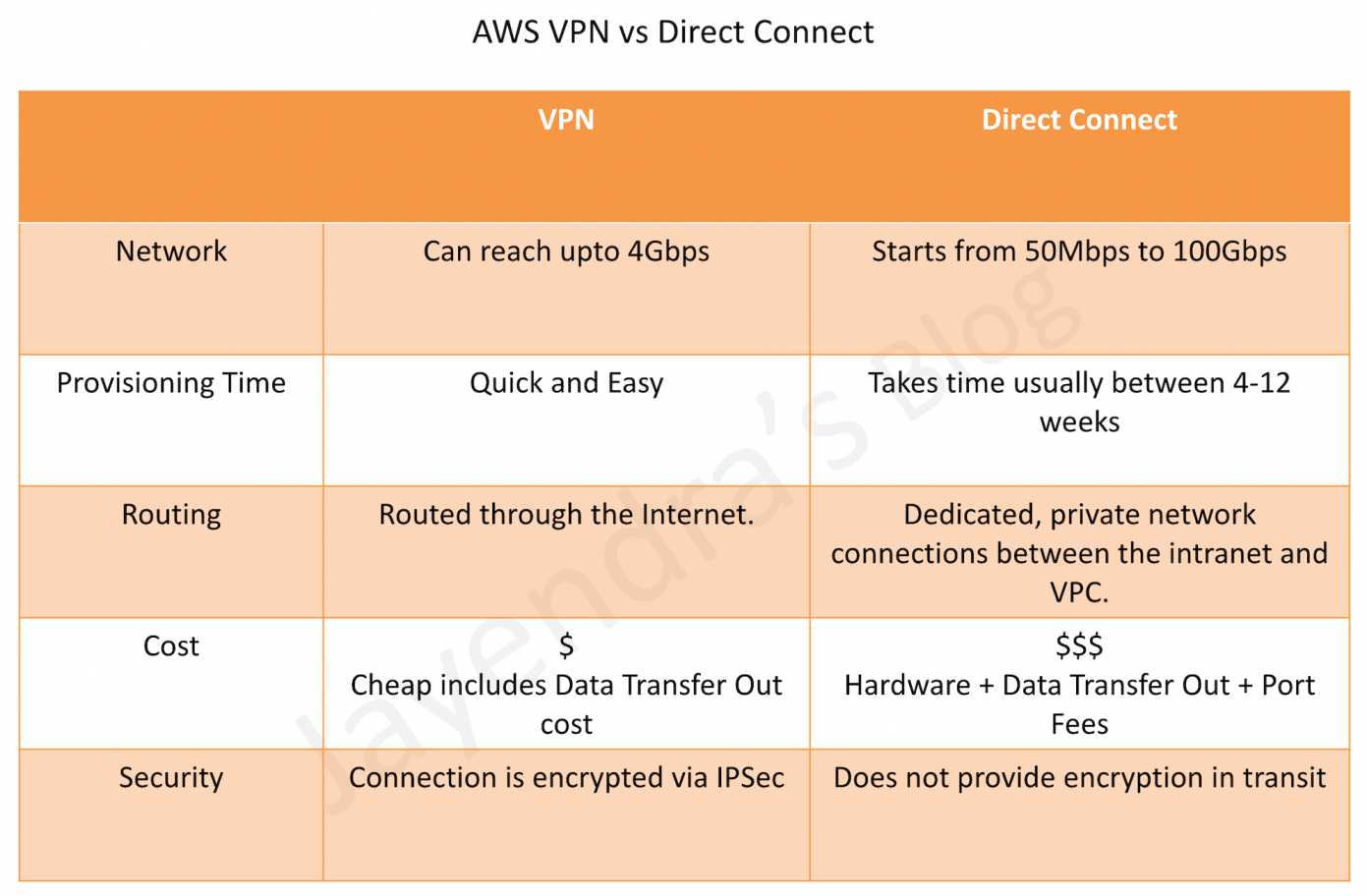
Refer blog post @ Direct Connect vs VPN
AWS Certification Exam Practice Questions
- Questions are collected from Internet and the answers are marked as per my knowledge and understanding (which might differ with yours).
- AWS services are updated everyday and both the answers and questions might be outdated soon, so research accordingly.
- AWS exam questions are not updated to keep up the pace with AWS updates, so even if the underlying feature has changed the question might not be updated
- Open to further feedback, discussion and correction.
- You are building a solution for a customer to extend their on-premises data center to AWS. The customer requires a 50-Mbps dedicated and private connection to their VPC. Which AWS product or feature satisfies this requirement?
- Amazon VPC peering
- Elastic IP Addresses
- AWS Direct Connect
- Amazon VPC virtual private gateway
- Is there any way to own a direct connection to Amazon Web Services?
- You can create an encrypted tunnel to VPC, but you don’t own the connection.
- Yes, it’s called Amazon Dedicated Connection.
- No, AWS only allows access from the public Internet.
- Yes, it’s called Direct Connect
- An organization has established an Internet-based VPN connection between their on-premises data center and AWS. They are considering migrating from VPN to AWS Direct Connect. Which operational concern should drive an organization to consider switching from an Internet-based VPN connection to AWS Direct Connect?
- AWS Direct Connect provides greater redundancy than an Internet-based VPN connection.
- AWS Direct Connect provides greater resiliency than an Internet-based VPN connection.
- AWS Direct Connect provides greater bandwidth than an Internet-based VPN connection.
- AWS Direct Connect provides greater control of network provider selection than an Internet-based VPN connection.
- Does AWS Direct Connect allow you access to all Availabilities Zones within a Region?
- Depends on the type of connection
- No
- Yes
- Only when there’s just one availability zone in a region. If there are more than one, only one availability zone can be accessed directly.
- A customer has established an AWS Direct Connect connection to AWS. The link is up and routes are being advertised from the customer’s end, however, the customer is unable to connect from EC2 instances inside its VPC to servers residing in its datacenter. Which of the following options provide a viable solution to remedy this situation? (Choose 2 answers)
- Add a route to the route table with an IPSec VPN connection as the target (deals with VPN)
- Enable route propagation to the Virtual Private Gateway (VGW)
- Enable route propagation to the customer gateway (CGW) (route propagation is enabled on VGW)
- Modify the route table of all Instances using the ‘route’ command. (no route command available)
- Modify the Instances VPC subnet route table by adding a route back to the customer’s on-premises environment.
- A company has configured and peered two VPCs: VPC-1 and VPC-2. VPC-1 contains only private subnets, and VPC-2 contains only public subnets. The company uses a single AWS Direct Connect connection and private virtual interface to connect their on-premises network with VPC-1. Which two methods increase the fault tolerance of the connection to VPC-1? Choose 2 answers
- Establish a hardware VPN over the internet between VPC-2 and the on-premises network. (Peered VPC does not support Edge to Edge Routing)
- Establish a hardware VPN over the internet between VPC-1 and the on-premises network
- Establish a new AWS Direct Connect connection and private virtual interface in the same region as VPC-2 (Peered VPC does not support Edge to Edge Routing)
- Establish a new AWS Direct Connect connection and private virtual interface in a different AWS region than VPC-1 (need to be in the same region as VPC-1)
- Establish a new AWS Direct Connect connection and private virtual interface in the same AWS region as VPC-1
- Your company previously configured a heavily used, dynamically routed VPN connection between your on-premises data center and AWS. You recently provisioned a Direct Connect connection and would like to start using the new connection. After configuring Direct Connect settings in the AWS Console, which of the following options will provide the most seamless transition for your users?
- Delete your existing VPN connection to avoid routing loops configure your Direct Connect router with the appropriate settings and verify network traffic is leveraging Direct Connect.
- Configure your Direct Connect router with a higher BGP priority than your VPN router, verify network traffic is leveraging Direct Connect, and then delete your existing VPN connection.
- Update your VPC route tables to point to the Direct Connect connection configure your Direct Connect router with the appropriate settings verify network traffic is leveraging Direct Connect and then delete the VPN connection.
- Configure your Direct Connect router, update your VPC route tables to point to the Direct Connect connection, configure your VPN connection with a higher BGP priority. And verify network traffic is leveraging the Direct Connect connection
- You are designing the network infrastructure for an application server in Amazon VPC. Users will access all the application instances from the Internet as well as from an on-premises network The on-premises network is connected to your VPC over an AWS Direct Connect link. How would you design routing to meet the above requirements?
- Configure a single routing table with a default route via the Internet gateway. Propagate a default route via BGP on the AWS Direct Connect customer router. Associate the routing table with all VPC subnets (propagating the default route would cause conflict)
- Configure a single routing table with a default route via the internet gateway. Propagate specific routes for the on-premises networks via BGP on the AWS Direct Connect customer router. Associate the routing table with all VPC subnets.
- Configure a single routing table with two default routes: one to the internet via an Internet gateway the other to the on-premises network via the VPN gateway use this routing table across all subnets in your VPC. (there cannot be 2 default routes)
- Configure two routing tables one that has a default route via the Internet gateway and another that has a default route via the VPN gateway Associate both routing tables with each VPC subnet. (as the instances have to be in the public subnet and should have a single routing table associated with them)
- You are implementing AWS Direct Connect. You intend to use AWS public service endpoints such as Amazon S3, across the AWS Direct Connect link. You want other Internet traffic to use your existing link to an Internet Service Provider. What is the correct way to configure AWS Direct Connect for access to services such as Amazon S3?
- Configure a public Interface on your AWS Direct Connect link. Configure a static route via your AWS Direct Connect link that points to Amazon S3. Advertise a default route to AWS using BGP.
- Create a private interface on your AWS Direct Connect link. Configure a static route via your AWS Direct Connect link that points to Amazon S3 Configure specific routes to your network in your VPC.
- Create a public interface on your AWS Direct Connect link. Redistribute BGP routes into your existing routing infrastructure advertise specific routes for your network to AWS
- Create a private interface on your AWS Direct connect link. Redistribute BGP routes into your existing routing infrastructure and advertise a default route to AWS.
- You have been asked to design network connectivity between your existing data centers and AWS. Your application’s EC2 instances must be able to connect to existing backend resources located in your data center. Network traffic between AWS and your data centers will start small, but ramp up to 10s of GB per second over the course of several months. The success of your application is dependent upon getting to market quickly. Which of the following design options will allow you to meet your objectives?
- Quickly create an internal ELB for your backend applications, submit a DirectConnect request to provision a 1 Gbps cross-connect between your data center and VPC, then increase the number or size of your DirectConnect connections as needed.
- Allocate EIPs and an Internet Gateway for your VPC instances to use for quick, temporary access to your backend applications, then provision a VPN connection between a VPC and existing on-premises equipment.
- Provision a VPN connection between a VPC and existing on-premises equipment, submit a DirectConnect partner request to provision cross connects between your data center and the DirectConnect location, then cut over from the VPN connection to one or more DirectConnect connections as needed.
- Quickly submit a DirectConnect request to provision a 1 Gbps cross connect between your data center and VPC, then increase the number or size of your DirectConnect connections as needed.
- You are tasked with moving a legacy application from a virtual machine running inside your datacenter to an Amazon VPC. Unfortunately, this app requires access to a number of on-premises services and no one who configured the app still works for your company. Even worse there’s no documentation for it. What will allow the application running inside the VPC to reach back and access its internal dependencies without being reconfigured? (Choose 3 answers)
- An AWS Direct Connect link between the VPC and the network housing the internal services (VPN or a DX for communication)
- An Internet Gateway to allow a VPN connection. (Virtual and Customer gateway is needed)
- An Elastic IP address on the VPC instance (Don’t need a EIP as private subnets can also interact with on-premises network)
- An IP address space that does not conflict with the one on-premises (IP address cannot conflict)
- Entries in Amazon Route 53 that allow the Instance to resolve its dependencies’ IP addresses (Route 53 is not required)
- A VM Import of the current virtual machine (VM Import to copy the VM to AWS as there is no documentation it can’t be configured from scratch)
- A company has multiple on-premises locations connected to AWS via Direct Connect. They need to enable direct communication between these locations using the AWS backbone without routing traffic through an AWS Region. Which feature should they use?
- Direct Connect Gateway
- Transit Gateway
- AWS Direct Connect SiteLink
- VPC Peering
- An organization is running multiple workloads over a single 10 Gbps Direct Connect dedicated connection using separate VIFs. One workload occasionally experiences traffic spikes that consume all available bandwidth, impacting other workloads. What feature can address this? (Choose 2 answers)
- Apply VIF Rate Limiters to the spike-prone VIF to cap its bandwidth consumption
- Create separate hosted connections for each workload
- Leave the critical workload’s VIF as Unlimited while applying Rate Limiters to non-critical VIFs
- Enable MACsec encryption on the connection
- A company needs to monitor BGP session status and prefix counts on their Direct Connect virtual interfaces without building custom Lambda functions. Which CloudWatch metrics should they use? (Choose 2 answers)
- ConnectionBpsIngress
- VirtualInterfaceBgpStatus
- VirtualInterfaceErrorCount
- VirtualInterfaceBgpPrefixesAccepted