Google Cloud Interconnect
- Google Cloud Interconnect provides low-latency, high-availability connections that enable reliable data transfer between networks.
- Cloud Interconnect offers the following options for extending the network:
- Dedicated Interconnect – provides a direct physical connection between the on-premises network and Google’s network.
- Partner Interconnect – provides connectivity between the on-premises and VPC networks through a supported service provider.
- Cross-Cloud Interconnect – provides dedicated connectivity between Google Cloud and another cloud service provider (AWS, Azure, OCI, Alibaba Cloud).
- Cross-Site Interconnect – provides Layer 2 connectivity between on-premises network sites using Google’s global network.
- Cloud Interconnect provides access to all Google Cloud products and services from the on-premises network except Google Workspace.
- Cloud Interconnect also allows access to supported APIs and services by using Private Google Access from on-premises hosts.
- Traffic between networks doesn’t traverse the public internet, reducing points of failure and improving latency.
- VPC network’s internal IP addresses are directly accessible from on-premises without NAT or VPN tunnels.
Dedicated Interconnect
- Dedicated Interconnect provides direct physical connections between the on-premises network and Google’s network.
- Dedicated Interconnect enables the transfer of large amounts of data between networks, which can be more cost-effective than purchasing additional bandwidth over the public internet.
- Dedicated Interconnect requires your network to physically meet Google’s network in a colocation facility with your own routing equipment.
- Dedicated Interconnect supports only dynamic routing.
- Dedicated Interconnect supports the following link types:
- 10 Gbps circuits (single mode fiber, 10GBASE-LR)
- 100 Gbps circuits (single mode fiber, 100GBASE-LR4)
- 400 Gbps circuits (single mode fiber, 400GBASE-LR4) – GA March 2026
- VLAN attachments support maximum bandwidths up to 400 Gbps (GA March 2026).
- VLAN attachment should be associated with a Cloud Router.
- Cloud Router creates a BGP session for the VLAN attachment and its corresponding on-premises peer router.
- Cloud Router receives the routes that the on-premises router advertises. These routes are added as custom dynamic routes in the VPC network.
- Cloud Router also advertises routes for Google Cloud resources to the on-premises peer router.
- Supports IPv6 traffic exchange between IPv6-enabled VPC network and on-premises network.
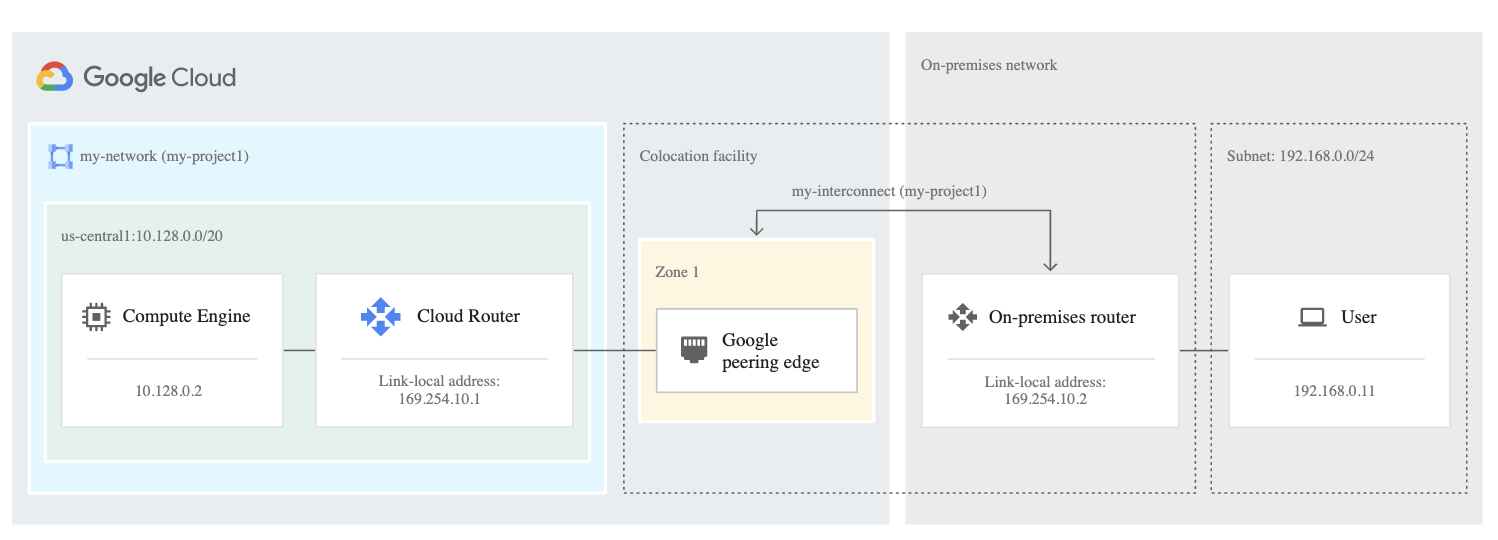
Dedicated Interconnect Provisioning
- Find a collocation facility with GCP Point of Presence (PoP) which offers Direct Interconnect connections.
- Order an Interconnect connection so that Google can allocate the necessary resources and send a Letter of Authorization and Connecting Facility Assignment (LOA-CFA).
- LOA-CFA is sent via email to NOC (technical contact) or can be downloaded from the Google Cloud console.
- Submit the LOA-CFA to the vendor so that they can provision the Interconnect connections between Google’s network and your network.
- Configure and test the connections with Google before you can use them.
- Create VLAN attachments to allocate a VLAN on the connection.
- Configure the on-premises router to establish a BGP session with the Cloud Router.
Dedicated Interconnect Redundancy
- Single Dedicated Interconnect connection does not offer redundancy or high availability.
- Google recommends redundancy using 2 (99.9%) or 4 (99.99%) interconnect connections so that if one connection fails, the other connection can continue to serve traffic.
- Redundant Interconnect connection with 2 connections must be created in the same metropolitan area (city) as the existing one, but in a different edge availability domain (metro availability zone).
- Redundant Interconnect connection with 4 connections must be created with 2 connections in two different metropolitan areas (city), and each connection in a different edge availability domain (metro availability zone).
- Dynamic routing mode for the VPC network must be global so that Cloud Router can advertise all subnets and propagate learned routes to all subnets regardless of the subnet’s region.
- A single-region Critical production SLA (99.99%) topology is now available (GA June 2026), allowing 99.99% availability within a single region.
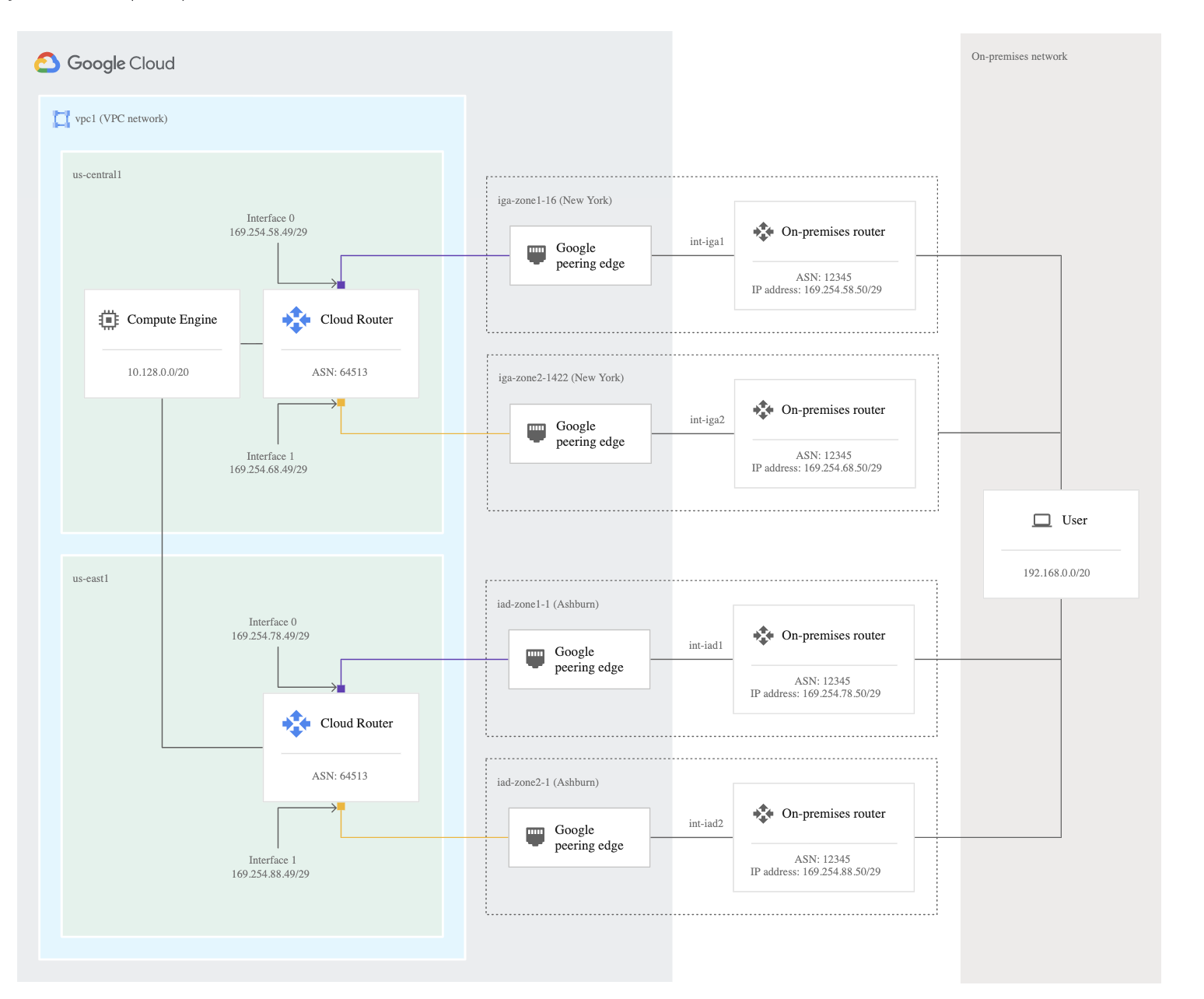
Partner Interconnect
- Partner Interconnect provides connectivity between the on-premises network and the VPC network through a supported service provider.
- A Partner Interconnect connection is useful if the data center is in a physical location that can’t reach a Dedicated Interconnect colocation facility, or the data needs don’t warrant an entire 10-Gbps connection.
- Partner Interconnect supports bandwidth from 50 Mbps minimum to 50 Gbps maximum per VLAN attachment.
- Service providers have existing physical connections to Google’s network that they make available for their customers to use.
- After the connectivity with a service provider is established, a Partner Interconnect connection from the service provider can be requested.
- After the service provider provisions the connection, you can start passing traffic between your networks by using the service provider’s network.
- Partner Interconnect provides Layer 2 and Layer 3 connectivity:
- For Layer 2 connections:
- You must configure and establish a BGP session between the Cloud Routers and on-premises routers for each created VLAN attachment.
- BGP configuration information is provided by the VLAN attachment after your service provider has configured it.
- For Layer 3 connections:
- The service provider establishes a BGP session between the Cloud Routers and their edge routers for each VLAN attachment.
- You don’t need to configure BGP on the on-premises router. Google and the service provider automatically set the correct configuration.
- For Layer 2 connections:
- Supports IPv6 traffic exchange between IPv6-enabled VPC network and on-premises network.
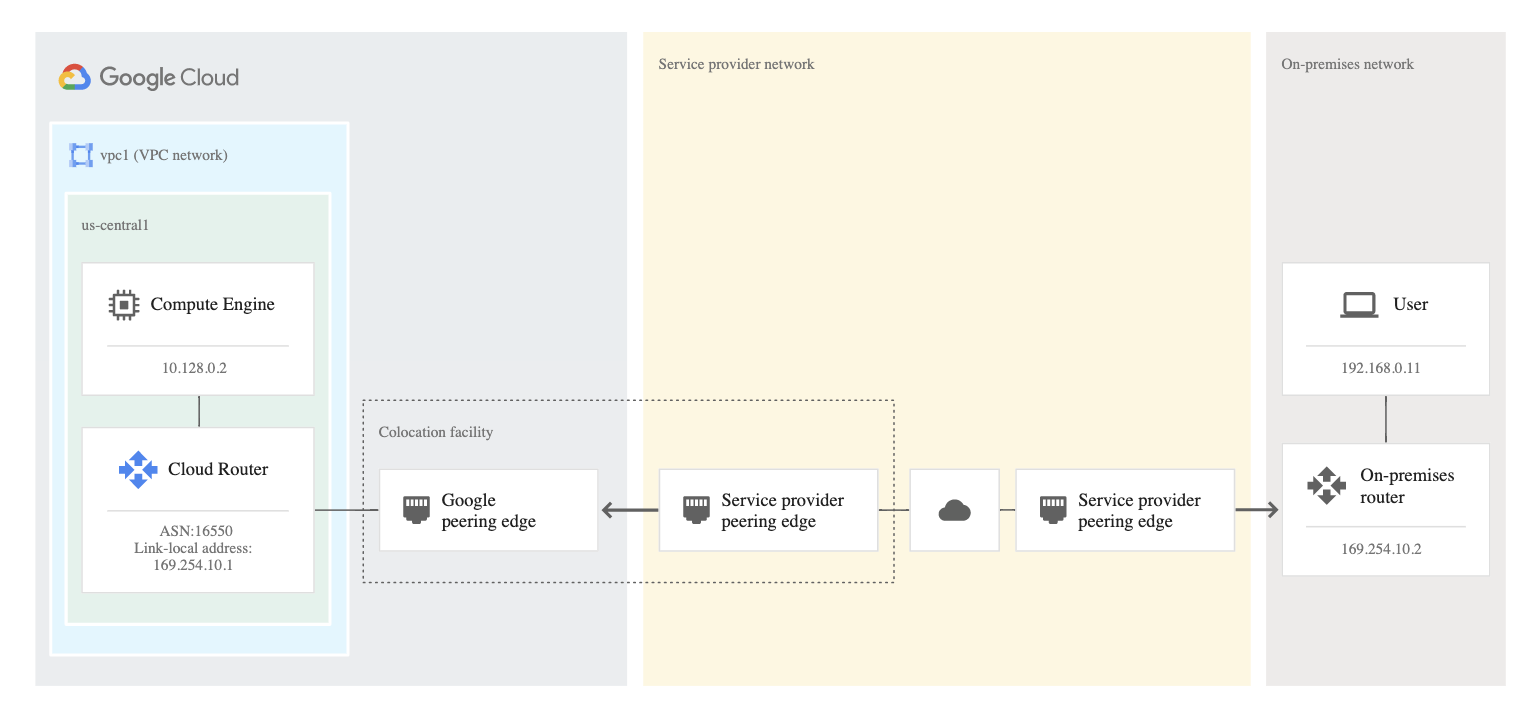
Partner Interconnect Provisioning
- Connect the on-premises network to a supported service provider.
- Create a VLAN attachment for a Partner Interconnect connection in the Google Cloud project, which generates a unique pairing key that must be used to request a connection from the service provider.
- Activate the connection.
- Depending on the connection, either you or your service provider then establishes a Border Gateway Protocol (BGP) session.
- Partner Interconnect provisioning does not require LOA-CFA.
Partner Interconnect Redundancy
- Single Partner Interconnect connection does not offer redundancy or high availability.
- 99.9% availability requires:
- At least two VLAN attachments in a single Google Cloud region, in separate edge availability domains (metro availability zones).
- At least one Cloud Router, connected to both VLAN attachments.
- 99.99% availability requires:
- At least four VLAN attachments across two metros, one in each edge availability domain (metro availability zone).
- Two Cloud Routers (one in each Google Cloud region of a VPC network).
- Associate one Cloud Router with each pair of VLAN attachments.
- Dynamic routing mode for the VPC network must be global so that Cloud Router can advertise all subnets and propagate learned routes to all subnets regardless of the subnet’s region.
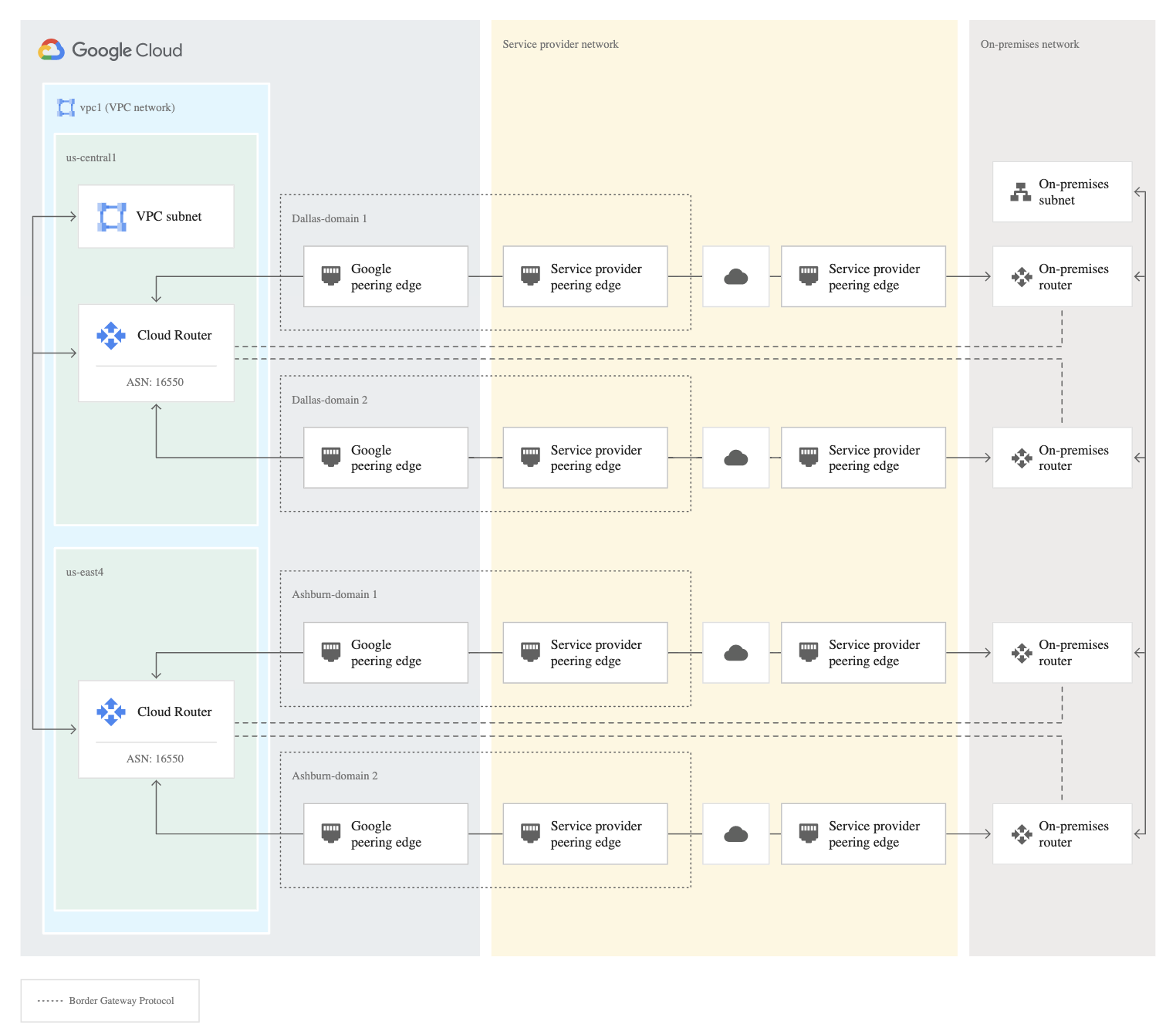
Cross-Cloud Interconnect
- Cross-Cloud Interconnect provides high-bandwidth dedicated connectivity between Google Cloud and another cloud service provider.
- Supported cloud providers include Amazon Web Services (AWS), Microsoft Azure, Oracle Cloud Infrastructure (OCI), and Alibaba Cloud.
- Provides private, SLA-backed connectivity without traversing the public internet.
- Available connection capacities: 10 Gbps, 100 Gbps, and 400 Gbps (GA March 2026).
- Google provisions and manages the physical connections from Google to the remote cloud provider.
- Supports traffic differentiation through application awareness (GA September 2025).
- Use cases:
- Multicloud deployments requiring private connectivity between clouds.
- Data replication and disaster recovery across cloud providers.
- Distributed applications spanning multiple clouds.
Partner Cross-Cloud Interconnect
- Partner Cross-Cloud Interconnect for AWS (GA April 2026) provides an on-demand, reliable method for establishing cross-cloud transport without manually setting up networking components.
- Provides region-to-region transport with SLA-protected, coordinated underlay built with AWS.
- Can be set up on-demand and sized up or down based on needs.
- Supports both VPC Network Peering and Network Connectivity Center (NCC) connectivity models.
- Partner Cross-Cloud Interconnect for OCI provides on-demand connections with variable speed options (1 Gbps to 50 Gbps).
Cross-Site Interconnect
- Cross-Site Interconnect (Preview, April 2025) provides reliable, high-bandwidth Layer 2 connectivity between on-premises network sites using Google’s global network.
- A transparent, on-demand, Layer 2 connectivity solution that leverages Google’s global infrastructure.
- Supports 10 Gbps and 100 Gbps connections.
- Supports an MTU size of 9,000 bytes for cross-site networks.
- Use cases:
- Site-to-site connectivity between on-premises locations.
- Simplifying WAN infrastructure for high-performance and high-bandwidth connectivity.
- Improving reliability posture across the WAN.
- Provisioning requires LOA-CFA similar to Dedicated Interconnect.
- Available in multiple colocation facilities globally (Singapore, Dallas, Miami, Melbourne, Taipei, Stockholm, etc.).
Cloud Interconnect Security
- Cloud Interconnect does not encrypt the connection between your network and Google’s network by default.
- Multiple encryption options are now available:
- HA VPN over Cloud Interconnect – Deploys IPsec-encrypted HA VPN tunnels over VLAN attachments. Supported for both Dedicated Interconnect and Partner Interconnect. Each HA VPN tunnel provides up to 3 Gbps bandwidth.
- MACsec for Cloud Interconnect – Uses IEEE 802.1AE MACsec standard to encrypt traffic between your on-premises router and Google’s edge routers. Available for 100 Gbps and 400 Gbps links regardless of location; for 10 Gbps links, availability varies by location.
- Application-level encryption or your own VPN for additional security.
- HA VPN over Cloud Interconnect helps maintain compliance with industry regulations requiring encryption of outgoing traffic or data in transit.
MACsec for Cloud Interconnect
- MACsec encrypts traffic at the Layer 2 (data link) level between your on-premises router and Google’s edge routers.
- MACsec doesn’t provide encryption in transit within Google’s network. For stronger security, combine with IPsec or TLS.
- Supports two security modes:
- Fail open (must-secure) – If MACsec session can’t be established, link operates without encryption.
- Fail closed – If MACsec session can’t be established, the link fails (drops all traffic).
- Available for 100 Gbps and 400 Gbps links regardless of location.
- Uses pre-shared keys to encrypt traffic transiting between routers.
HA VPN over Cloud Interconnect
- Establishes encrypted HA VPN tunnels over Cloud Interconnect VLAN attachments.
- Supported for both Dedicated Interconnect and Partner Interconnect.
- Each HA VPN tunnel provides up to 3 Gbps bandwidth.
- Provides IPsec encryption at the IP layer (Layer 3).
- Requires a Cloud Router with
encrypted_interconnect_router = true. - Can reserve regional internal IP ranges for HA VPN gateway interfaces.
Traffic Differentiation (Application Awareness)
- Dedicated Interconnect and Cross-Cloud Interconnect support network traffic differentiation through application awareness (GA September 2025).
- Lets you map outbound traffic to different traffic classes.
- Supports bandwidth percentage policy or strict priority policy for traffic prioritization.
- Uses Differentiated Services Field Codepoint (DSCP) in IP headers for traffic differentiation.
- Managed traffic classification (Preview April 2026) automates DSCP bit assignment in outgoing packets.
- Contact your account team to enable application awareness.
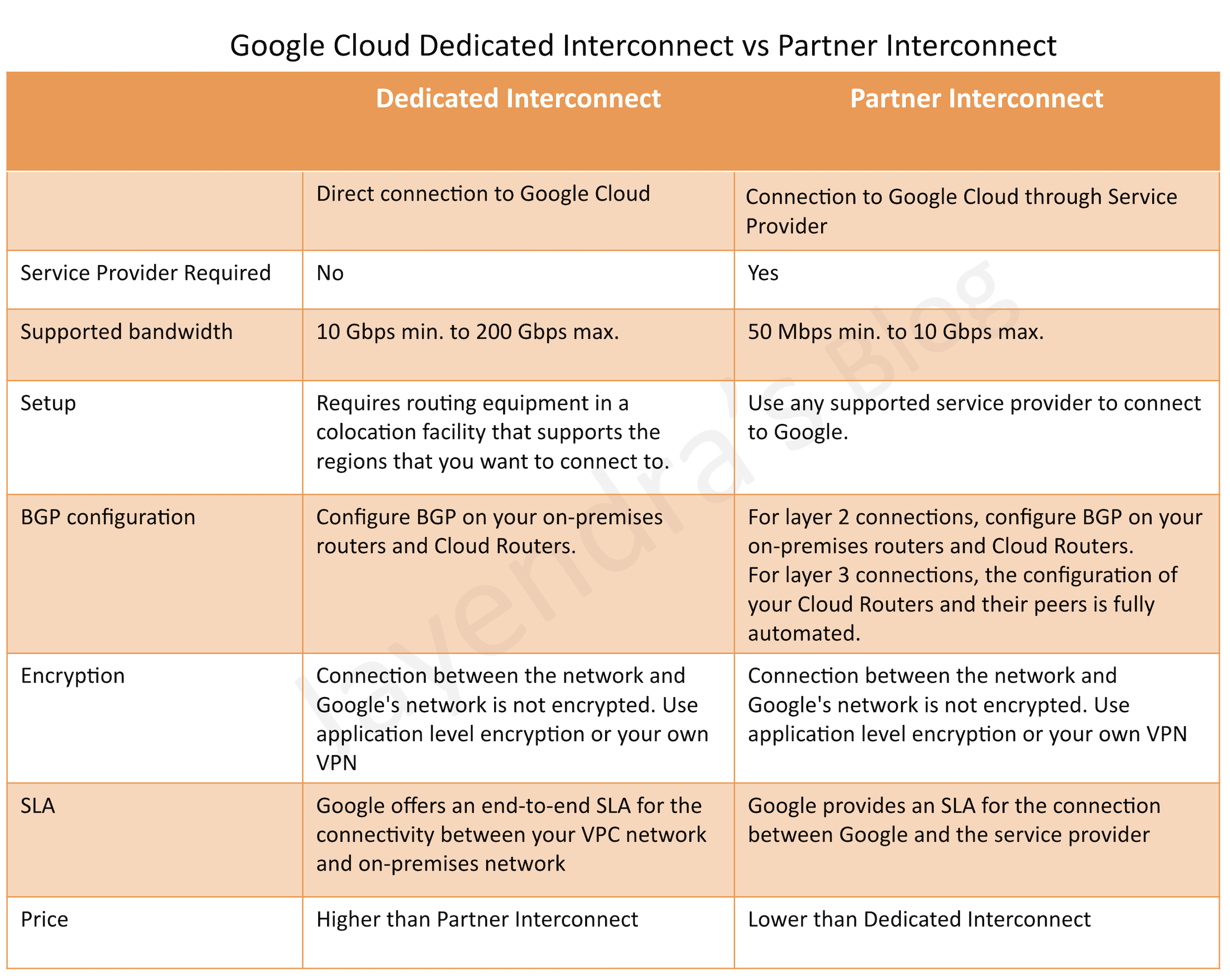
Dedicated Interconnect vs Partner Interconnect
- Choosing between Dedicated Interconnect vs Partner Interconnect, consider the connection requirements, such as the connection location and capacity:
- If you can’t physically meet Google’s network in a colocation facility to reach your VPC networks, use Partner Interconnect to connect through service providers.
- If you have high bandwidth needs (up to 400 Gbps per link), Dedicated Interconnect can be a cost-effective solution.
- If you require lower bandwidth (50 Mbps to 50 Gbps), Partner Interconnect provides flexible options through service providers.
- If you need connectivity to another cloud provider, use Cross-Cloud Interconnect or Partner Cross-Cloud Interconnect.
Cloud Interconnect MTU
- Cloud Interconnect VLAN attachments support the following MTU sizes:
- 1,440 bytes
- 1,460 bytes
- 1,500 bytes
- 8,896 bytes
- Cross-site networks support an MTU size of 9,000 bytes.
Connection Groups and SLA
- Interconnect connection groups and VLAN attachment groups (GA June 2025) help communicate intended reliability levels.
- Reliability options:
- Critical production – 99.99% uptime SLA for maximum resiliency.
- Non-critical production – 99.9% uptime SLA for non-critical workloads.
- No SLA – No uptime guarantee (not recommended for production).
- Resource groups provide feedback on how Cloud Interconnect resources meet the intended level of reliability.
GCP Certification Exam Practice Questions
- Questions are collected from Internet and the answers are marked as per my knowledge and understanding (which might differ with yours).
- GCP services are updated everyday and both the answers and questions might be outdated soon, so research accordingly.
- GCP exam questions are not updated to keep up the pace with GCP updates, so even if the underlying feature has changed the question might not be updated
- Open to further feedback, discussion and correction.
- Your company has decided to build a backup replica of their on-premises user authentication PostgreSQL database on Google
Cloud Platform. The database is 4 TB, and large updates are frequent. Replication requires private address space communication.
Which networking approach should you use?- Google Cloud Dedicated Interconnect
- Google Cloud VPN connected to the data center network
- A NAT and TLS translation gateway installed on-premises
- A Google Compute Engine instance with a VPN server installed connected to the data center network
- A company wants to connect cloud applications to an Oracle database in its data center. Requirements are a maximum of 20 Gbps
of data and a Service Level Agreement (SLA) of 99%. Which option best suits the requirements?- Implement a high-throughput Cloud VPN connection
- Cloud Router with VPN
- Dedicated Interconnect
- Partner Interconnect
- A company wants to connect cloud applications to an Oracle database in its data center. Requirements are a maximum of 9 Gbps
of data and a Service Level Agreement (SLA) of 99%. Which option best suits the requirements?- Implement a high-throughput Cloud VPN connection
- Cloud Router with VPN
- Dedicated Interconnect
- Partner Interconnect
- A company needs to establish private connectivity between their Google Cloud environment and their AWS environment for a multicloud application. They require high bandwidth and an SLA. Which connectivity option should they use?
- Cloud VPN with AWS Site-to-Site VPN
- Partner Interconnect through a shared service provider
- Cross-Cloud Interconnect
- Dedicated Interconnect with VPN tunnels to AWS
- An organization requires encrypted traffic over their Dedicated Interconnect connection to meet regulatory compliance requirements. What is the recommended approach?
- Use a third-party VPN appliance on a Compute Engine instance
- Deploy HA VPN over Cloud Interconnect
- Enable Cloud Armor on the Interconnect
- Use application-level TLS only
- A company wants to connect two of their on-premises data centers using Google’s global network for high-bandwidth, low-latency Layer 2 connectivity. Which Google Cloud service should they use?
- Cloud VPN
- Dedicated Interconnect
- Network Connectivity Center
- Cross-Site Interconnect
- Which encryption options are available for Cloud Interconnect traffic? (Choose TWO)
- MACsec for Cloud Interconnect
- Cloud Armor DDoS protection
- HA VPN over Cloud Interconnect
- Cloud KMS envelope encryption
- Identity-Aware Proxy
- A company needs an on-demand, managed connection between Google Cloud and AWS without setting up physical infrastructure or colocation facilities. Which service should they use?
- Cross-Cloud Interconnect
- Dedicated Interconnect with AWS Direct Connect
- Partner Cross-Cloud Interconnect for AWS
- Cloud VPN with AWS Site-to-Site VPN