Kubernetes Architecture
- A Kubernetes cluster consists of at least one main (control) plane, and one or more worker machines, called nodes.
- Both the control planes and node instances can be physical devices, virtual machines, or instances in the cloud.
- In managed Kubernetes environments like AWS EKS, GCP GKE, Azure AKS the control plane is managed by the cloud provider.
- The latest stable release is Kubernetes v1.36 (April 2026), with the ecosystem consolidating around containerd, the Gateway API, and native sidecar containers.
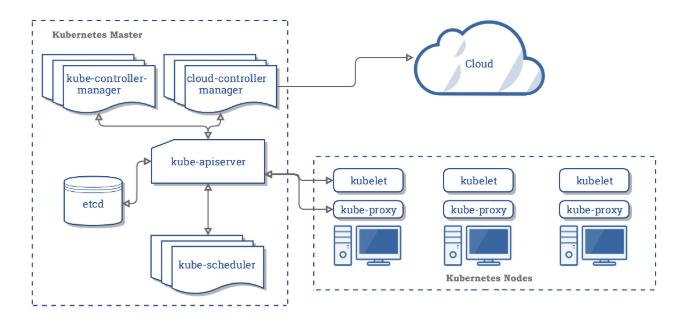
Control Plane
- The control plane is also known as a master node or head node.
- The control plane manages the worker nodes and the Pods in the cluster.
- In production environments, the control plane usually runs across multiple computers and a cluster usually runs multiple nodes, providing fault-tolerance and high availability.
- It is not recommended to run user workloads on master mode.
- The Control plane’s components make global decisions about the cluster, as well as detect and respond to cluster events.
- The control plane receives input from a CLI or UI via an API.
API Server (kube-apiserver)
- API server exposes a REST interface to the Kubernetes cluster. It is the front end for the Kubernetes control plane.
- All operations against pods, services, and so forth, are executed programmatically by communicating with the endpoints provided by it.
- It tracks the state of all cluster components and manages the interaction between them.
- It is designed to scale horizontally.
- It consumes YAML/JSON manifest files.
- It validates and processes the requests made via API.
- Supports Declarative Validation (GA in v1.36) using ValidatingAdmissionPolicy as an in-process alternative to admission webhooks.
- Supports Server-Side Sharded List and Watch (v1.36) for improved API scalability at large cluster sizes.
etcd (key-value store)
- Etcd is a consistent, distributed, and highly-available key-value store.
- is stateful, persistent storage that stores all of Kubernetes cluster data (cluster state and config).
- is the source of truth for the cluster.
- can be part of the control plane, or, it can be configured externally.
- The latest major release is etcd v3.6.0 (May 2025), introducing significant memory optimizations, downgrade support, and migration to v3store. etcd v3.7.0-beta.0 was announced in May 2026.
- ETCD benefits include
- Fully replicated: Every node in an etcd cluster has access to the full data store.
- Highly available: etcd is designed to have no single point of failure and gracefully tolerate hardware failures and network partitions.
- Reliably consistent: Every data ‘read’ returns the latest data ‘write’ across all clusters.
- Fast: etcd has been benchmarked at 10,000 writes per second.
- Secure: etcd supports automatic Transport Layer Security (TLS) and optional secure socket layer (SSL) client certificate authentication.
- Simple: Any application, from simple web apps to highly complex container orchestration engines such as Kubernetes, can read or write data to etcd using standard HTTP/JSON tools.
Scheduler (kube-scheduler)
- The scheduler is responsible for assigning work to the various nodes. It keeps watch over the resource capacity and ensures that a worker node’s performance is within an appropriate threshold.
- It schedules pods to worker nodes.
- It watches api-server for newly created Pods with no assigned node, and selects a healthy node for them to run on.
- If there are no suitable nodes, the pods are put in a pending state until such a healthy node appears.
- It watches API Server for new work tasks.
- Factors taken into account for scheduling decisions include:
- Individual and collective resource requirements.
- Hardware/software/policy constraints.
- Affinity and anti-affinity specifications.
- Data locality.
- Inter-workload interference.
- Deadlines and taints.
- Workload-Aware Scheduling (introduced in v1.35, advancing in v1.36) allows the scheduler to treat groups of pods (e.g., AI training jobs) as a single scheduling unit, enabling gang scheduling and coordinated preemption decisions.
- Dynamic Resource Allocation (DRA) (GA in v1.36) enables the scheduler to match resource claims (e.g., GPUs, FPGAs) with available devices using CEL expressions for flexible filtering.
Controller Manager (kube-controller-manager)
- Controller manager is responsible for making sure that the shared state of the cluster is operating as expected.
- It watches the desired state of the objects it manages and watches their current state through the API server.
- It takes corrective steps to make sure that the current state is the same as the desired state.
- It is a controller of controllers.
- It runs controller processes. Logically, each controller is a separate process, but to reduce complexity, they are all compiled into a single binary and run in a single process.
- Some types of controllers are:
- Node controller: Responsible for noticing and responding when nodes go down.
- Job controller: Watches for Job objects that represent one-off tasks, then creates Pods to run those tasks to completion.
- EndpointSlice controller: Populates EndpointSlice objects (joins Services & Pods). Note: The older Endpoints controller is being phased out in favor of EndpointSlice for better scalability.
- Service Account & Token controllers: Create default accounts and API access tokens for new namespaces.
Cloud Controller Manager
- The cloud controller manager integrates with the underlying cloud technologies in your cluster when the cluster is running in a cloud environment.
- The cloud-controller-manager only runs controllers that are specific to your cloud provider.
- Cloud controller lets you link your cluster into cloud provider’s API, and separates out the components that interact with that cloud platform from components that only interact with your cluster.
- The following controllers can have cloud provider dependencies:
- Node controller: For checking the cloud provider to determine if a node has been deleted in the cloud after it stops responding.
- Route controller: For setting up routes in the underlying cloud infrastructure.
- Service controller: For creating, updating, and deleting cloud provider load balancers.
Data Plane Worker Node(s)
- The data plane is known as the worker node or compute node.
- A virtual or physical machine that contains the services necessary to run containerized applications.
- A Kubernetes cluster needs at least one worker node, but normally has many.
- The worker node(s) host the Pods that are the components of the application workload.
- Pods are scheduled and orchestrated to run on nodes.
- Cluster can be scaled up and down by adding and removing nodes.
- Node components run on every node, maintaining running pods and providing the Kubernetes runtime environment.
kubelet
- A Kubelet tracks the state of a pod to ensure that all the containers are running and healthy.
- provides a heartbeat message every few seconds to the control plane.
- runs as an agent on each node in the cluster.
- acts as a conduit between the API server and the node.
- instantiates and executes Pods.
- watches API Server for work tasks.
- gets instructions from master and reports back to Masters.
- Supports In-Place Pod Resize (GA in v1.35, Dec 2025) — allows changing CPU and memory resources of a running pod without restarting it.
- Fine-Grained Kubelet API Authorization (GA in v1.36) — provides granular access control for the kubelet’s API endpoints, improving node-level security.
kube-proxy
- Kube proxy is a networking component that routes traffic coming into a node from the service to the correct containers.
- is a network proxy that runs on each node in a cluster.
- manages IP translation and routing.
- maintains network rules on nodes. These network rules allow network communication to Pods from inside or outside of cluster.
- ensures each Pod gets a unique IP address.
- makes possible that all containers in a pod share a single IP.
- facilitates Kubernetes networking services and load-balancing across all pods in a service.
- It deals with individual host sub-netting and ensures that the services are available to external parties.
- kube-proxy supports three backend modes:
- iptables — the traditional default mode, being superseded.
- nftables — the modern replacement (stable in v1.36), solving iptables performance limitations and planned to become the default in v1.37+.
- IPVS — deprecated in v1.35 and will be removed in a future release. Users should migrate to nftables.
- eBPF-based alternatives (e.g., Cilium) can replace kube-proxy entirely, providing higher performance through kernel-level packet processing without iptables rules.
Container Runtime
- Container runtime is responsible for running containers (in Pods).
- Kubernetes supports any implementation of the Kubernetes Container Runtime Interface (CRI) specifications.
- To run the containers, each worker node has a container runtime engine.
- It pulls images from a container image registry and starts and stops containers.
- Kubernetes supports several CRI-compliant container runtimes:
- containerd — the most widely adopted runtime (used by ~80% of production clusters), default for EKS, GKE, and AKS.
- CRI-O — lightweight OCI-compliant runtime, commonly used with OpenShift.
⚠️ Important: Docker (via dockershim) is no longer supported as a container runtime since Kubernetes v1.24 (April 2022). The dockershim component was removed from the kubelet. Docker-built images continue to work with all CRI-compliant runtimes as they produce standard OCI images. For clusters previously using Docker, the recommended migration is to containerd.
Key Kubernetes Architecture Updates (2024-2026)
- Native Sidecar Containers (GA in v1.33) — init containers with
restartPolicy: Alwaysthat run alongside app containers for the pod’s entire lifecycle, providing first-class support for service meshes, log shippers, and observability agents. - User Namespaces (GA in v1.36) — containers get their own UID/GID space, so a container running as root no longer maps to root on the host node, significantly improving security isolation.
- Gateway API — the successor to Ingress, now the recommended way to manage external traffic routing into the cluster. The CKA exam curriculum has been updated to include Gateway API.
- ValidatingAdmissionPolicy (GA in v1.36) — declarative, in-process admission control using CEL expressions as an alternative to admission webhooks.
- PSI Metrics (GA in v1.36) — Pressure Stall Information metrics exposed by the kubelet for node-level resource pressure monitoring.