Google Cloud Storage – Storage Classes
- Google Cloud Storage – Storage class affects the object’s availability and pricing model
- Storage class of an existing object can be changed either by rewriting the object or by using Object Lifecycle Management.
- Bucket’s default storage class is set to Standard Storage, if not specified
- A default storage class for the bucket can be specified so when a bucket is created, all the objects added to the bucket will inherit this storage class unless explicitly set otherwise.
- Changing the default storage class of a bucket does not affect any of the objects that already exist in the bucket.
- Autoclass can be enabled on a bucket to let Cloud Storage manage storage class transitions automatically based on access patterns.
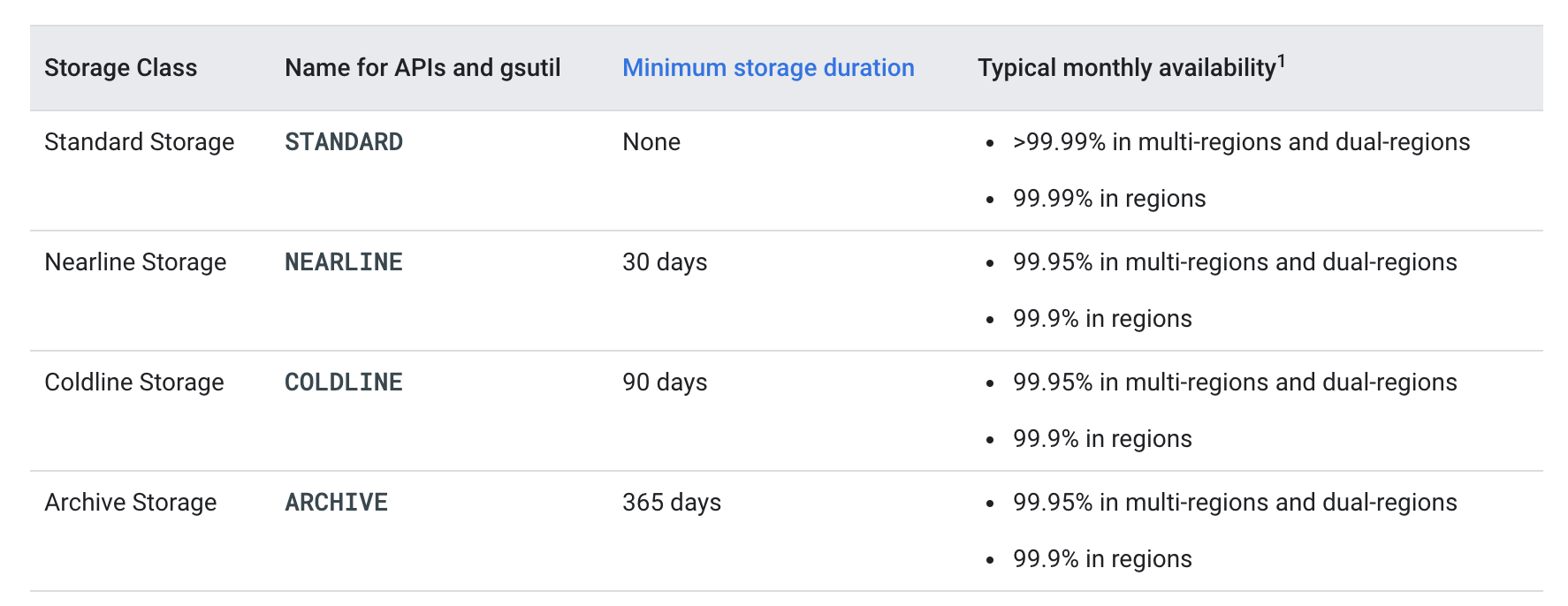
Storage Classes Options
- All storage classes provide the following
- Unlimited storage with unlimited access.
- No minimum object size.
- Worldwide accessibility and worldwide storage locations.
- Low latency with no offline data retrieval (time to the first byte typically tens of milliseconds).
- High durability (99.999999999% annual durability).
- Geo-redundancy, if the data is stored in a multi-region or dual-region.
- A uniform experience with Cloud Storage features, security, tools, and APIs
Rapid Storage (New – 2025)
- Rapid Storage is a high-performance storage class optimized for I/O-intensive workloads such as AI/ML and data analytics.
- Rapid Storage is only available with Rapid Bucket (zonal buckets) and stores data in zonal locations.
- Provides sub-millisecond latency (<1ms for random reads and writes), up to 15 TB/s of aggregate throughput, and 20 million QPS.
- Colocates data in the same physical zone as compute resources (TPUs/GPUs) for lowest latency.
- Ideal for AI/ML training, inference, and data analytics workloads.
- No minimum storage duration and no retrieval fees.
- API/CLI name:
RAPID - Availability SLA – 99.9% in zones (typical >99.95%)
- Rapid Cache (formerly Anywhere Cache) accelerates reads on-demand and colocates compute and data for workloads in existing multi-region buckets.
Standard Storage
- Standard Storage is best for data that is frequently accessed (hot data) and/or stored for only brief periods of time.
- No minimum storage duration and no retrieval fees.
- API/CLI name:
STANDARD - for regional locations
- for dual-region,
- provides optimized performance when accessing Google Cloud products that are located in one of the associated regions,
- provides improved availability that comes from storing data in geographically separate locations.
- Availability SLA – 99.95% (typical >99.99%)
- for multi-region
- ideal for storing data that is accessed around the world, such as serving website content, streaming videos, executing interactive workloads, or serving data supporting mobile and gaming applications.
- Availability SLA – 99.95% (typical >99.99%)
Nearline Storage
- Nearline Storage is a low-cost, highly durable storage service for storing infrequently accessed data (warm data)
- Nearline Storage is a better choice than Standard Storage in scenarios where slightly lower availability, a 30-day minimum storage duration, and data access costs are acceptable trade-offs for lowered at-rest storage cost
- Nearline Storage is ideal for data you plan to read or modify on average once per month or less. for e.g., if you want to continuously add files to Cloud Storage and plan to access those files once a month for analysis, Nearline Storage is a great choice.
- Nearline Storage is also appropriate for data backup, long-tail multimedia content, and data archiving.
- Has retrieval fees for data access.
- API/CLI name:
NEARLINE - Availability SLA
- Multi-region/Dual-region: 99.9% (typical 99.95%)
- Region: 99.0% (typical 99.9%)
Coldline Storage
- Coldline Storage provides a very-low-cost, highly durable storage service for storing infrequently accessed data (cold data)
- Coldline Storage is a better choice than Standard Storage or Nearline Storage in scenarios where slightly lower availability, a 90-day minimum storage duration, and higher costs for data access are acceptable trade-offs for lowered at-rest storage costs.
- Coldline Storage is ideal for data you plan to read or modify at most once a quarter.
- Has retrieval fees for data access.
- API/CLI name:
COLDLINE - Availability SLA
- Multi-region/Dual-region: 99.9% (typical 99.95%)
- Region: 99.0% (typical 99.9%)
Archive Storage
- Archive Storage is the lowest-cost, highly durable storage service for data archiving, online backup, and disaster recovery. (coldest data)
- Archive Storage has higher costs for data access and operations, as well as a 365-day minimum storage duration.
- Data is available within milliseconds, not hours or days (unlike other cloud providers’ archival tiers).
- Archive Storage is the best choice for data that you plan to access less than once a year. for e.g. cold data storage for archival and disaster recovery
- Has retrieval fees for data access.
- API/CLI name:
ARCHIVE - Availability SLA
- Multi-region/Dual-region: 99.9% (typical 99.95%)
- Region: 99.0% (typical 99.9%)
Autoclass
- Autoclass automatically transitions objects to appropriate storage classes based on each object’s access pattern.
- Moves infrequently accessed data to colder storage classes to reduce costs, and promotes accessed cold data back to Standard storage.
- When enabled:
- All objects added to the bucket begin in Standard storage (even if a different class is specified).
- The bucket’s default storage class is always Standard storage.
- Objects smaller than 128 KiB don’t transition and remain in Standard storage permanently.
- Terminal Storage Class – configurable setting:
- Nearline (default): Objects transition to Nearline after 30 days of no access and stay there.
- Archive (optional): Objects transition progressively — Standard → Nearline (30 days) → Coldline (90 days) → Archive (365 days).
- Pricing Benefits:
- No retrieval fees (except as part of enablement charges).
- No early deletion fees.
- All operations charged at Standard storage rate.
- No operation charge for transitions to colder classes.
- A management fee and enablement charge apply.
- Can be enabled on both new and existing buckets.
- Cannot coexist with Object Lifecycle Management rules that use
SetStorageClassaction ormatchesStorageClasscondition. - Recommended when: data has varied access frequencies, or access patterns are unknown/unpredictable.
- Not recommended when: majority of data fits specific known storage class use cases, or other Google Cloud services regularly read data from the bucket.
Soft Delete (Default Protection)
- Soft delete (introduced 2024) provides bucket-level protection against accidental or malicious deletion.
- Retains recently deleted objects for a configurable retention period — 7 days by default (can be set between 7 and 90 days, or disabled).
- Enabled by default on all buckets.
- Soft-deleted objects retain their existing storage classes until the end of their retention duration.
- Restored soft-deleted objects begin in Standard storage when Autoclass is enabled.
Storage Class Comparison
| Storage Class | API Name | Min. Storage Duration | Retrieval Fees | Best For |
|---|---|---|---|---|
| Rapid | RAPID | None | None | AI/ML, high-performance analytics (zonal) |
| Standard | STANDARD | None | None | Frequently accessed (hot) data |
| Nearline | NEARLINE | 30 days | Yes | Once per month access |
| Coldline | COLDLINE | 90 days | Yes | Once per quarter access |
| Archive | ARCHIVE | 365 days | Yes | Less than once per year access |
Legacy Storage Classes
- Google Cloud Storage provided additional storage classes which have been phased out and cannot be set using the Google Cloud console:
- Multi-Regional Storage
- Equivalent to Standard Storage, except Multi-Regional Storage can only be used for objects stored in multi-regions or dual-regions.
- Regional Storage
- Equivalent to Standard Storage, except Regional Storage, can only be used for objects stored in regions.
- Durable Reduced Availability (DRA) Storage:
- Similar to Standard Storage except:
- DRA has higher pricing for operations.
- DRA has lower performance, particularly in terms of availability (DRA has a 99% availability SLA).
- Similar to Standard Storage except:
- Multi-Regional Storage
- When enabling Autoclass, legacy storage classes are treated differently from Standard storage — objects in legacy classes transition to Standard storage.
GCP Certification Exam Practice Questions
- Questions are collected from Internet and the answers are marked as per my knowledge and understanding (which might differ with yours).
- GCP services are updated everyday and both the answers and questions might be outdated soon, so research accordingly.
- GCP exam questions are not updated to keep up the pace with GCP updates, so even if the underlying feature has changed the question might not be updated
- Open to further feedback, discussion and correction.
- You’ve created a bucket to store some data archives for compliance. The data isn’t likely to need to be viewed. However, you need to store it for at least 7 years. What is the best default storage class?
- Multi-regional
- Coldline
- Regional
- Nearline
- Archive
- Your company has unpredictable storage access patterns across different datasets. Some data is accessed frequently, while other data sits idle for months. Which feature should you enable to automatically optimize storage costs?
- Object Lifecycle Management with SetStorageClass rules
- Autoclass
- Nearline Storage for all buckets
- Manual storage class transitions via rewrites
- You are running an AI/ML training workload on TPUs and need the lowest possible latency for reading training data from Cloud Storage. Which storage option should you use?
- Standard Storage in a multi-region bucket
- Standard Storage in a regional bucket co-located with TPUs
- Rapid Storage in a zonal bucket (Rapid Bucket) co-located with TPUs
- Nearline Storage with Rapid Cache enabled
- When using Autoclass with the terminal storage class set to Archive, what is the transition timeline for an object that is never accessed after upload?
- Standard → Archive after 30 days
- Standard → Coldline after 90 days → Archive after 365 days
- Standard → Nearline after 30 days → Coldline after 90 days → Archive after 365 days
- Standard → Nearline after 30 days → Archive after 90 days
- Which of the following is true about Autoclass pricing? (Select TWO)
- No retrieval fees are charged (except as part of enablement charges)
- Operations are charged at the rate of the object’s current storage class
- No early deletion fees are charged
- There are no management fees
- Transition operations to colder classes incur Class A charges