AWS VPC Explained – Beginner’s Guide to Networking

What is AWS VPC? (AWS VPC Explained)

Amazon Virtual Private Cloud (VPC) is your own private, isolated section of the AWS cloud where you launch resources like EC2 instances, databases, and load balancers. Think of it as your own private office building within a massive business park (AWS).

Real-World Analogy: VPC as a Private Office Building

Imagine AWS as a giant business park with thousands of buildings. When you create a VPC, you get your own building with:

  • Your own address range (CIDR block) — like having your own floor numbers and room numbers
  • Your own rooms (subnets) — different departments on different floors
  • Your own security guards (security groups & NACLs) — controlling who enters and exits
  • Your own reception desk (internet gateway) — managing visitors from outside
  • Your own internal hallways (route tables) — directing people to the right rooms

Without a VPC, your AWS resources would be exposed to everyone — like working in an open field. A VPC gives you walls, doors, and locks.

AWS VPC Architecture
VPC (10.0.0.0/16)
Public Subnet (AZ-1)
EC2 (Web Server)
NAT Gateway
↕ Route to IGW
Private Subnet (AZ-1)
EC2 (App Server)
RDS (Database)
↕ Route to NAT GW
Public Subnet (AZ-2)
EC2 (Web Server)
NAT Gateway
↕ Route to IGW
Private Subnet (AZ-2)
EC2 (App Server)
RDS (Standby)
↕ Route to NAT GW
⬆⬇
Internet Gateway (IGW)
⬆⬇
Internet / Users

CIDR Notation Basics

Before diving deeper, you need to understand CIDR (Classless Inter-Domain Routing) notation — it’s how you define the size of your network.

How CIDR Works

A CIDR block looks like this: 10.0.0.0/16

  • 10.0.0.0 — the starting IP address
  • /16 — how many bits are “locked” (the network portion)

The smaller the number after the slash, the MORE IP addresses you get:

CIDR Block Number of IPs Use Case
/16 65,536 Large VPC (maximum size)
/20 4,096 Medium subnet
/24 256 Standard subnet (most common)
/28 16 Smallest allowed (minimum size)

Simple Rule: Each step from /16 to /17 to /18… cuts the number of addresses in half.

AWS-specific note: AWS reserves 5 IP addresses in each subnet (first 4 and last 1). So a /24 subnet gives you 251 usable IPs, not 256.

Common Private IP Ranges for VPCs

  • 10.0.0.0/16 — Most popular choice (10.0.0.0 to 10.0.255.255)
  • 172.16.0.0/16 — Alternative range
  • 192.168.0.0/16 — Familiar if you’ve used home routers

Default VPC vs. Custom VPC

Every AWS account comes with a default VPC in each Region. It’s like a starter apartment — convenient but limited.

Feature Default VPC Custom VPC
Created automatically? Yes (one per Region) No (you create it)
CIDR block 172.31.0.0/16 You choose (/16 to /28)
Subnets One public subnet per AZ You design the layout
Internet access Yes (by default) Only if you configure it
Best for Quick testing, learning Production workloads
Security posture Open (all subnets are public) Locked down by design

Best Practice: Use the default VPC for experimentation. Create custom VPCs for any real workload — you get full control over security, IP addressing, and network design.

Subnets: Public vs. Private

A subnet is a smaller segment of your VPC’s IP address range, placed in a specific Availability Zone (AZ). Think of subnets as individual rooms in your office building.

Public Subnet

  • Has a route to the Internet Gateway
  • Resources CAN have public IP addresses
  • Used for: Web servers, load balancers, bastion hosts
  • Analogy: The lobby of your building — visitors (internet traffic) can reach it

Private Subnet

  • NO direct route to the Internet Gateway
  • Resources cannot be reached from the internet
  • Used for: Databases, application servers, internal services
  • Analogy: The server room — only authorized internal staff can access it

Key Point: A subnet is public or private based on its route table, not a toggle switch. If the route table has a route to an Internet Gateway, it’s public.

Route Tables

A route table contains rules (routes) that determine where network traffic is directed. Every subnet must be associated with a route table.

Analogy: Route tables are like signs in a building directing you — “Lobby → left,” “Server room → right,” “Exit → through reception.”

How Route Tables Work

Destination Target Meaning
10.0.0.0/16 local Traffic within VPC stays local
0.0.0.0/0 igw-xxxxx All other traffic → Internet Gateway

Key Rules:

  • Every VPC has a main route table (default for all subnets)
  • You can create custom route tables for specific subnets
  • The local route (VPC internal traffic) cannot be removed
  • Most specific route wins (longest prefix match)

Internet Gateway (IGW)

An Internet Gateway is a horizontally scaled, redundant, and highly available VPC component that allows communication between your VPC and the internet.

Analogy: The front door of your office building. Without it, nobody from outside can enter, and nobody inside can leave to the internet.

Key Characteristics

  • Only one IGW per VPC
  • Supports both IPv4 and IPv6
  • Highly available — no bandwidth constraints
  • Must be attached to the VPC AND referenced in a route table to work

Making a Subnet Public (3 Steps)

  1. Create and attach an Internet Gateway to your VPC
  2. Add a route in the subnet’s route table: 0.0.0.0/0 → IGW
  3. Ensure instances have public IP addresses (or Elastic IPs)

NAT Gateway

A NAT (Network Address Translation) Gateway allows instances in private subnets to access the internet (for software updates, API calls) WITHOUT allowing the internet to initiate connections back to them.

Analogy: A one-way mail slot. Your private servers can send letters out (make requests), but nobody outside can push mail back in unless it’s a reply.

How NAT Gateway Works

Key Points

  • NAT Gateway lives in a public subnet
  • You add a route in the private subnet’s route table: 0.0.0.0/0 → nat-xxxxx
  • Managed by AWS — no patching required
  • Supports up to 45 Gbps bandwidth (scales automatically)
  • Charged per hour + per GB of data processed
  • Zonal NAT Gateway: operates in a single AZ (traditional)
  • Regional NAT Gateway (New 2025): automatically expands across AZs for high availability without manual setup

NAT Gateway vs. NAT Instance

Feature NAT Gateway NAT Instance
Managed by AWS You
Availability Highly available in AZ Depends on your setup
Bandwidth Up to 45 Gbps Depends on instance type
Maintenance None required You patch/update
Cost Higher Lower (but more effort)
Recommendation ✓ Use this Only for cost savings

Security Groups vs. NACLs

AWS gives you two layers of network security. Understanding the difference is critical for the exam and real-world usage.

Security Groups (Instance-Level Firewall)

Analogy: A bodyguard assigned to each person (instance). The bodyguard decides who can talk to that person.

  • Operates at the instance level (attached to ENI)
  • Stateful — if inbound traffic is allowed, the response is automatically allowed
  • Supports ALLOW rules only (no deny rules)
  • All rules evaluated before deciding
  • Default: denies all inbound, allows all outbound

Example Security Group for a Web Server:

Type Protocol Port Source Description
Inbound TCP 80 0.0.0.0/0 Allow HTTP from anywhere
Inbound TCP 443 0.0.0.0/0 Allow HTTPS from anywhere
Inbound TCP 22 203.0.113.0/32 Allow SSH from my IP only
Outbound All All 0.0.0.0/0 Allow all outbound

Network ACLs (Subnet-Level Firewall)

Analogy: A security checkpoint at each floor’s entrance. Everyone passing through that floor gets checked, regardless of which room they’re going to.

  • Operates at the subnet level
  • Stateless — inbound and outbound rules are evaluated independently
  • Supports both ALLOW and DENY rules
  • Rules evaluated in order by rule number (lowest first)
  • Default NACL: allows all inbound and outbound traffic

Example NACL for a Public Subnet:

Rule # Type Protocol Port Range Source/Dest Allow/Deny
100 Inbound TCP 80 0.0.0.0/0 ALLOW
110 Inbound TCP 443 0.0.0.0/0 ALLOW
120 Inbound TCP 1024-65535 0.0.0.0/0 ALLOW
* Inbound All All 0.0.0.0/0 DENY
100 Outbound TCP 80 0.0.0.0/0 ALLOW
110 Outbound TCP 443 0.0.0.0/0 ALLOW
120 Outbound TCP 1024-65535 0.0.0.0/0 ALLOW
* Outbound All All 0.0.0.0/0 DENY

Security Groups vs. NACLs Comparison

Feature Security Group Network ACL
Level Instance (ENI) Subnet
Stateful/Stateless Stateful Stateless
Rules Allow only Allow AND Deny
Rule evaluation All rules evaluated Rules processed in order
Default (custom) Deny all inbound Deny all traffic
Default (default) Allow internal Allow all traffic
Applies to Only if associated All instances in subnet

Best Practice: Use Security Groups as your primary defense (easier to manage). Use NACLs as an additional layer for subnet-wide rules, like blocking a specific IP range.

VPC Peering

A VPC Peering Connection is a networking connection between two VPCs that enables traffic routing between them using private IP addresses. Instances in either VPC can communicate as if they are in the same network.

Analogy: Building a private bridge between two office buildings. Employees (resources) can walk between buildings directly without going outside (through the internet).

Key Rules

  • Works across different AWS accounts and different Regions
  • CIDR blocks must NOT overlap between peered VPCs
  • Not transitive — if VPC-A peers with VPC-B, and VPC-B peers with VPC-C, VPC-A CANNOT reach VPC-C through VPC-B
  • You must update route tables in BOTH VPCs
  • Security groups can reference the peered VPC’s security groups

When to Use VPC Peering

  • Connecting a development VPC to a production VPC
  • Sharing resources across AWS accounts
  • Simple one-to-one VPC connectivity

For complex multi-VPC architectures, consider AWS Transit Gateway instead — it acts as a central hub connecting multiple VPCs and on-premises networks.

VPC Endpoints

VPC Endpoints allow you to privately connect your VPC to supported AWS services without requiring an Internet Gateway, NAT Gateway, VPN, or AWS Direct Connect. Traffic never leaves the AWS network.

Analogy: Instead of leaving your building to visit the bank (AWS service), the bank opens a private counter inside your building. Faster, safer, and cheaper.

Types of VPC Endpoints

Type How it Works Supported Services Cost
Gateway Endpoint Route table entry pointing to the endpoint S3, DynamoDB only Free
Interface Endpoint (PrivateLink) ENI with private IP in your subnet Most AWS services (100+) Per hour + per GB

Why Use VPC Endpoints?

  • Security: Traffic stays within AWS network (never traverses the internet)
  • Performance: Lower latency, more reliable
  • Cost savings: No NAT Gateway data processing charges for AWS service traffic
  • Compliance: Keep sensitive data off the public internet

Example: S3 Gateway Endpoint

Without endpoint: EC2 → NAT Gateway → Internet Gateway → S3 (over the internet)

With endpoint: EC2 → S3 Gateway Endpoint → S3 (private AWS network)

Step-by-Step: Creating a VPC with Public and Private Subnets

Here’s how to create a production-ready VPC from scratch using the AWS Console:

Step 1: Create the VPC

  1. Go to VPC Console → “Create VPC”
  2. Choose “VPC and more” (creates subnets, route tables, and gateways automatically) OR “VPC only” for manual setup
  3. Name: my-app-vpc
  4. IPv4 CIDR: 10.0.0.0/16 (65,536 addresses — plenty of room)
  5. Click “Create VPC”

Step 2: Create Subnets

  1. Create a Public Subnet: 10.0.1.0/24 in AZ us-east-1a
  2. Create a Private Subnet: 10.0.2.0/24 in AZ us-east-1a
  3. Create a Public Subnet: 10.0.3.0/24 in AZ us-east-1b (for high availability)
  4. Create a Private Subnet: 10.0.4.0/24 in AZ us-east-1b

Step 3: Create and Attach an Internet Gateway

  1. Create an Internet Gateway: my-app-igw
  2. Attach it to your VPC

Step 4: Configure Route Tables

  1. Public Route Table: Add route 0.0.0.0/0 → igw-xxxxx
  2. Associate public subnets (10.0.1.0/24, 10.0.3.0/24) with this route table
  3. Private Route Table: Keep only the local route (or add NAT Gateway route)
  4. Associate private subnets (10.0.2.0/24, 10.0.4.0/24) with this route table

Step 5: Create a NAT Gateway (for private subnet internet access)

  1. Create a NAT Gateway in one of the public subnets
  2. Allocate an Elastic IP for the NAT Gateway
  3. Update the Private Route Table: add 0.0.0.0/0 → nat-xxxxx

Step 6: Configure Security Groups

  1. Web-SG: Allow inbound HTTP (80), HTTPS (443) from 0.0.0.0/0
  2. App-SG: Allow inbound from Web-SG only on app port
  3. DB-SG: Allow inbound from App-SG only on database port (3306/5432)

Quick Reference Table

Component What It Does Key Facts
VPC Isolated virtual network Max size /16, min /28. Up to 5 CIDRs per VPC (adjustable to 50).
Subnet Segment of VPC in one AZ Public = has IGW route. AWS reserves 5 IPs per subnet.
Internet Gateway Connects VPC to internet One per VPC. Highly available. No bandwidth limit.
NAT Gateway Private subnet → internet (outbound only) Lives in public subnet. Up to 45 Gbps. Charged per hour + data.
Route Table Directs traffic Local route always present. Most specific route wins.
Security Group Instance-level firewall Stateful. Allow rules only. All rules evaluated.
Network ACL Subnet-level firewall Stateless. Allow + Deny. Rules processed in order.
VPC Peering Connect two VPCs privately Non-transitive. No overlapping CIDRs. Cross-account/region OK.
VPC Endpoint Private access to AWS services Gateway (S3, DynamoDB – free). Interface (most services – paid).
Elastic IP Static public IPv4 address Free when attached to a running instance. Charged when unused.

Practice Questions

Question 1

You have an EC2 instance in a private subnet that needs to download software updates from the internet. Which combination enables this?

  1. Attach an Internet Gateway and assign a public IP to the instance
  2. Create a NAT Gateway in a public subnet and add a route in the private subnet’s route table
  3. Create a VPC Endpoint for the update server
  4. Add a route to 0.0.0.0/0 in the private subnet pointing to the Internet Gateway
Show Answer

Answer: B – A NAT Gateway in a public subnet allows private instances to access the internet for outbound traffic without being directly accessible from the internet. Option A would make it a public subnet. Option D would not work without a public IP on the instance.

Question 2

What makes a subnet “public” in AWS?

  1. It has “public” in its name tag
  2. Auto-assign public IP is enabled
  3. Its route table has a route to an Internet Gateway
  4. It is in the default VPC
Show Answer

Answer: C – A subnet is public when its associated route table contains a route directing internet-bound traffic (0.0.0.0/0) to an Internet Gateway. The name and auto-assign IP settings don’t determine this.

Question 3

Your security team wants to block all traffic from a specific IP range (203.0.113.0/24) at the subnet level. Which should you use?

  1. Security Group with a deny rule
  2. Network ACL with a deny rule
  3. Route table blackhole route
  4. AWS WAF rule
Show Answer

Answer: B – Network ACLs support both ALLOW and DENY rules and operate at the subnet level. Security Groups only support ALLOW rules, so you cannot explicitly deny specific IPs with them.

Question 4

VPC-A (10.0.0.0/16) is peered with VPC-B (172.16.0.0/16). VPC-B is peered with VPC-C (192.168.0.0/16). Can instances in VPC-A communicate with VPC-C through VPC-B?

  1. Yes, VPC peering is transitive
  2. Yes, if route tables are configured correctly in VPC-B
  3. No, VPC peering is NOT transitive
  4. Yes, but only for ICMP traffic
Show Answer

Answer: C – VPC peering is non-transitive. VPC-A must create a direct peering connection with VPC-C to communicate. Traffic cannot pass through VPC-B as an intermediary.

Question 5

An application in a private subnet needs to access S3 without traversing the internet. What’s the most cost-effective solution?

  1. Create a NAT Gateway and access S3 over the internet
  2. Create an S3 Gateway Endpoint
  3. Create an S3 Interface Endpoint (PrivateLink)
  4. Peer the VPC with the S3 VPC
Show Answer

Answer: B – S3 Gateway Endpoints are free and provide private access to S3 without requiring a NAT Gateway. Interface Endpoints (Option C) would also work but incur hourly and data charges. NAT Gateway (Option A) would add unnecessary cost.

What’s New in AWS VPC (2025-2026)

  • VPC Encryption Controls (Nov 2025): Enforce encryption in transit for all traffic within and across VPCs using monitor and enforce modes — no application changes needed.
  • Regional NAT Gateways (Nov 2025): A single NAT Gateway that automatically expands across Availability Zones based on your workload, providing automatic high availability without manual multi-AZ setup.
  • Amazon VPC Lattice: A fully managed service for connecting, securing, and monitoring service-to-service communication across VPCs and accounts — ideal for microservices architectures.
  • Amazon VPC IPAM: Centrally plan, track, and monitor IP addresses across your AWS organization.

Summary

AWS VPC is the foundation of cloud networking. Every resource you deploy sits inside a VPC. Here’s the key takeaway:

  • VPC = Your private network in AWS (an isolated building)
  • Subnets = Rooms in your building (public-facing or private)
  • Route Tables = Signs directing traffic to the right destination
  • Internet Gateway = Your front door to the internet
  • NAT Gateway = One-way outbound access for private resources
  • Security Groups = Personal bodyguards (stateful, allow-only)
  • NACLs = Floor-level security checkpoints (stateless, allow + deny)
  • VPC Peering = Private bridge between two VPCs
  • VPC Endpoints = Private counter for AWS services inside your VPC

Start with the default VPC for learning, then build custom VPCs for production. Always place databases in private subnets and web servers in public subnets. Use security groups as your primary defense, and add NACLs for subnet-wide rules.

Frequently Asked Questions

What is a VPC in AWS?

A Virtual Private Cloud (VPC) is your own isolated network within AWS where you launch resources. Think of it like renting a private floor in an office building — you control the layout (subnets), doors (gateways), and security (security groups/NACLs).

What is the difference between a public and private subnet?

A public subnet has a route to an Internet Gateway, allowing resources with public IPs to communicate directly with the internet. A private subnet has no internet route — resources can only access the internet through a NAT Gateway for outbound traffic.

Do I need to create a VPC to use AWS?

No, every AWS account comes with a default VPC in each region with public subnets, an internet gateway, and default security groups. However, for production workloads, creating a custom VPC with public and private subnets is recommended for better security.
Related Posts

AWS VPN

AWS VPC VPN

  • AWS VPN connections are used to extend on-premises data centers to AWS.
  • VPN connections provide secure IPSec connections between the data center or branch office and the AWS resources.
  • AWS Site-to-Site VPN or AWS Hardware VPN or AWS Managed VPN
    • Connectivity can be established by creating an IPSec, hardware VPN connection between the VPC and the remote network.
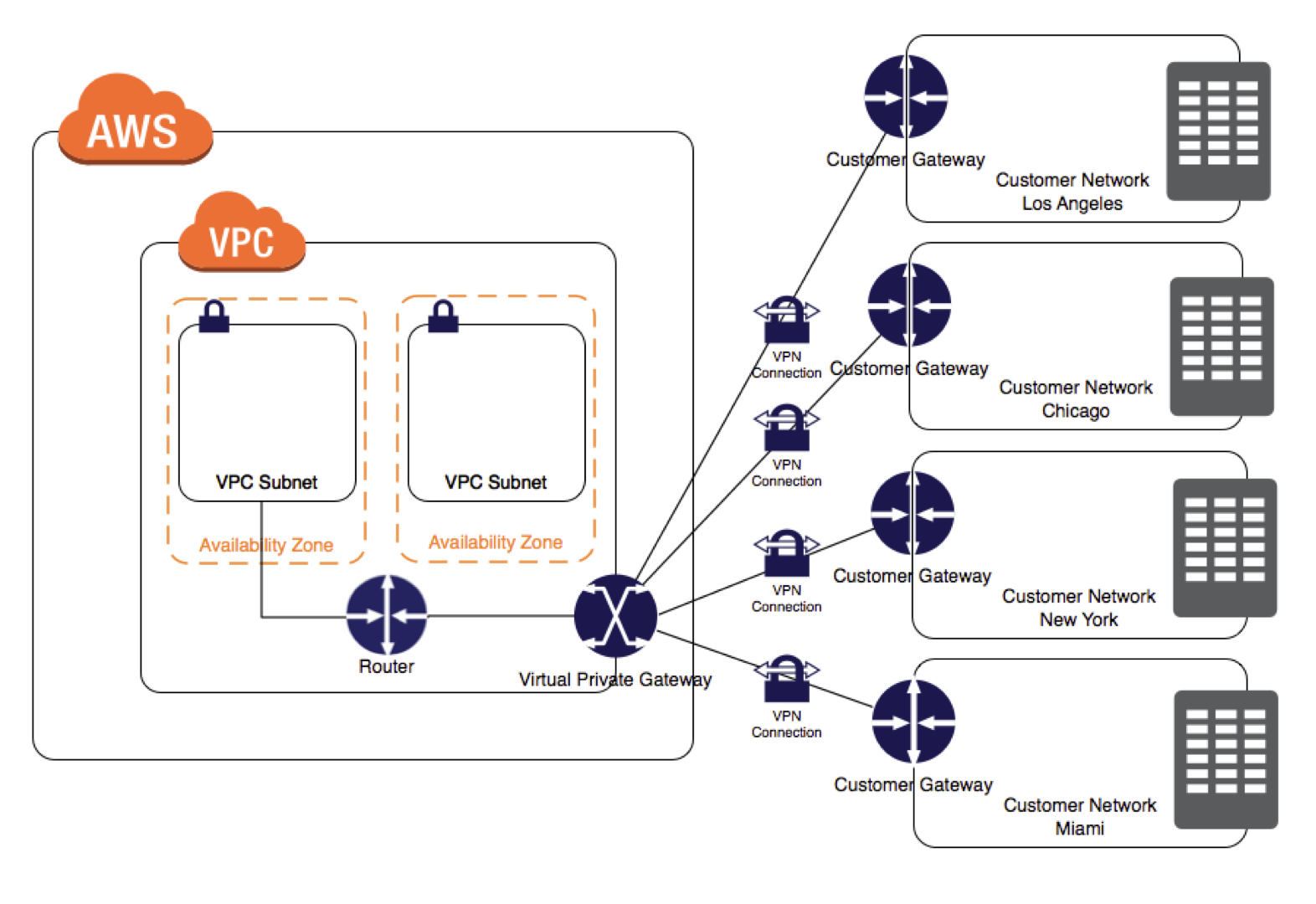
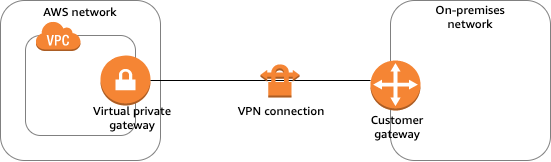
    • On the AWS side of the VPN connection, a Virtual Private Gateway (VGW) or Transit Gateway provides two VPN endpoints for automatic failover.
    • On the customer side, a customer gateway (CGW) needs to be configured, which is the physical device or software application on the remote side of the VPN connection
  • AWS Client VPN
    • AWS Client VPN is a managed client-based VPN service that enables secure access to AWS resources and resources in the on-premises network.
  • AWS VPN CloudHub
    • For more than one remote network e.g. multiple branch offices, multiple AWS hardware VPN connections can be created via the VPC to enable communication between these networks
  • AWS Software VPN
    • A VPN connection can be created to the remote network by using an EC2 instance in the VPC that’s running a third-party software VPN appliance.
    • AWS does not provide or maintain third-party software VPN appliances; however, there is a range of products provided by partners and open source communities.
  • AWS Direct Connect provides a dedicated private connection from a remote network to the VPC. Direct Connect can be combined with an AWS hardware VPN connection to create an IPsec-encrypted connection

AWS Site-to-Site VPN Options (2025)

  • As of November 2025, AWS Site-to-Site VPN includes five distinct options:
    • Standard VPN with VGW – Up to 1.25 Gbps per tunnel; terminates on a Virtual Private Gateway.
    • Standard VPN with TGW or Cloud WAN – Up to 1.25 Gbps per tunnel; terminates on a Transit Gateway or AWS Cloud WAN. Supports ECMP for higher aggregate bandwidth.
    • Large Bandwidth Tunnel with TGW – Up to 5 Gbps per tunnel (launched November 2025); a 4x improvement over the standard 1.25 Gbps limit. Ideal for bandwidth-intensive hybrid applications, big data migrations, and disaster recovery.
    • VPN Concentrator – Simplifies multi-site connectivity for distributed enterprises (launched November 2025). Supports up to 100 low-bandwidth remote sites (under 100 Mbps each) through a single Transit Gateway attachment with 5 Gbps aggregate bandwidth.
    • Accelerated VPN – Uses AWS Global Accelerator to route traffic through the nearest AWS edge location, reducing internet distance and improving performance. Supported on Transit Gateway.
  • Private IP VPN – Enables Site-to-Site VPN connections over AWS Direct Connect using private IP addresses. Encrypts DX traffic between on-premises networks and AWS without traversing the public internet. Requires Transit Gateway.

VPN Components

AWS VPN Components

  • Virtual Private Gateway – VGW
    • A virtual private gateway is the VPN concentrator on the AWS side of the VPN connection
    • Supports standard bandwidth (up to 1.25 Gbps per tunnel)
    • Does not support IPv6 for Site-to-Site VPN connections
    • Does not support ECMP
  • Customer Gateway – CGW
    • A customer gateway is a physical device or software application on the customer side of the VPN connection.
    • When a VPN connection is created, the VPN tunnel comes up when traffic is generated from the remote side of the VPN connection.
    • By default, VGW is not the initiator; CGW must bring up the tunnels for the Site-to-Site VPN connection by generating traffic and initiating the Internet Key Exchange (IKE) negotiation process.
    • If the VPN connection experiences a period of idle time, usually 10 seconds, depending on the configuration, the tunnel may go down. To prevent this, a network monitoring tool to generate keepalive pings; for e.g. by using IP SLA.
  • Transit Gateway
    • A transit gateway is a transit hub that can be used to interconnect VPCs and on-premises networks.
    • A Site-to-Site VPN connection on a transit gateway can support either IPv4 traffic or IPv6 traffic inside the VPN tunnels.
    • Supports ECMP (Equal Cost Multi-Path) routing for aggregating bandwidth across multiple VPN tunnels (up to 50 Gbps).
    • Supports large bandwidth tunnels (up to 5 Gbps per tunnel).
    • Supports IPv6 addresses for outer tunnel IPs (announced July 2025), enabling full IPv6 migration (IPv6-in-IPv6) and IPv4-in-IPv6 configurations.
    • Supports VPN Concentrator attachments for multi-site connectivity.
    • Supports Private IP VPN connections over Direct Connect.
  • AWS Cloud WAN
    • AWS Cloud WAN is a managed wide area networking service for building and managing global networks.
    • Site-to-Site VPN connections can be attached to Cloud WAN core networks for global hybrid connectivity.
    • Supports IPv6 outer tunnel IPs (same as Transit Gateway).
  • A Site-to-Site VPN connection offers two VPN tunnels between a VGW or a transit gateway on the AWS side, and a CGW (which represents a VPN device) on the remote (on-premises) side.

VPN Routing Options

  • For a VPN connection, the route table for the subnets should be updated with the type of routing (static or dynamic) that you plan to use.
  • Route tables determine where network traffic is directed. Traffic destined for the VPN connections must be routed to the virtual private gateway.
  • The type of routing can depend on the make and model of the CGW device
    • Static Routing
      • If your device does not support BGP, specify static routing.
      • Using static routing, the routes (IP prefixes) can be specified that should be communicated to the virtual private gateway.
      • Devices that don’t support BGP may also perform health checks to assist failover to the second tunnel when needed.
    • BGP Dynamic Routing
      • If the VPN device supports Border Gateway Protocol (BGP), specify dynamic routing with the VPN connection.
      • When using a BGP device, static routes need not be specified to the VPN connection because the device uses BGP for auto-discovery and to advertise its routes to the virtual private gateway.
      • BGP-capable devices are recommended as the BGP protocol offers robust liveness detection checks that can assist failover to the second VPN tunnel if the first tunnel goes down.
  • Only IP prefixes known to the virtual private gateway, either through BGP advertisement or static route entry, can receive traffic from the VPC.
  • Virtual private gateway does not route any other traffic destined outside of the advertised BGP, static route entries, or its attached VPC CIDR.

VPN Route Priority

  • Longest prefix match applies.
  • If the prefixes are the same, then the VGW prioritizes routes as follows, from most preferred to least preferred:
    • BGP propagated routes from an AWS Direct Connect connection
    • Manually added static routes for a Site-to-Site VPN connection
    • BGP propagated routes from a Site-to-Site VPN connection
    • Prefix with the shortest AS PATH is preferred for matching prefixes where each Site-to-Site VPN connection uses BGP
    • Path with the lowest multi-exit discriminators (MEDs) value is preferred when the AS PATHs are the same length and if the first AS in the AS_SEQUENCE is the same across multiple paths.

VPN Bandwidth and Throughput

  • Standard VPN Tunnel: Up to 1.25 Gbps per tunnel (default)
  • Large Bandwidth VPN Tunnel: Up to 5 Gbps per tunnel (available on Transit Gateway, launched November 2025)
    • Supports modifying tunnel bandwidth on existing VPN connections (announced May 2026) without changing IP addresses, CIDR blocks, or pre-shared keys
  • VPN Concentrator Tunnel: Up to 100 Mbps per tunnel, 5 Gbps aggregate per concentrator
  • ECMP (Transit Gateway): Up to 50 Gbps aggregate bandwidth using multiple VPN tunnels with ECMP configured (each flow limited to max bandwidth per tunnel)
  • Many factors affect realized bandwidth including packet size, traffic mix (TCP/UDP), shaping or throttling policies on intermediate networks, internet weather, and specific application requirements.

VPN Limitations

  • supports only IPSec tunnel mode. Transport mode is currently not supported.
  • supports only one VGW can be attached to a VPC at a time.
  • does not support IPv6 traffic on a virtual private gateway. (IPv6 is supported on Transit Gateway and Cloud WAN.)
  • does not support Path MTU Discovery.
  • does not support overlapping CIDR blocks for the networks. It is recommended to use non-overlapping CIDR blocks.
  • does not support transitive routing. So for traffic from on-premises to AWS via a virtual private gateway, it
    • does not support Internet connectivity through Internet Gateway
    • does not support Internet connectivity through NAT Gateway
    • does not support VPC Peered resources access through VPC Peering
    • does not support S3, DynamoDB access through VPC Gateway Endpoint
    • However, Internet connectivity through NAT instance and VPC Interface Endpoint or PrivateLink services are accessible.
  • provides a bandwidth of 1.25 Gbps per tunnel for standard VPN connections. Large bandwidth tunnels support up to 5 Gbps per tunnel on Transit Gateway.
  • MTU is 1446 bytes and MSS is 1406 bytes. Jumbo frames are not supported.

VPN Tunnel Endpoint Lifecycle Control

  • The VPN Tunnel Endpoint Lifecycle Control feature enables scheduling endpoint replacements at a time that aligns with business and operational needs, prior to the service-mandated deadline.
  • Provides advanced notice of upcoming maintenance updates to help plan and minimize service disruptions.
  • When enabled, AWS notifies before performing tunnel endpoint replacements.
  • Users can accept the maintenance update at a convenient time or let it apply automatically by the deadline.
  • During a tunnel endpoint update, AWS applies replacement to one tunnel at a time to ensure continuous connectivity.
  • Available in most AWS commercial and GovCloud regions.

VPN Monitoring

  • AWS Site-to-Site VPN automatically sends notifications to the AWS Health Dashboard
  • AWS Site-to-Site VPN is integrated with CloudWatch with the following metrics available
    • TunnelState
      • The state of the tunnels.
      • For static VPNs, 0 indicates DOWN and 1 indicates UP.
      • For BGP VPNs, 1 indicates ESTABLISHED and 0 is used for all other states.
      • For both types of VPNs, values between 0 and 1 indicate at least one tunnel is not UP.
    • TunnelDataIn
      • The bytes received on the AWS side of the connection through the VPN tunnel from a customer gateway.
      • This metric counts the data after decryption.
    • TunnelDataOut
      • The bytes sent from the AWS side of the connection through the VPN tunnel to the customer gateway.
      • This metric counts the data before encryption.
    • ConcentratorBandwidthUsage
      • The bandwidth usage for a Site-to-Site VPN Concentrator connection.
      • Available only for VPN connections using a VPN Concentrator.
      • Units: Bits per second
  • Site-to-Site VPN Logs
    • VPN logs can be published to Amazon CloudWatch Logs for detailed analysis of VPN connection activity.
    • Provides tunnel activity logs for troubleshooting connectivity issues.
  • Amazon CloudWatch Network Synthetic Monitor
    • Supports hybrid monitors for networking built with AWS Direct Connect and AWS Site-to-Site VPN.
    • Provides proactive monitoring of hybrid connectivity health.

IPv6 Support for Site-to-Site VPN

  • Inner Tunnel IPv6: Supported on Transit Gateway and Cloud WAN. Allows IPv4 or IPv6 traffic inside VPN tunnels.
  • Outer Tunnel IPv6 (July 2025): Site-to-Site VPN now supports IPv6 addresses for outer tunnel IPs on Transit Gateway and Cloud WAN connections.
  • Enables full IPv6 migration with IPv6 addresses for both outer tunnel IPs and inner packet IPs (IPv6-in-IPv6).
  • Supports IPv6 outer tunnel IPs with IPv4 inner packet IPs (IPv4-in-IPv6).
  • Helps customers with IPv6-only network mandates meet regulatory and compliance needs.
  • IPv6 VPNs support the same throughput (Gbps and PPS), MTU, and route limits as IPv4 VPNs.
  • Note: Virtual private gateways do NOT support IPv6 for Site-to-Site VPN connections. IPv6 requires Transit Gateway or Cloud WAN.

VPN Concentrator (November 2025)

  • AWS Site-to-Site VPN Concentrator simplifies multi-site connectivity for distributed enterprises with many low-bandwidth remote sites.
  • Suitable for customers needing to connect 25+ remote sites to AWS, with each site needing low bandwidth (under 100 Mbps).
  • Allows up to 100 remote sites to connect through a single VPN Concentrator attachment to AWS Transit Gateway.
  • Provides 5 Gbps aggregate bandwidth shared across all connected sites.
  • Eliminates the need to deploy and manage multiple virtual appliances for HA and connectivity.
  • AWS manages high availability across multiple Availability Zones.
  • Can be used with eero integration for simplified remote site connectivity without manual tunnel configuration.
  • Quotas:
    • Up to 50 VPN Concentrators per Region
    • Up to 5 VPN Concentrators per Transit Gateway or Cloud WAN
    • Up to 100 remote sites per VPN Concentrator

VPN Connection Redundancy

VPN Connection Redundancy

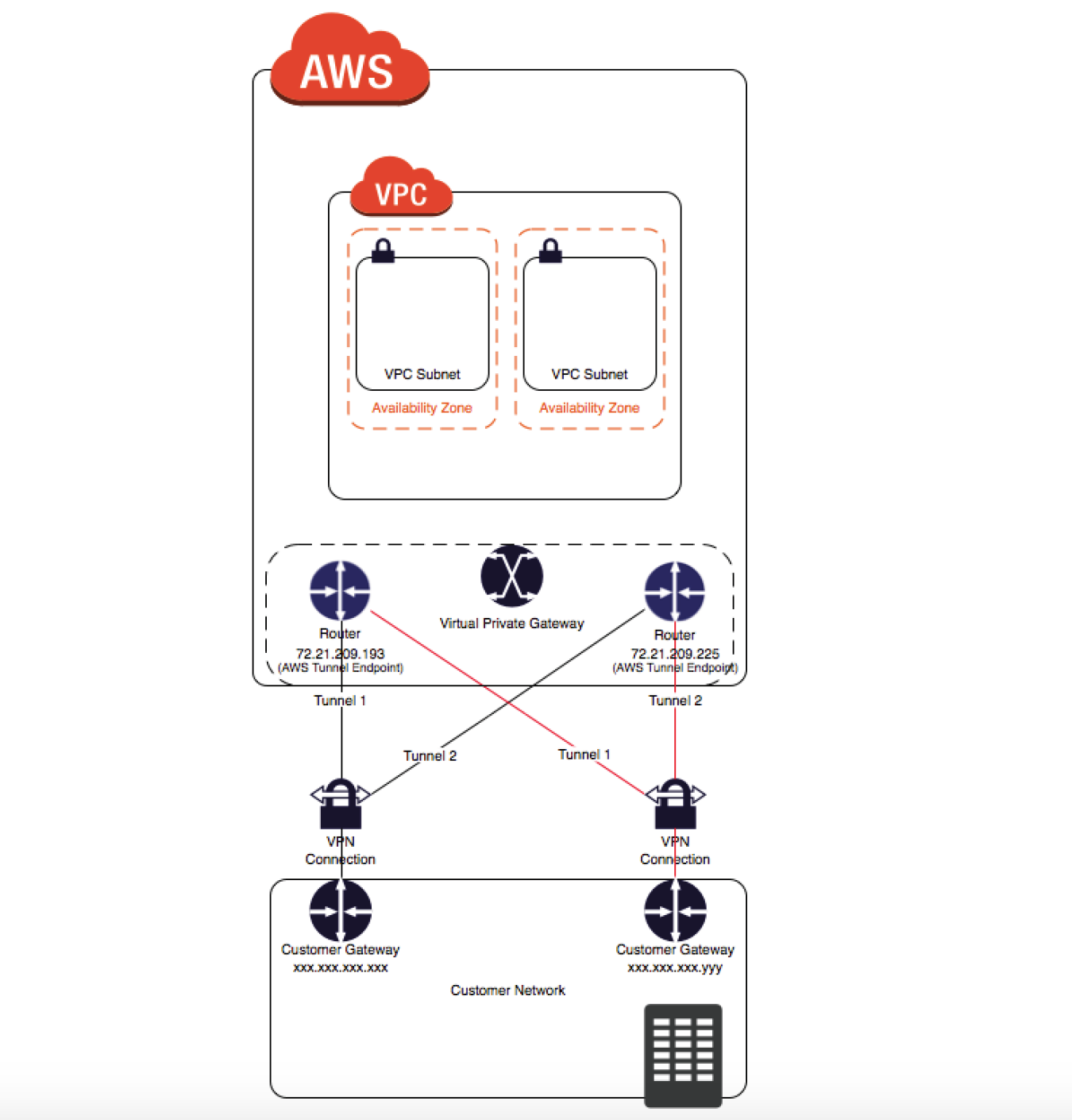
  • A VPN connection is used to connect the customer network to a VPC.
  • Each VPN connection has two tunnels to help ensure connectivity in case one of the VPN connections becomes unavailable, with each tunnel using a unique virtual private gateway public IP address.
  • Both tunnels should be configured for redundancy.
  • When one tunnel becomes unavailable, for e.g. down for maintenance, network traffic is automatically routed to the available tunnel for that specific VPN connection.
  • To protect against a loss of connectivity in case the customer gateway becomes unavailable, a second VPN connection can be set up to the VPC and virtual private gateway by using a second customer gateway.
  • Customer gateway IP address for the second VPN connection must be publicly accessible.
  • By using redundant VPN connections and CGWs, maintenance on one of the customer gateways can be performed while traffic continues to flow over the second customer gateway’s VPN connection.
  • Dynamically routed VPN connections using the Border Gateway Protocol (BGP) are recommended, if available, to exchange routing information between the customer gateways and the virtual private gateways.
  • Statically routed VPN connections require static routes for the network to be entered on the customer gateway side.
  • BGP-advertised and statically entered route information allows gateways on both sides to determine which tunnels are available and reroute traffic if a failure occurs.

Multiple Site-to-Site VPN Connections

VPN Connection

  • VPC has an attached virtual private gateway, and the remote network includes a customer gateway, which must be configured to enable the
    VPN connection.
  • Routing must be set up so that any traffic from the VPC bound for the remote network is routed to the virtual private gateway.
  • Each VPN has two tunnels associated with it that can be configured on the customer router, as is not a single point of failure
  • Multiple VPN connections to a single VPC can be created, and a second CGW can be configured to create a redundant connection to the same external location or to create VPN connections to multiple geographic locations.

VPN CloudHub

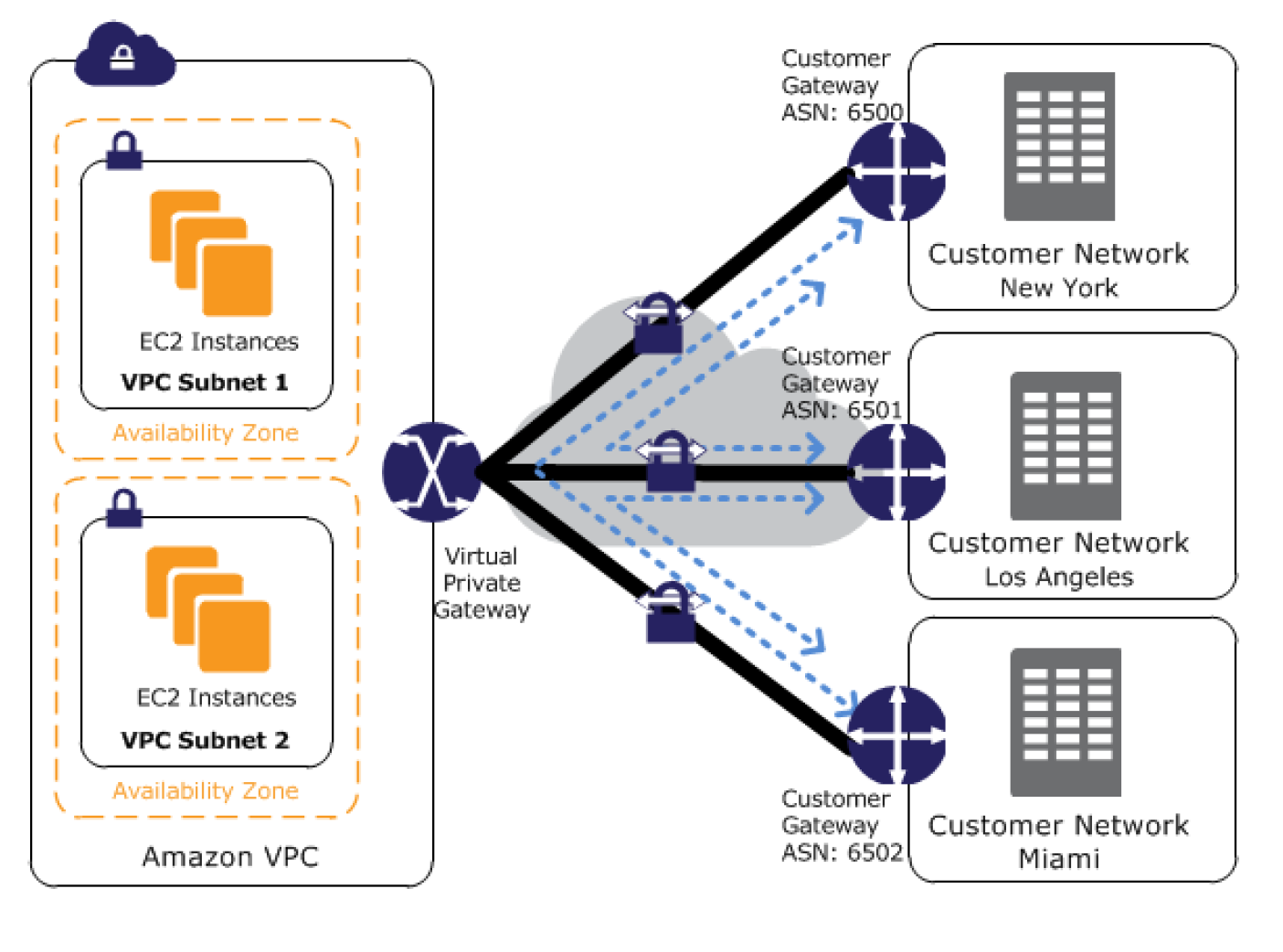
  • VPN CloudHub can be used to provide secure communication between multiple on-premises sites if you have multiple VPN connections
  • VPN CloudHub operates on a simple hub-and-spoke model using a Virtual Private gateway in a detached mode that can be used without a VPC.
  • Design is suitable for customers with multiple branch offices and existing
    Internet connections who’d like to implement a convenient, potentially low-cost hub-and-spoke model for primary or backup connectivity between these remote offices
  • Note: For large-scale multi-site connectivity (25+ sites), consider using the newer VPN Concentrator feature with Transit Gateway, which provides a managed, scalable alternative.

VPN CloudHub Architecture

  • VPN CloudHub architecture with blue dashed lines indicates network
    traffic between remote sites being routed over their VPN connections.
  • AWS VPN CloudHub requires a virtual private gateway with multiple customer gateways.
  • Each customer gateway must use a unique Border Gateway Protocol (BGP) Autonomous System Number (ASN)
  • Customer gateways advertise the appropriate routes (BGP prefixes) over their VPN connections.
  • Routing advertisements are received and re-advertised to each BGP peer, enabling each site to send data to and receive data from the other sites.
  • Routes for each spoke must have unique ASNs and the sites must not have overlapping IP ranges.
  • Each site can also send and receive data from the VPC as if they were using a standard VPN connection.
  • Sites that use AWS Direct Connect connections to the virtual private gateway can also be part of the AWS VPN CloudHub.
  • To configure the AWS VPN CloudHub,
    • multiple customer gateways can be created, each with the unique public IP address of the gateway and the ASN.
    • a VPN connection can be created from each customer gateway to a common virtual private gateway.
    • each VPN connection must advertise its specific BGP routes. This is done using the network statements in the VPN configuration files for the VPN connection.

Private IP VPN over Direct Connect

  • AWS Site-to-Site VPN Private IP VPN enables deploying VPN connections over Direct Connect using private IP addresses.
  • Direct Connect provides a private, dedicated connection but is not encrypted. Private IP VPN adds IPSec encryption to DX traffic.
  • Requires a Transit Gateway with a Direct Connect Gateway attachment.
  • Traffic stays on the AWS private network and never traverses the public internet.
  • Satisfies security and compliance regulations requiring encryption at layer 3 for dedicated connections.
  • Configuration:
    • Create or use an existing Transit Gateway with a private IP CIDR block.
    • Establish a Direct Connect connection and Transit VIF to a Direct Connect Gateway.
    • Create a Private IP VPN connection specifying private outside IP address type.

Accelerated Site-to-Site VPN

  • An accelerated VPN connection uses AWS Global Accelerator to route traffic from the on-premises network to the nearest AWS edge location.
  • Reduces the distance over which data is shared on the internet by leveraging the AWS global fiber network.
  • Improves performance for VPN connections where the customer gateway is geographically distant from the AWS Region.
  • Requires a Transit Gateway (not supported on VGW).
  • Each accelerated VPN connection uses two Global Accelerator resources (one per tunnel).
  • Default quota: 10 accelerated Site-to-Site VPN connections per Region (adjustable).

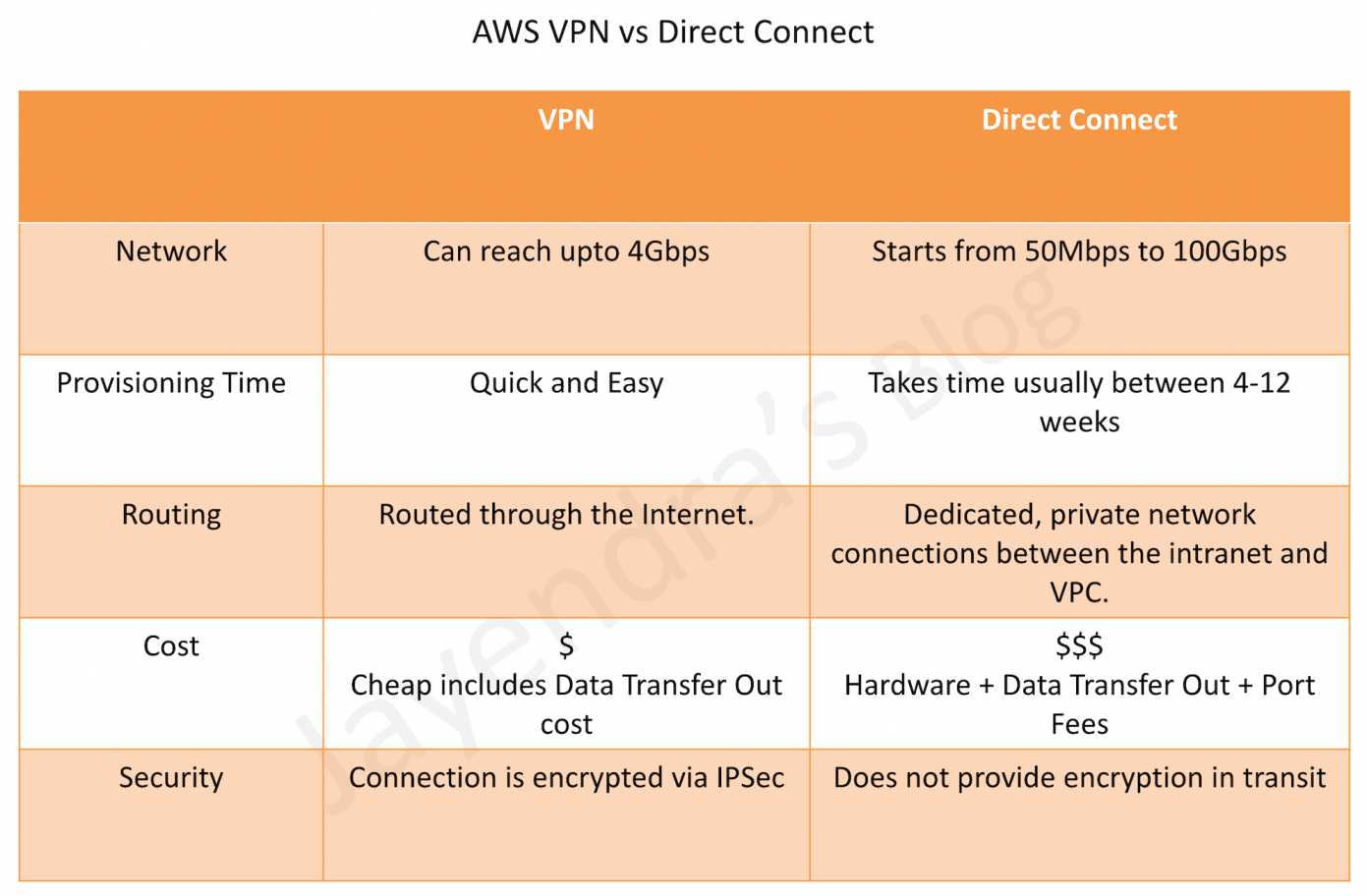
VPN vs Direct Connect

AWS Direct Connect vs VPN

VPN Quotas

  • Customer gateways per Region: 50 (adjustable)
  • Virtual private gateways per Region: 5 (adjustable)
  • Site-to-Site VPN connections per Region: 50 (adjustable)
  • Site-to-Site VPN connections per virtual private gateway: 10 (adjustable)
  • Accelerated VPN connections per Region: 10 (adjustable)
  • Large Bandwidth Tunnel connections per Region: 50 (adjustable)
  • VPN Concentrators per Region: 50 (adjustable)
  • VPN Concentrators per Transit Gateway or Cloud WAN: 5 (adjustable)
  • Remote sites per VPN Concentrator: 100 (adjustable)
  • Dynamic routes advertised from CGW to VPN on VGW: 100 (not adjustable)
  • Routes advertised from VPN on VGW to CGW: 1,000 (not adjustable)
  • Dynamic routes advertised from CGW to VPN on Transit Gateway: 1,000 (not adjustable)
  • Routes advertised from VPN on Transit Gateway to CGW: 5,000 (not adjustable)

AWS Certification Exam Practice Questions

  • Questions are collected from Internet and the answers are marked as per my knowledge and understanding (which might differ with yours).
  • AWS services are updated everyday and both the answers and questions might be outdated soon, so research accordingly.
  • AWS exam questions are not updated to keep up the pace with AWS updates, so even if the underlying feature has changed the question might not be updated
  • Open to further feedback, discussion and correction.
  1. You have in total 5 offices, and the entire employee-related information is stored under AWS VPC instances. Now all the offices want to connect the instances in VPC using VPN. Which of the below help you to implement this?
    1. you can have redundant customer gateways between your data center and your VPC
    2. you can have multiple locations connected to the AWS VPN CloudHub
    3. You have to define 5 different static IP addresses in route table.
    4. 1 and 2
    5. 1,2 and 3
  2. You have in total of 15 offices, and the entire employee-related information is stored under AWS VPC instances. Now all the offices want to connect the instances in VPC using VPN. What problem do you see in this scenario?
    1. You can not create more than 1 VPN connections with single VPC (Can be created)
    2. You can not create more than 10 VPN connections with single VPC (soft limit can be extended)
    3. When you create multiple VPN connections, the virtual private gateway can not sends network traffic to the appropriate VPN connection using statically assigned routes. (Can route the traffic to correct connection)
    4. Statically assigned routes cannot be configured in case of more than 1 VPN with the virtual private gateway. (can be configured)
    5. None of above
  3. You have been asked to virtually extend two existing data centers into AWS to support a highly available application that depends on existing, on-premises resources located in multiple data centers and static content that is served from an Amazon Simple Storage Service (S3) bucket. Your design currently includes a dual-tunnel VPN connection between your CGW and VGW. Which component of your architecture represents a potential single point of failure that you should consider changing to make the solution more highly available?
    1. Add another VGW in a different Availability Zone and create another dual-tunnel VPN connection.
    2. Add another CGW in a different data center and create another dual-tunnel VPN connection. (Refer link)
    3. Add a second VGW in a different Availability Zone, and a CGW in a different data center, and create another dual-tunnel.
    4. No changes are necessary: the network architecture is currently highly available.
  4. You are designing network connectivity for your fat client application. The application is designed for business travelers who must be able to connect to it from their hotel rooms, cafes, public Wi-Fi hotspots, and elsewhere on the Internet. You do not want to publish the application on the Internet. Which network design meets the above requirements while minimizing deployment and operational costs? [PROFESSIONAL]
    1. Implement AWS Direct Connect, and create a private interface to your VPC. Create a public subnet and place your application servers in it. (High Cost and does not minimize deployment)
    2. Implement Elastic Load Balancing with an SSL listener that terminates the back-end connection to the application. (Needs to be published to internet)
    3. Configure an IPsec VPN connection, and provide the users with the configuration details. Create a public subnet in your VPC, and place your application servers in it. (Instances still in public subnet are internet accessible)
    4. Configure an SSL VPN solution in a public subnet of your VPC, then install and configure SSL VPN client software on all user computers. Create a private subnet in your VPC and place your application servers in it. (Cost effective and can be in private subnet as well. Note: AWS Client VPN is the managed alternative for this use case.)
  5. You are designing a connectivity solution between on-premises infrastructure and Amazon VPC Your server’s on-premises will De communicating with your VPC instances You will De establishing IPSec tunnels over the internet You will be using VPN gateways and terminating the IPsec tunnels on AWS-supported customer gateways. Which of the following objectives would you achieve by implementing an IPSec tunnel as outlined above? (Choose 4 answers) [PROFESSIONAL]
    1. End-to-end protection of data in transit
    2. End-to-end Identity authentication
    3. Data encryption across the Internet
    4. Protection of data in transit over the Internet
    5. Peer identity authentication between VPN gateway and customer gateway
    6. Data integrity protection across the Internet
  6. A development team that is currently doing a nightly six-hour build which is lengthening over time on-premises with a large and mostly under utilized server would like to transition to a continuous integration model of development on AWS with multiple builds triggered within the same day. However, they are concerned about cost, security and how to integrate with existing on-premises applications such as their LDAP and email servers, which cannot move off-premises. The development environment needs a source code repository; a project management system with a MySQL database resources for performing the builds and a storage location for QA to pick up builds from. What AWS services combination would you recommend to meet the development team’s requirements? [PROFESSIONAL]
    1. A Bastion host Amazon EC2 instance running a VPN server for access from on-premises, Amazon EC2 for the source code repository with attached Amazon EBS volumes, Amazon EC2 and Amazon RDS MySQL for the project management system, EIP for the source code repository and project management system, Amazon SQL for a build queue, An Amazon Auto Scaling group of Amazon EC2 instances for performing builds and Amazon Simple Email Service for sending the build output. (Bastion is not for VPN connectivity also SES should not be used)
    2. An AWS Storage Gateway for connecting on-premises software applications with cloud-based storage securely, Amazon EC2 for the resource code repository with attached Amazon EBS volumes, Amazon EC2 and Amazon RDS MySQL for the project management system, EIPs for the source code repository and project management system, Amazon Simple Notification Service for a notification initiated build, An Auto Scaling group of Amazon EC2 instances for performing builds and Amazon S3 for the build output. (Storage Gateway does provide secure connectivity but still needs VPN. SNS alone cannot handle builds)
    3. An AWS Storage Gateway for connecting on-premises software applications with cloud-based storage securely, Amazon EC2 for the resource code repository with attached Amazon EBS volumes, Amazon EC2 and Amazon RDS MySQL for the project management system, EIPs for the source code repository and project management system, Amazon SQS for a build queue, An Amazon Elastic Map Reduce (EMR) cluster of Amazon EC2 instances for performing builds and Amazon CloudFront for the build output. (Storage Gateway does not provide secure connectivity, still needs VPN. EMR is not ideal for performing builds as it needs normal EC2 instances)
    4. A VPC with a VPN Gateway back to their on-premises servers, Amazon EC2 for the source-code repository with attached Amazon EBS volumes, Amazon EC2 and Amazon RDS MySQL for the project management system, EIPs for the source code repository and project management system, SQS for a build queue, An Auto Scaling group of EC2 instances for performing builds and S3 for the build output. (VPN gateway is required for secure connectivity. SQS for build queue and EC2 for builds)
  7. A company has 50 branch offices and wants to connect all of them to AWS. Each branch has bandwidth requirements under 50 Mbps. Which AWS VPN solution is most cost-effective and operationally simple?
    1. Create 50 individual Site-to-Site VPN connections to a Transit Gateway (Works but higher cost and operational overhead with 50 separate VPN connections)
    2. Use a VPN Concentrator on Transit Gateway to connect all branches through a single attachment (VPN Concentrator supports up to 100 sites with under 100 Mbps each, single TGW attachment simplifies management)
    3. Use VPN CloudHub with a Virtual Private Gateway (VPN CloudHub works but limited to VGW capabilities and doesn’t scale as easily)
    4. Deploy EC2-based VPN appliances in multiple AZs (Self-managed, higher operational overhead)
  8. A company requires encrypted connectivity between their on-premises data center and AWS over their existing Direct Connect connection. The traffic must not traverse the public internet. Which solution meets these requirements?
    1. Configure a standard Site-to-Site VPN over the internet as backup to Direct Connect (Traffic traverses the public internet)
    2. Configure a Private IP VPN connection over Direct Connect using Transit Gateway (Private IP VPN encrypts DX traffic using private IP addresses without internet traversal)
    3. Enable MACsec on Direct Connect and use VGW for VPN termination (MACsec provides L2 encryption but VGW doesn’t support Private IP VPN)
    4. Use AWS Client VPN over Direct Connect (Client VPN is for remote user access, not site-to-site connectivity)
  9. A company needs to migrate large datasets to AWS and requires more than 1.25 Gbps of VPN bandwidth per tunnel. What should they configure?
    1. Create multiple standard VPN connections and enable ECMP on a VGW (VGW does not support ECMP)
    2. Use Accelerated VPN with Global Accelerator to increase per-tunnel bandwidth (Accelerated VPN improves latency but does not increase per-tunnel bandwidth beyond standard limits)
    3. Configure a Large Bandwidth Tunnel VPN connection on Transit Gateway for up to 5 Gbps per tunnel (Large Bandwidth Tunnels support up to 5 Gbps per tunnel on TGW)
    4. Configure Direct Connect with 10 Gbps dedicated connection (Meets bandwidth needs but is not a VPN solution and takes longer to provision)
  10. An organization has VPN connections from multiple branch offices to AWS. The VPN performance is poor because the branches are far from the AWS Region. What can improve VPN performance without changing the on-premises equipment? (Choose 2)
    1. Enable Accelerated VPN using AWS Global Accelerator on Transit Gateway (Routes traffic to the nearest AWS edge location to reduce internet distance)
    2. Enable VPN CloudHub on a Virtual Private Gateway (VPN CloudHub is for inter-site communication, not for improving performance)
    3. Use Large Bandwidth Tunnels (5 Gbps) on Transit Gateway (Higher per-tunnel bandwidth can improve throughput for bandwidth-constrained connections)
    4. Configure Private IP VPN over Direct Connect (Requires Direct Connect infrastructure, changes the connectivity model)
    5. Add more VPN tunnels with ECMP on VGW (VGW does not support ECMP)

References