AWS CloudTrail
- AWS CloudTrail helps you enable governance, compliance, operational, and risk auditing of the AWS account.
- CloudTrail helps to get a history of AWS API calls and related events for the AWS account.
- CloudTrail records actions taken by a user, role, or AWS service.
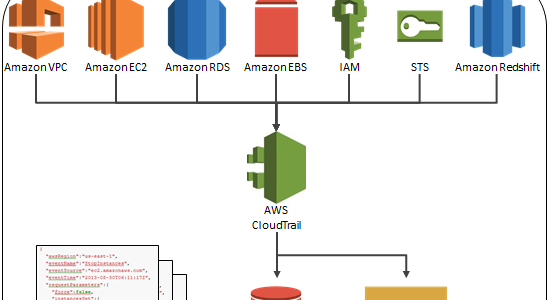
- CloudTrail tracking includes calls made by using the AWS Management Console, AWS SDKs, Command-line tools (CLI), APIs, and higher-level AWS services (such as AWS CloudFormation)
- CloudTrail helps to identify which users and accounts called AWS, the source IP address the calls were made from, and when the calls occurred.
- CloudTrail is enabled on your AWS account when you create it.
- CloudTrail is per AWS account and per region for all the supported services.
- CloudTrail AWS API call history enables security analysis, resource change tracking, and compliance auditing.
- CloudTrail event history provides a viewable, searchable, and downloadable record of the past 90 days of CloudTrail management events.
- CloudTrail logs can be encrypted by using default S3 SSE-S3 or KMS.
- CloudTrail log file integrity validation can be used to check whether a log file was modified, deleted, or unchanged after CloudTrail delivered it.
- CloudTrail integrates with AWS Organizations and provides an organization trail that enables the delivery of events in the management account, delegated administrator account, and all member accounts in an organization to the same S3 bucket, CloudWatch Logs, and CloudWatch Events.
- CloudTrail Insights can be enabled on a trail to help identify and respond to unusual activity associated with both management events and data events.
- CloudTrail Lake helps run fine-grained SQL-based queries on events. Note: CloudTrail Lake is no longer open to new customers starting May 31, 2026. Existing customers can continue to use it. AWS recommends Amazon CloudWatch for similar capabilities.
- CloudTrail supports Network Activity Events (GA Feb 2025) that capture AWS API calls made through VPC endpoints, providing visibility into data perimeter security.
- CloudTrail supports Data Event Aggregation (Nov 2025) that consolidates high-volume data events into 5-minute summaries for efficient monitoring.
- CloudTrail now integrates directly with Amazon CloudWatch via service-linked channels (SLCs) (Dec 2025), enabling simplified event delivery without requiring trails.
CloudTrail Works
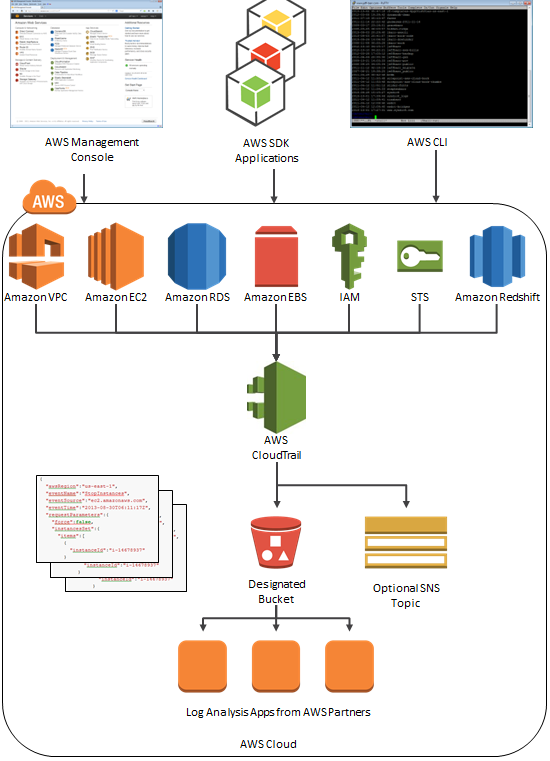
- AWS CloudTrail captures AWS API calls and related events made by or on behalf of an AWS account and delivers log files to a specified S3 bucket.
- S3 lifecycle rules can be applied to archive or delete log files automatically.
- Log files contain API calls from all of the account’s CloudTrail-supported services.
- Log files from all the regions can be delivered to a single S3 bucket and are encrypted, by default, using S3 server-side encryption (SSE). Encryption can be configured with AWS KMS.
- CloudTrail publishes new log files multiple times an hour, usually about every 5 mins, and typically delivers log files within 15 mins of an API call.
- CloudTrail can be configured, optionally, to deliver events to a log group to be monitored by CloudWatch Logs.
- SNS notifications can be configured to be sent each time a log file is delivered to your bucket.
- A Trail is a configuration that enables logging of the AWS API activity and delivery of events to a specified S3 bucket.
- Trail can be created with CloudTrail console, AWS CLI, or CloudTrail API.
- Events in a trail can also be delivered and analyzed with CloudWatch Logs and EventBridge.
- A Trail can be applied to all regions or a single region
- A trail that applies to all regions
- When a trail is created that applies to all regions, CloudTrail creates the same trail in each region, records the log files in each region, and delivers the log files to the specified single S3 bucket (and optionally to the CloudWatch Logs log group).
- Default setting when a trail is created using the CloudTrail console.
- A single SNS topic for notifications and CloudWatch Logs log group for events would suffice for all regions.
- Advantages
- configuration settings for the trail apply consistently across all regions.
- manage trail configuration for all regions from one location.
- immediately receive events from a new region.
- receive log files from all regions in a single S3 bucket and optionally in a CloudWatch Logs log group.
- create trails in regions not used often to monitor for unusual activity.
- A trail that applies to one region
- An S3 bucket can be specified that receives events only from that region and it can be in any region that you specify.
- Additional individual trails are created that apply to specific regions, those trails can deliver event logs to a single S3 bucket.
- A trail that applies to all regions
- Turning on a trail means creating a trail and start logging.
- CloudTrail supports five trails per region. A trail that applies to all regions counts as one trail in every region.
- As a best practice, a trail can be created that applies to all regions in the AWS partition e.g. AWS for all standard AWS regions or aws-cn for China
- IAM can control which AWS users can create, configure, or delete trails, start and stop logging, and access the buckets containing log information.
- Log file integrity validation can be enabled to verify that log files have remained unchanged since CloudTrail delivered them.
- CloudTrail Lake helps run fine-grained SQL-based queries on the events.
CloudTrail with AWS Organizations
- With AWS Organizations, an Organization trail can be created that will log all events for all AWS accounts in that organization.
- Organization trails can apply to all AWS Regions or one Region.
- Organization trails must be created in the management account, and when specified as applying to an organization, are automatically applied to all member accounts in the organization.
- Member accounts will be able to see the organization trail, but cannot modify or delete it.
- By default, member accounts will not have access to the log files for the organization trail in the S3 bucket.
- A delegated administrator account can be designated to manage CloudTrail on behalf of the organization, without needing direct access to the management account.
CloudTrail Events
- An event in CloudTrail is the record of activity in an AWS account.
- CloudTrail events provide a history of both API and non-API account activity made through the AWS Management Console, AWS SDKs, command line tools, and other AWS services.
- CloudTrail has the following event types:
- Management Events
- Management events provide information about management or control plane operations that are performed on resources.
- Includes resource creation, modification, and deletion events.
- By default, trails log all management events for the AWS account.
- The first copy of management events in each region is delivered free of charge.
- Data Events
- Data events provide information about the resource or data plane operations performed on or in a resource.
- Includes data events like reading and writing of objects in S3, items in DynamoDB, Lambda function invocations, and more.
- By default, trails don’t log data events for the AWS account.
- Data events can be filtered using advanced event selectors for fine-grained control over which events are logged.
- Data Event Aggregation (Nov 2025) automatically consolidates data events into 5-minute summaries, showing access frequency, error rates, and most-used actions to simplify monitoring at scale.
- Network Activity Events (GA Feb 2025)
- Network activity events capture AWS API calls made through VPC endpoints from a private VPC to an AWS service.
- Records both control plane and data plane actions passing through a VPC endpoint.
- Provides visibility into API activity regardless of the AWS account initiating the action.
- Helps detect when external credentials are used at a VPC endpoint (data exfiltration prevention).
- Logs actions that were denied due to VPC endpoint policies.
- Available for services including S3, EC2, KMS, Secrets Manager, and CloudTrail.
- By default, trails don’t log network activity events.
- CloudTrail Insights Events
- CloudTrail Insights events capture unusual API call rate or error rate activity in the AWS account.
- Insights can now detect anomalies in both management events and data events (Nov 2025).
- For management events: detects unusual levels of write management API activity, or unusual levels of errors returned on management API activity.
- For data events: automatically detects anomalies in data access patterns, helping identify potential threats or issues.
- By default, trails don’t log CloudTrail Insights events.
- When enabled, CloudTrail detects unusual activity, and Insights events are logged to a different folder or prefix in the destination S3 bucket for the trail.
- Insights events provide relevant information, such as the associated API, error code, incident time, and statistics, that help understand and act on unusual activity.
- Unlike other types of events captured in a CloudTrail trail, Insights events are logged only when CloudTrail detects changes in the account’s API usage or error rate logging that differ significantly from the account’s typical usage patterns.
- After enabling Insights for the first time, it may take up to 36 hours (trails) or 7 days (event data stores) to begin delivering Insights events.
- Management Events
Global Services Option
- For most services, events are sent to the region where the action happened.
- For global services such as IAM, AWS STS, and CloudFront, events are delivered to any trail that has the Include global services option enabled.
- AWS OpsWorks and Route 53 actions are logged in the US East (N. Virginia) region.
- To avoid receiving duplicate global service events, remember:
- Global service events are always delivered to trails that have the Apply trail to all regions option enabled.
- Events are delivered from a single region to the bucket for the trail. This setting cannot be changed.
- If you have a single region trail, you should enable the Include global services option.
- If you have multiple single region trails, you should enable the Include global services option in only one of the trails.
- About global service events:
- have a trail with the Apply trail to all regions option enabled.
- have multiple single-region trails.
- do not need to enable the Include global services option for the single region trails. Global service events are delivered for the first trail.
CloudTrail Lake
⚠️ Important: CloudTrail Lake is no longer open to new customers starting May 31, 2026. Existing customers can continue to use the service as normal. AWS recommends migrating to Amazon CloudWatch for similar capabilities. CloudTrail Trails, Insights, and Aggregated Events are not affected.
- CloudTrail Lake is a managed data lake for capturing, immutably storing, accessing, and analyzing activity events.
- Supports SQL-based queries on CloudTrail events for audit, security, and operational purposes.
- Can aggregate events across multiple AWS accounts and regions into a single event data store.
- Supports ingesting activity events from non-AWS sources (other cloud providers, in-house applications, SaaS applications).
- Event data stores can retain data for up to 10 years (One-year extendable retention pricing) or 7 years (Seven-year retention pricing).
- AI-powered natural language query generation (GA Nov 2024) allows asking questions in plain English without writing SQL queries.
- AI-powered query result summarization (preview) provides summaries of query results.
- Enhanced event filtering (Nov 2024) provides greater control over which events are ingested into event data stores.
- Event enrichment (May 2025) allows appending resource tags and AWS global condition keys to events for easier categorization and analysis.
- Expanded event size (May 2025) supports events up to 1 MB (increased from 256 KB limit), reducing truncation.
- Pre-built dashboards – 14+ pre-curated dashboards for security, compliance, and operational monitoring use cases.
- Cross-account data access (Nov 2024) enables sharing event data stores across accounts.
- Migration to CloudWatch: AWS provides tools to export CloudTrail Lake event data stores directly to Amazon CloudWatch, including historical data import.
CloudTrail Log File Integrity
- Validated log files are invaluable in security and forensic investigations.
- CloudTrail log file integrity validation can be used to check whether a log file was modified, deleted, or unchanged after CloudTrail delivered it.
- The validation feature is built using industry-standard algorithms: SHA-256 for hashing and SHA-256 with RSA for digital signing which makes it computationally infeasible to modify, delete or forge CloudTrail log files without detection.
- When log file integrity validation is enabled:
- CloudTrail creates a hash for every log file that it delivers.
- Every hour, CloudTrail also creates and delivers a digest file that references the log files for the last hour and contains a hash of each.
- CloudTrail signs each digest file using the private key of a public and private key pair.
- After delivery, the public key can be used to validate the digest file.
- CloudTrail uses different key pairs for each AWS region.
- Digest files are delivered to the same S3 bucket, but a separate folder, associated with the trail for the log files.
- The separation of digest files and log files enables the enforcement of granular security policies and permits existing log processing solutions to continue to operate without modification.
- Each digest file also contains the digital signature of the previous digest file if one exists.
- Signature for the current digest file is in the metadata properties of the digest file S3 object.
- Log files and digest files can be stored in S3 or S3 Glacier securely, durably and inexpensively for an indefinite period of time.
- To enhance the security of the digest files stored in S3, S3 MFA Delete can be enabled.
CloudTrail Integration with Amazon CloudWatch
- CloudTrail can deliver events to Amazon CloudWatch Logs for centralized monitoring and analysis.
- Simplified enablement via Service-Linked Channels (SLCs) (Dec 2025):
- New integration allows receiving CloudTrail events in CloudWatch without requiring trails.
- Provides additional benefits such as safety-checks and termination protection.
- Supports organization-wide enablement across accounts.
- Incurs both CloudTrail event delivery charges and CloudWatch Logs ingestion fees.
- CloudWatch provides unified management and analytics for operational, security, and compliance data with:
- Native analytics powered by OpenSearch (Logs QL, SQL, PPL queries).
- Pre-built connectors for popular third-party sources.
- Open access through Apache Iceberg APIs.
- Built-in support for OCSF and OpenTelemetry formats.
- Traditional trail-based integration with CloudWatch Logs remains supported for metric filters, alarms, and real-time monitoring.
CloudTrail Enabled Use Cases
- Track changes to AWS resources
- Can be used to track creation, modification or deletion of AWS resources
- Compliance Aid
- Easier to demonstrate compliance with internal policy and regulatory standards
- Troubleshooting Operational Issues
- Identify the recent changes or actions to troubleshoot any issues
- Security Analysis
- Use log files as inputs to log analysis tools to perform security analysis and to detect user behavior patterns
- Data Perimeter Monitoring
- Use network activity events to monitor API activity at VPC endpoints and detect potential data exfiltration attempts
- Anomaly Detection
- Use CloudTrail Insights to automatically detect unusual API call rates and error rates for both management and data events
CloudTrail Processing Library (CPL)
- CloudTrail Processing Library (CPL) is a Java library that helps build applications to take immediate action on events in CloudTrail log files.
- CPL helps to:
- read messages delivered to SNS or SQS
- download and read log files from S3 continuously
- serialize the events into a POJO
- allow custom logic implementation for processing
- fault tolerant and supports multi-threading
AWS CloudTrail vs AWS Config
- AWS Config reports on WHAT has changed, whereas CloudTrail reports on WHO made the change, WHEN, and from WHICH location.
- AWS Config focuses on the configuration of the AWS resources and reports with detailed snapshots on HOW the resources have changed, whereas CloudTrail focuses on the events, or API calls, that drive those changes. It focuses on the user, application, and activity performed on the system.
AWS Certification Exam Practice Questions
- Questions are collected from Internet and the answers are marked as per my knowledge and understanding (which might differ with yours).
- AWS services are updated everyday and both the answers and questions might be outdated soon, so research accordingly.
- AWS exam questions are not updated to keep up the pace with AWS updates, so even if the underlying feature has changed the question might not be updated
- Open to further feedback, discussion and correction.
- You currently operate a web application in the AWS US-East region. The application runs on an auto-scaled layer of EC2 instances and an RDS Multi-AZ database. Your IT security compliance officer has tasked you to develop a reliable and durable logging solution to track changes made to your EC2, IAM and RDS resources. The solution must ensure the integrity and confidentiality of your log data. Which of these solutions would you recommend?
- Create a new CloudTrail trail with one new S3 bucket to store the logs and with the global services option selected. Use IAM roles, S3 bucket policies and Multi-Factor Authentication (MFA) Delete on the S3 bucket that stores your logs. (Single New bucket with global services option for IAM and MFA delete for confidentiality)
- Create a new CloudTrail with one new S3 bucket to store the logs. Configure SNS to send log file delivery notifications to your management system. Use IAM roles and S3 bucket policies on the S3 bucket that stores your logs. (Missing Global Services for IAM)
- Create a new CloudTrail trail with an existing S3 bucket to store the logs and with the global services option selected Use S3 ACLs and Multi Factor Authentication (MFA) Delete on the S3 bucket that stores your logs. (Existing bucket prevents confidentiality)
- Create three new CloudTrail trails with three new S3 buckets to store the logs one for the AWS Management console, one for AWS SDKs and one for command line tools. Use IAM roles and S3 bucket policies on the S3 buckets that store your logs (3 buckets not needed, Missing Global services options)
- Which of the following are true regarding AWS CloudTrail? Choose 3 answers
- CloudTrail is enabled globally (it can be enabled for all regions and also per-region basis)
- CloudTrail is enabled by default (CloudTrail is enabled by default on all AWS accounts and records management events)
- CloudTrail is enabled on a per-region basis (it can be enabled for all regions and also per-region basis)
- CloudTrail is enabled on a per-service basis (once enabled it is applicable for all the supported services, service can’t be selected)
- Logs can be delivered to a single Amazon S3 bucket for aggregation
- CloudTrail is enabled for all available services within a region. (is enabled only for CloudTrail supported services)
- Logs can only be processed and delivered to the region in which they are generated. (can be logged to bucket in any region)
- An organization has configured the custom metric upload with CloudWatch. The organization has given permission to its employees to upload data using CLI as well SDK. How can the user track the calls made to CloudWatch?
- The user can enable logging with CloudWatch which logs all the activities
- Use CloudTrail to monitor the API calls
- Create an IAM user and allow each user to log the data using the S3 bucket
- Enable detailed monitoring with CloudWatch
- A user is trying to understand the CloudWatch metrics for the AWS services. It is required that the user should first understand the namespace for the AWS services. Which of the below mentioned is not a valid namespace for the AWS services?
- AWS/StorageGateway
- AWS/CloudTrail (CloudWatch supported namespaces)
- AWS/ElastiCache
- AWS/SWF
- Your CTO thinks your AWS account was hacked. What is the only way to know for certain if there was unauthorized access and what they did, assuming your hackers are very sophisticated AWS engineers and doing everything they can to cover their tracks?
- Use CloudTrail Log File Integrity Validation. (Refer link)
- Use AWS Config SNS Subscriptions and process events in real time.
- Use CloudTrail backed up to AWS S3 and Glacier.
- Use AWS Config Timeline forensics.
- Your CTO has asked you to make sure that you know what all users of your AWS account are doing to change resources at all times. She wants a report of who is doing what over time, reported to her once per week, for as broad a resource type group as possible. How should you do this?
- Create a global AWS CloudTrail Trail. Configure a script to aggregate the log data delivered to S3 once per week and deliver this to the CTO.
- Use CloudWatch Events Rules with an SNS topic subscribed to all AWS API calls. Subscribe the CTO to an email type delivery on this SNS Topic.
- Use AWS IAM credential reports to deliver a CSV of all uses of IAM User Tokens over time to the CTO.
- Use AWS Config with an SNS subscription on a Lambda, and insert these changes over time into a DynamoDB table. Generate reports based on the contents of this table.
- A company wants to detect potential data exfiltration from their VPC. They use VPC endpoints for private connectivity to AWS services. What CloudTrail feature should they enable to monitor API activity at their VPC endpoints?
- CloudTrail Data Events
- CloudTrail Insights Events
- CloudTrail Network Activity Events (Network activity events capture API calls made through VPC endpoints and can detect when external credentials access resources)
- CloudTrail Management Events
- A security team wants to automatically detect anomalous data access patterns in their S3 buckets. Which CloudTrail capability should they use? (Select TWO)
- Enable CloudTrail Insights for data events (Insights now supports detecting anomalies in data events since Nov 2025)
- Enable CloudTrail Management Events
- Configure Data Event Aggregation (Aggregation provides 5-minute summaries showing access frequency and error rates)
- Enable CloudTrail Network Activity Events
- Use CloudTrail Processing Library
- An organization processes thousands of S3 API calls per minute and wants to simplify security monitoring without processing individual events. Which CloudTrail feature best addresses this?
- CloudTrail Lake SQL queries
- CloudTrail Insights for management events
- CloudTrail Data Event Aggregation (Automatically consolidates data events into 5-minute summaries showing key trends like access frequency, error rates, and most-used actions)
- CloudTrail Log File Integrity Validation
- A company is looking for a managed solution to capture, store, and analyze CloudTrail logs with native analytics capabilities. They are a new AWS customer. Which approach should they use?
- Create a CloudTrail Lake event data store (CloudTrail Lake is no longer open to new customers since May 31, 2026)
- Use Amazon CloudWatch with CloudTrail integration via service-linked channels (AWS recommends CloudWatch for new customers, which provides unified analytics powered by OpenSearch, OCSF support, and Iceberg APIs)
- Deliver CloudTrail logs to S3 and query with Athena
- Use AWS Config to analyze API activity