Google Cloud – App Engine Standard vs Flexible Environment
📢 Important Updates (2024-2026)
- Legacy Runtimes Deprecated (Jan 31, 2026): Python 2.7, Java 8, Go 1.11, and PHP 5.5 first-generation runtimes have been deprecated. Existing apps continue to run but new deployments are blocked.
- Second-Generation Runtimes: Standard environment now uses gVisor-based sandboxing with significantly fewer restrictions than the first-generation sandbox.
- Cloud Run Recommended: Google recommends Cloud Run as the preferred serverless platform for new projects, combining the best of both App Engine environments.
- VPC Connectivity: Standard environment now supports VPC access via Direct VPC egress and Serverless VPC connectors.
Application Execution
- Standard environment
- Application instances run in a sandboxed environment using second-generation runtimes (gVisor-based containers) for supported languages: Go, Java, Node.js, PHP, Python, and Ruby.
- Second-generation runtimes (current) provide significantly relaxed restrictions compared to the original sandbox:
- Can write to the
/tmpdirectory (in-memory filesystem) - Can use any language-native libraries and system calls supported by gVisor
- Supports network access including VPC connectivity
- Background threads supported within request lifecycle
- Can write to the
First-generation sandbox(deprecated Jan 2026) had strict restrictions:- Only allowed a limited set of binary libraries
- App could not write to disk
- Limited CPU and memory options
- Did not support SSH debugging, background processes, or Cloud VPN
- Supported Languages: Go (up to 1.26), Java (up to 25), Node.js (up to 24), PHP (up to 8.5), Python (up to 3.14), Ruby (up to 4.0)
- Flexible environment
- Application instances run within Docker containers on Compute Engine virtual machines (VM).
- Supports custom runtimes or source code written in any programming language via Docker containers.
- Allows selection of any Compute Engine machine type for instances, providing access to more memory and CPU (up to 80 vCPU and 6.5GB per vCPU).
- Supports SSH debugging into instances.
Accessing External Services
- Standard environment
- Second-generation runtimes: Use Google Cloud Client Libraries (recommended) for accessing services like Firestore, Cloud Storage, etc. These libraries are portable across all Google Cloud platforms.
First-generation runtimes:Used legacy bundled services (google.appengine APIs) – these are still available on second-gen runtimes for Java, Python, Go, and PHP for backward compatibility but are not recommended for new apps.
- Flexible environment
- Legacy google.appengine APIs are not available.
- Uses Google Cloud Client Libraries, making the application more portable.
Scaling
- Standard Environment
- Rapid scaling with scale-to-zero capability — can scale from zero instances up to thousands very quickly.
- Uses a custom-designed autoscaling algorithm.
- Supports three scaling types: automatic, basic, and manual scaling.
- Configurable: max/min instances, target CPU utilization, target throughput utilization, max concurrent requests, and pending latency.
- Flexible Environment
- Must have at least one instance running for each active version (cannot scale to zero).
- Uses the Compute Engine Autoscaler.
- Can take longer to scale up in response to traffic compared to Standard.
- Supports automatic and manual scaling only.
Health Checks
- Standard environment
- Performs automatic readiness and liveness checks on instances.
- If an instance consistently fails checks, App Engine terminates and replaces it with a new instance.
- Flexible environment
- Instances are health-checked using configurable health check endpoints.
- Health check results are used by the load balancer to determine whether to send traffic to an instance and whether it should be autohealed.
Networking & Connectivity
- Standard environment
- VPC connectivity supported via Direct VPC egress (Preview) or Serverless VPC Access connectors.
- Supports Shared VPC for cross-project networking.
- Direct VPC egress supports: network tags, Public NAT, dual-stack subnets.
- Supports configurable ingress settings (internal-only, internal-and-Cloud-Load-Balancing, all traffic).
- App Engine firewall rules available for access control.
- Flexible environment
- Instances run on Compute Engine VMs within the project’s VPC network directly.
- Full network access including SSH and Cloud VPN support.
- Configurable ingress settings and firewall rules available.
Traffic Migration
- Standard environment
- Allows routing requests to the target version either immediately or gradually (traffic splitting).
- Supports splitting traffic by IP address, cookie, or random.
- Flexible environment
- Supports both immediate and gradual traffic migration.
- Supports traffic splitting by IP address or cookie.
Single Zone Failures
- Standard environment
- Applications are single-zoned; all instances live in a single availability zone.
- In the event of a zone failure, the application starts new instances in a different zone in the same region and the load balancer routes traffic to the new instances.
- Latency spike can be observed due to loading requests and Memcache flush.
- Flexible environment
- Applications use Regional Managed Instance Groups with instances distributed among multiple availability zones within a region.
- In the event of a single zone failure, the load balancer stops routing traffic to that zone.
- Provides higher availability compared to Standard environment.
Deployment
- Standard Environment
- Deployments are generally faster — instance startup time is in seconds for auto-scaling.
- Deploys from source code only (no container image support).
- Uses
app.yamlfor all configuration.
- Flexible Environment
- Instance startup time in minutes (not seconds).
- Deployment time is longer due to Docker image building.
- Supports custom runtime Docker containers.
- Uses
app.yamlfor configuration.
Compute Resources
- Standard Environment
- Predefined instance classes: F1 (384MB/600MHz), F2 (768MB/1.2GHz), F4 (1.5GB/2.4GHz), F4_1G (3GB/2.4GHz) for automatic scaling.
- B1, B2, B4, B4_1G, B8 (up to 3GB/4.8GHz) for basic and manual scaling.
- No GPU support.
- Flexible Environment
- Any Compute Engine machine type — up to 80 vCPU and 6.5GB RAM per vCPU.
- Much greater resource flexibility.
- No GPU support (use Cloud Run or Compute Engine for GPU workloads).
Pricing
- Standard Environment
- Billed per instance-hour based on instance class.
- Includes a generous free tier (28 instance-hours/day for F1, 8 instance-hours/day for B1).
- No per-request fees.
- No committed use discounts (CUDs) available.
- Flexible Environment
- Billed based on vCPU, memory, and persistent disk resources of the underlying Compute Engine VMs.
- No free tier.
- Minimum one instance always running (cannot scale to zero).
Cloud Run — The Recommended Alternative
Cloud Run is the latest evolution of Google Cloud Serverless and is officially recommended by Google for new projects. It combines the best features of both App Engine environments:
- Scale-to-zero like Standard environment
- Container flexibility like Flexible environment (any language, any library)
- GPU support — one GPU per instance configurable
- Sidecar containers — run multiple containers per service
- Volume mounts — mount Cloud Storage buckets directly
- Multi-region load balancing — deploy services across regions
- Committed Use Discounts (CUDs) available
- Up to 8 vCPU and 32GB memory per instance
- IAM-based access control with Cloud Run Invoker role
- Configurable health checks — startup and liveness probes
- Direct VPC egress (GA) with full VPC Flow Logs support
Google provides a comprehensive migration guide from App Engine Standard to Cloud Run and from Flexible to Cloud Run.
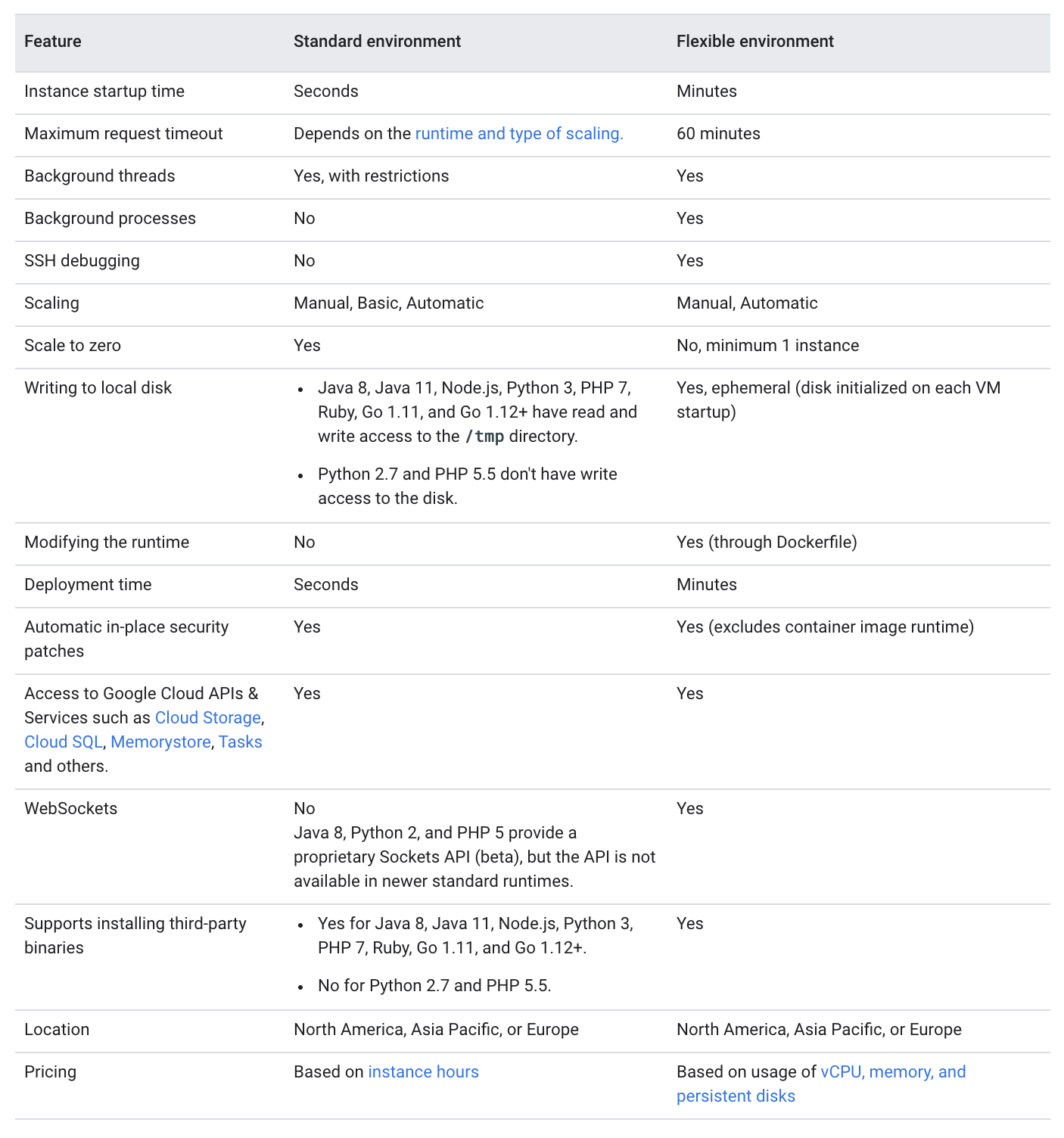
Summary Comparison Table
| Feature | Standard Environment | Flexible Environment |
|---|---|---|
| Instance startup | Seconds | Minutes |
| Scale to zero | Yes | No (min 1 instance) |
| Custom runtimes | No (predefined only) | Yes (Docker) |
| Supported languages | Go, Java, Node.js, PHP, Python, Ruby | Any (via Docker) |
| SSH access | No | Yes |
| VPC connectivity | Yes (Direct VPC egress / connectors) | Yes (native VPC) |
| Max compute | F4_1G (3GB/2.4GHz) | Any CE machine type |
| Background processes | Limited (within request lifecycle) | Yes |
| Write to disk | Yes (/tmp only, in-memory) | Yes (ephemeral disk) |
| Free tier | Yes | No |
| Health checks | Automatic | Configurable |
| Traffic splitting | IP, cookie, random | IP, cookie |
| High availability | Single zone (auto-recovers) | Multi-zone (regional MIG) |
GCP Certification Exam Practice Questions
- Questions are collected from Internet and the answers are marked as per my knowledge and understanding (which might differ with yours).
- GCP services are updated everyday and both the answers and questions might be outdated soon, so research accordingly.
- GCP exam questions are not updated to keep up the pace with GCP updates, so even if the underlying feature has changed the question might not be updated
- Open to further feedback, discussion and correction.
- You’re writing a Python application and want your application to run in a sandboxed managed environment with the ability to scale up in seconds to account for huge spikes in demand. Which service should you host your application on?
- Compute Engine
- App Engine Flexible Environment
- Kubernetes Engine
- App Engine Standard Environment
- A Company is planning the migration of their web application to Google App Engine. However, they would still continue to use their on-premises database. How can they setup application?
- Setup the application using App Engine Standard environment with Cloud VPN to connect to database
- Setup the application using App Engine Flexible environment with Cloud VPN to connect to database
- Setup the application using App Engine Standard environment with Cloud Router to connect to database
- Setup the application using App Engine Flexible environment with Cloud Router to connect to database
Note: With second-generation runtimes, Standard environment can now connect to VPC using Direct VPC egress or Serverless VPC connectors, making option A potentially valid for newer deployments. However, for direct Cloud VPN connectivity, Flexible environment remains the straightforward choice.
- A startup wants to deploy a containerized application written in Rust with minimal operational overhead and the ability to scale to zero during periods of inactivity. Which Google Cloud service should they use?
- App Engine Standard Environment
- App Engine Flexible Environment
- Cloud Run
- Google Kubernetes Engine
- Your team is running an application on App Engine Standard environment using Python 2.7 runtime. Google has deprecated first-generation runtimes. What is the recommended migration path?
- Migrate directly to Compute Engine
- Migrate to the latest Python 3 runtime on App Engine Standard or migrate to Cloud Run
- No action needed; the application will continue running indefinitely
- Migrate to App Engine Flexible environment
- Which of the following is TRUE about App Engine Standard environment with second-generation runtimes? (Choose TWO)
- Applications can connect to VPC networks using Direct VPC egress
- Applications can use any programming language via custom Docker containers
- Applications can scale to zero instances when there is no traffic
- Applications support SSH access for debugging
- Applications require at least one instance always running
- A company wants to deploy a web application that requires GPU access for AI inference with automatic scaling and minimal infrastructure management. Which service should they use?
- App Engine Standard Environment
- App Engine Flexible Environment
- Cloud Run
- Compute Engine with managed instance groups
- Which App Engine environment provides multi-zone high availability by distributing instances across multiple zones in a region?
- Standard Environment with automatic scaling
- Standard Environment with manual scaling
- Flexible Environment
- Both Standard and Flexible environments
Frequently Asked Questions
What is the difference between App Engine Standard and Flexible?
Standard environment runs in a sandbox with automatic scaling to zero, supports specific language runtimes, and has free daily quota. Flexible environment runs in Docker containers on Compute Engine VMs with custom runtimes, no free tier, and minimum 1 instance.
Can App Engine scale to zero?
App Engine Standard can scale to zero instances when there’s no traffic, meaning you pay nothing during idle time. Flexible environment requires at least one instance running at all times.
Should I use App Engine or Cloud Run?
Cloud Run is recommended for new applications — it offers container-based serverless with scale-to-zero, any language/binary support, and per-request pricing. App Engine is still valid for existing apps but Cloud Run provides more flexibility.