AWS Network Firewall vs WAF vs Security Groups vs NACLs

AWS Network Firewall vs WAF vs Security Groups vs NACLs

📅 Updated June 2026: Added AWS WAF Classic EOL notice, Network Firewall Transit Gateway attachment, Web Category-based filtering, WAF AI Bot Control dashboard, Security Group VPC Associations, and AWS Shield Network Security Director.

⚠️ AWS WAF Classic Deprecated

AWS WAF Classic reached End of Life (EOL) on September 30, 2025.

All references to WAF in this post refer to the current AWS WAF (formerly “AWS WAFv2”). If you are still using WAF Classic, you must migrate immediately.

Migration: Use the AWS WAF Classic migration guide and the CreateWebACLMigrationStack API to migrate your web ACLs.

Overview

  • AWS Network Firewall is a stateful, fully managed network firewall and intrusion detection and prevention service (IDS/IPS) for VPCs.
  • AWS WAF is a web application firewall that helps protect web applications from attacks by allowing rules configuration that allow, block, or monitor (count) web requests based on defined conditions.
  • Security groups act as a virtual firewall for associated instances, controlling both inbound and outbound traffic at the instance level.
  • Network access control lists (NACLs) act as a firewall for associated subnets, controlling both inbound and outbound traffic at the subnet level.
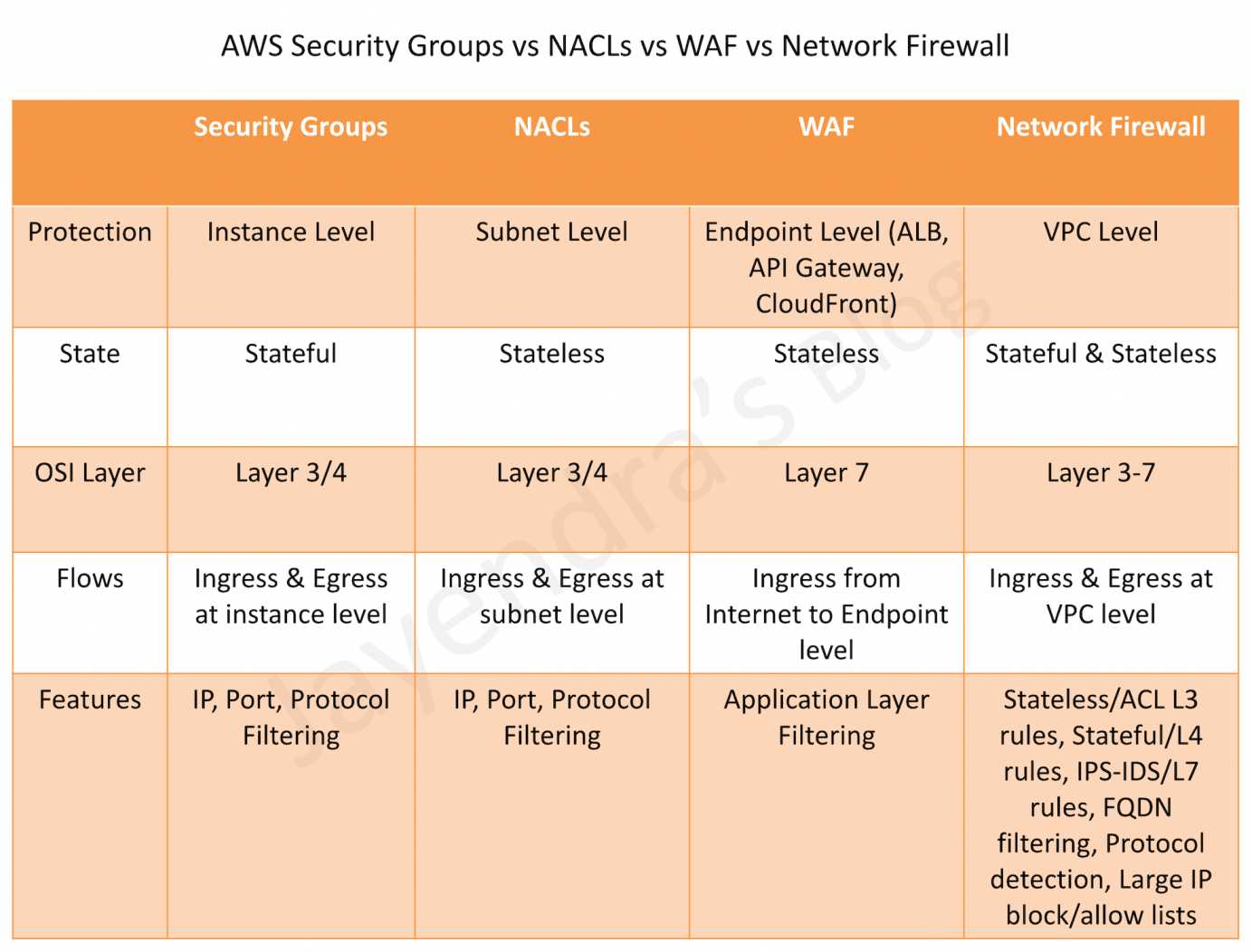
AWS Security Groups vs NACLs vs WAF vs Network Firewall

Comparison Table

Feature Security Groups NACLs AWS WAF AWS Network Firewall
Scope Instance/ENI level Subnet level Application level (Layer 7) VPC level (Layers 3-7)
State Stateful Stateless Stateful Stateful & Stateless
Rules Allow rules only Allow and Deny rules Allow, Block, Count, CAPTCHA, Challenge Allow, Drop, Reject, Alert
Rule Processing All rules evaluated Rules processed in order (lowest number first) Rules processed by priority Rules processed by priority with strict/action order
Traffic Inspection IP, Port, Protocol IP, Port, Protocol HTTP/HTTPS headers, body, URI, query strings IP, Port, Protocol, Domain, HTTP/TLS, IDS/IPS signatures
IDS/IPS No No No (application-level only) Yes (Suricata-compatible)
TLS Inspection No No No (inspects after decryption at ALB/CloudFront) Yes (decrypts and re-encrypts HTTPS traffic)
Domain Filtering No No No Yes (FQDN, SNI, URL categories)
Bot Control No No Yes (650+ bots including AI crawlers) No (use WAF for bot control)
Cost Free Free Pay per web ACL, rule, and requests Pay per endpoint hour and data processed

Security Groups

  • Act as a virtual firewall at the instance/ENI level
  • Stateful – return traffic is automatically allowed regardless of rules
  • Support allow rules only – cannot create deny rules
  • All rules are evaluated before deciding whether to allow traffic
  • Can reference other security groups as sources/destinations (including cross-account)
  • Applied to ENIs – an instance can have multiple security groups
  • Default security group allows all outbound and denies all inbound (except from same group)

Security Group Updates (2024-2026)

  • Security Group VPC Associations (Oct 2024) – Associate a security group with multiple VPCs in the same account and Region, eliminating the need to duplicate security groups across VPCs
  • Shared Security Groups – In shared VPCs, security groups can now be shared with participant accounts using AWS RAM
  • Cross-VPC Security Group Referencing (AWS Cloud WAN) – Create inbound rules referencing security groups in other VPCs attached to AWS Cloud WAN within the same Region

Network Access Control Lists (NACLs)

  • Act as a firewall at the subnet level
  • Stateless – return traffic must be explicitly allowed by rules
  • Support both allow and deny rules
  • Rules are processed in number order (lowest first); processing stops at first match
  • Default NACL allows all inbound and outbound traffic
  • Custom NACLs deny all traffic by default until rules are added
  • Applied automatically to all instances in the associated subnet
  • Provide broad subnet-level protection as a first line of defense

AWS WAF (Web Application Firewall)

  • Operates at Layer 7 (Application Layer) – inspects HTTP/HTTPS requests
  • Protects against common web exploits: SQL injection, XSS, CSRF
  • Deployed on CloudFront, ALB, API Gateway, AppSync, Cognito, App Runner, and Verified Access
  • Rules based on IP addresses, HTTP headers, HTTP body, URI strings, query strings, and geo-location
  • Supports rate-based rules for DDoS mitigation at application layer
  • Managed rule groups from AWS and AWS Marketplace partners
  • Centrally managed using AWS Firewall Manager across accounts

AWS WAF Updates (2024-2026)

  • New Console Experience (June 2025) – Pre-configured protection packs for specific workloads (e-commerce, APIs, transaction processing), automated security recommendations, and a unified dashboard
  • AI Activity Dashboard (Feb 2026) – Bot Control detection catalog covers 650+ unique bots including AI search engine crawlers, AI data collectors, AI assistants, and LLM training crawlers
  • Dynamic Label Interpolation (May 2026) – Forward WAF classification signals to origin and embed context in responses with a single rule
  • Protection Packs – Pre-configured Web ACLs tailored to specific workload types with expert-curated rules that are continuously updated

AWS Network Firewall

  • Operates at Layers 3-7 – provides network-level and application-level filtering
  • Deployed within a VPC using firewall endpoints in dedicated firewall subnets
  • Supports both stateful and stateless rule groups
  • Intrusion Detection and Prevention (IDS/IPS) using Suricata-compatible rules
  • Domain name filtering – Allow/deny based on FQDN or SNI for encrypted traffic
  • TLS Inspection – Decrypts and re-encrypts HTTPS traffic for deep packet inspection
  • Supports AWS Managed Rule Groups for active threat defense (malware, botnets, C2 channels)
  • Auto-scales based on traffic load
  • Centrally managed using AWS Firewall Manager
  • Can be shared across accounts using AWS RAM

AWS Network Firewall Updates (2024-2026)

  • Transit Gateway Native Attachment (2026) – Attach Network Firewall directly to Transit Gateway, eliminating the need for a dedicated inspection VPC. Simplifies architecture and enables flexible cost allocation across accounts.
  • Web Category-based Filtering (Jan 2026) – Pre-defined URL categories to control access to GenAI services, social media, streaming sites, and other web categories directly in firewall rules
  • Enhanced Managed Rules from Marketplace Partners (Apr 2026) – Support for up to 10 million domain name indicators and 1 million IP addresses in managed rule groups
  • Price Reductions (Feb 2026) – Hourly and data processing discounts on NAT Gateways service-chained with Network Firewall secondary endpoints
  • Enhanced Console & Monitoring (Sep 2025) – Expanded monitoring insights, advanced TLS inspection features, PrivateLink endpoint analysis, and improved filtering
  • Application Layer Traffic Controls (Sep 2025) – Enhanced default rules for handling TLS client hellos and HTTP requests split across multiple packets

When to Use Each Service

Use Case Recommended Service
Control traffic to/from specific instances Security Groups
Block specific IPs at the subnet level NACLs
Protect web apps from SQL injection, XSS AWS WAF
Block/manage bot traffic and AI crawlers AWS WAF (Bot Control)
Rate limiting at application layer AWS WAF
IDS/IPS for VPC traffic AWS Network Firewall
Domain/FQDN-based egress filtering AWS Network Firewall
TLS traffic inspection (decrypt/re-encrypt) AWS Network Firewall
Block access to GenAI/social media categories AWS Network Firewall (Web Category Filtering)
Centralized inspection across multiple VPCs AWS Network Firewall + Transit Gateway
Centralized policy management across accounts AWS Firewall Manager
Identify misconfigured network security AWS Shield Network Security Director

AWS Shield Network Security Director (Preview)

  • Launched June 2025 as a capability of AWS Shield
  • Discovers compute, networking, and network security resources across your AWS accounts
  • Identifies missing or misconfigured network security services (WAF, Security Groups, NACLs)
  • Provides actionable remediation recommendations based on AWS best practices and threat intelligence
  • Supports multi-account analysis with AWS Organizations integration (Dec 2025)
  • Findings available in AWS Security Hub (Mar 2026)
  • Visualizes network topology and security configuration issues

AWS Firewall Manager

  • Centrally configure and manage firewall rules across multiple accounts and resources in an AWS Organization
  • Manages policies for AWS WAF, AWS Network Firewall, Security Groups, NACLs, and Shield Advanced
  • Automatically applies protections to new accounts and resources as they are added
  • Supports retrofitting – application teams can customize rules in Firewall Manager-managed Web ACLs using console or IaC tools
  • Requires AWS Organizations and a designated Firewall Manager administrator account

Defense in Depth Architecture

AWS recommends a layered security approach combining all four services:

  1. NACLs – First line of defense at subnet boundary; block known malicious IPs
  2. Security Groups – Instance-level access control; allow only required ports/protocols
  3. AWS Network Firewall – VPC-level IDS/IPS, domain filtering, and deep packet inspection
  4. AWS WAF – Application-level protection against web exploits and bot traffic

Use AWS Firewall Manager for centralized policy management and AWS Shield Network Security Director to identify gaps in your security posture.

AWS Certification Exam Practice Questions

Question 1:

A company needs to inspect all egress traffic from their VPC and block access to known malicious domains. They also need IDS/IPS capabilities. Which service should they use?

  1. AWS WAF
  2. Network ACLs
  3. AWS Network Firewall
  4. Security Groups

Answer: C – AWS Network Firewall provides domain-based filtering, IDS/IPS with Suricata-compatible rules, and can inspect all VPC egress traffic. WAF only inspects HTTP/HTTPS at the application layer and requires a load balancer or CloudFront.

Question 2:

A solutions architect needs to protect a web application from SQL injection and cross-site scripting attacks. The application is behind an Application Load Balancer. Which is the MOST appropriate service?

  1. AWS Network Firewall
  2. AWS WAF
  3. Network ACLs
  4. Security Groups

Answer: B – AWS WAF is specifically designed to protect web applications from common exploits like SQL injection and XSS. It integrates directly with ALB to inspect HTTP/HTTPS requests.

Question 3:

A company wants to block a specific IP address from accessing any resources in a subnet. Which service provides the ability to explicitly DENY traffic?

  1. Security Groups
  2. AWS WAF
  3. Network ACLs
  4. AWS Network Firewall

Answer: C – NACLs support both allow and deny rules at the subnet level. Security Groups only support allow rules. While WAF and Network Firewall can also block traffic, NACLs are the most appropriate for simple IP-based subnet-level blocking.

Question 4:

An organization needs to control access to generative AI services from their corporate VPC. They want to block employees from accessing specific AI platforms while allowing approved ones. Which feature should they use?

  1. AWS WAF Bot Control
  2. Security Group rules
  3. AWS Network Firewall with Web Category-based filtering
  4. NACLs with deny rules

Answer: C – AWS Network Firewall’s Web Category-based filtering (launched Jan 2026) enables controlling access to GenAI services using pre-defined URL categories without maintaining individual domain lists.

Question 5:

A company wants to detect and manage AI crawlers and LLM training bots accessing their web application. Which AWS service provides this capability?

  1. AWS Network Firewall
  2. AWS WAF with Bot Control
  3. Security Groups
  4. AWS Shield Advanced

Answer: B – AWS WAF Bot Control’s detection catalog covers 650+ unique bots including AI search engine crawlers, AI data collectors, AI assistants, and LLM training crawlers. The AI Activity Dashboard provides visibility into AI bot traffic patterns.

Question 6:

A company operates multiple VPCs connected via Transit Gateway and wants to centrally inspect all inter-VPC traffic. What is the SIMPLEST architecture using AWS Network Firewall?

  1. Deploy Network Firewall in each VPC
  2. Create a dedicated inspection VPC with firewall endpoints
  3. Attach Network Firewall directly to Transit Gateway
  4. Use Gateway Load Balancer with third-party appliances

Answer: C – AWS Network Firewall now supports native Transit Gateway attachment, eliminating the need for a dedicated inspection VPC. This simplifies architecture by directly attaching the firewall to the Transit Gateway.

Question 7:

Which statement correctly describes the difference between Security Groups and NACLs? (Select TWO)

  1. Security Groups are stateless; NACLs are stateful
  2. Security Groups operate at instance level; NACLs operate at subnet level
  3. Security Groups evaluate all rules; NACLs process rules in order
  4. NACLs support allow rules only; Security Groups support allow and deny
  5. Both Security Groups and NACLs can reference other security groups

Answer: B, C – Security Groups operate at the instance/ENI level and evaluate all rules before making a decision. NACLs operate at the subnet level and process rules in numerical order, stopping at the first match. Security Groups are stateful (not stateless), and NACLs support both allow and deny rules.

Question 8:

A security team needs to identify which AWS resources have misconfigured network security services across their multi-account environment. Which service should they use?

  1. AWS Config
  2. AWS Shield Network Security Director
  3. Amazon Inspector
  4. AWS Firewall Manager

Answer: B – AWS Shield Network Security Director discovers resources across accounts, identifies missing or misconfigured network security services (WAF, Security Groups, NACLs), and provides remediation recommendations. It integrates with AWS Organizations for multi-account analysis.

References

AWS VPC Security – Security Group vs NACLs

Security Groups vs NACLs

AWS VPC Security Group vs NACLs

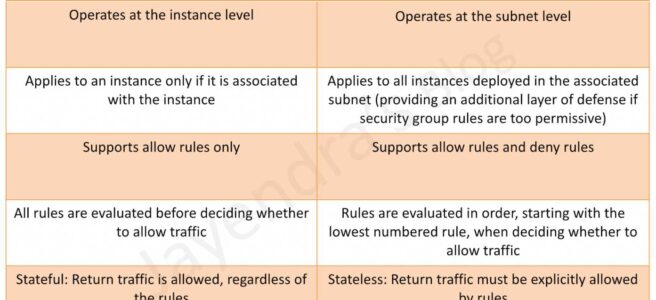
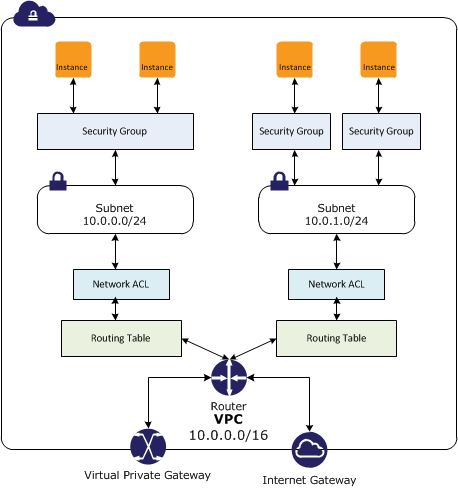
  • In a VPC, both Security Groups and Network ACLs (NACLS) together help to build a layered network defence.
  • Security groups – Act as a virtual firewall for associated instances, controlling both inbound and outbound traffic at the instance level
  • Network access control lists (NACLs) – Act as a firewall for associated subnets, controlling both inbound and outbound traffic at the subnet level

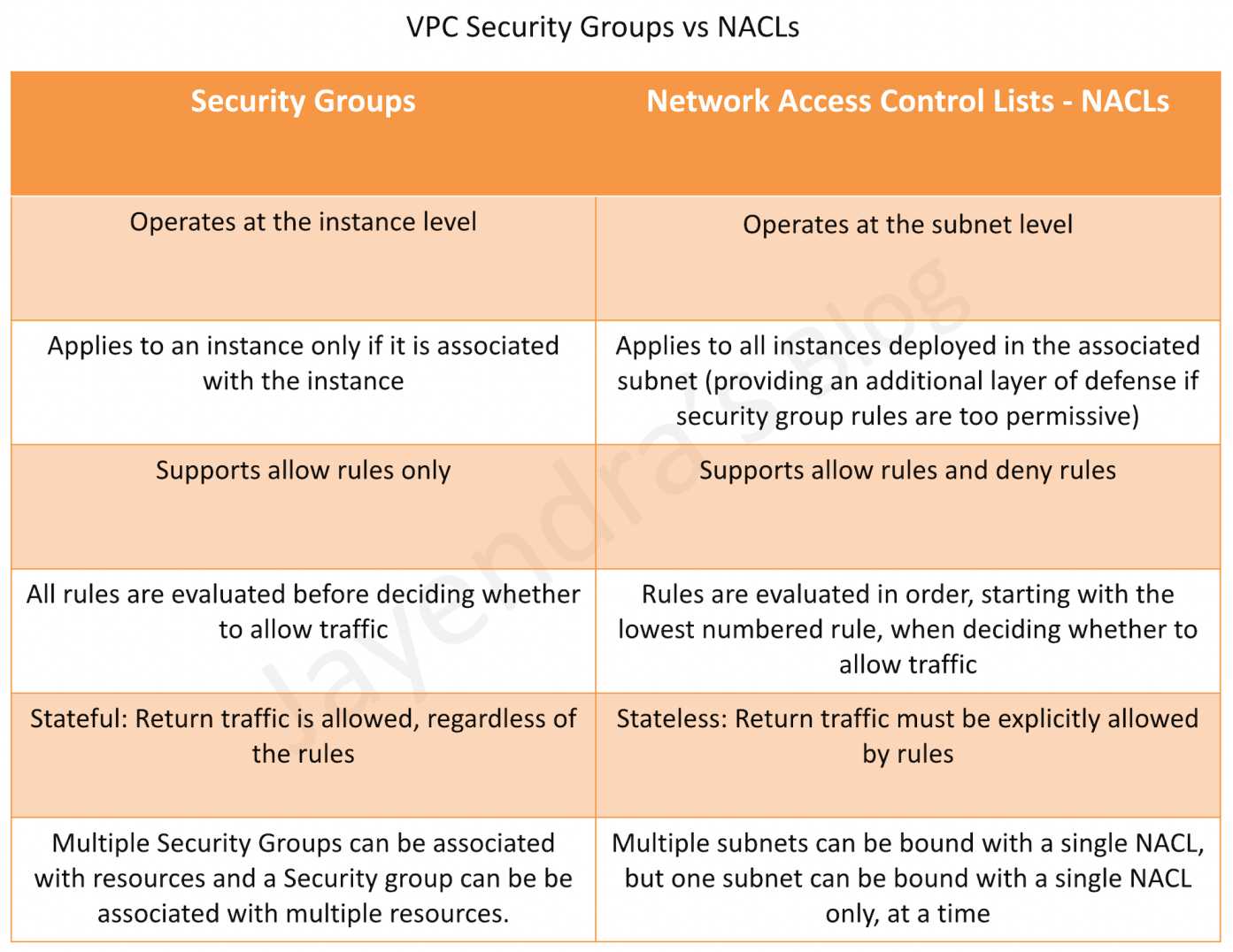
Security Groups vs NACLs

Security Groups

  • Acts at an Instance level and not at the subnet level.
  • Each instance within a subnet can be assigned a different set of Security groups
  • An instance can be assigned up to 5 security groups (default, can be increased up to 16) with each security group having up to 60 rules (inbound and outbound separately).
  • allows separate rules for inbound and outbound traffic.
  • allows adding or removing rules (authorizing or revoking access) for both Inbound (ingress) and Outbound (egress) traffic to the instance
    • Default Security group allows no external inbound traffic but allows inbound traffic from instances with the same security group
    • Default Security group allows all outbound traffic
    • New Security groups start with only an outbound rule that allows all traffic to leave the instances.
  • can specify only Allow rules, but not deny rules
  • can grant access to a specific IP, CIDR range, or to another security group in the VPC or in a peer VPC (requires a VPC peering connection)
  • are evaluated as a Whole or Cumulative bunch of rules with the most permissive rule taking precedence for e.g. if you have a rule that allows access to TCP port 22 (SSH) from IP address 203.0.113.1 and another rule that allows access to TCP port 22 from everyone, everyone has access to TCP port 22.
  • are Stateful – responses to allowed inbound traffic are allowed to flow outbound regardless of outbound rules, and vice versa. Hence an Outbound rule for the response is not needed
  • Instances associated with a security group can’t talk to each other unless rules allowing the traffic are added.
  • are associated with ENI (network interfaces).
  • are associated with the instance and can be changed, which changes the security groups associated with the primary network interface (eth0) and the changes would be applicable immediately to all the instances associated with the Security Group.

Security Group Quotas

  • VPC security groups per Region: 2,500 (adjustable)
  • Inbound or outbound rules per security group: 60 (adjustable, enforced separately for IPv4 and IPv6)
  • Security groups per network interface: 5 (default, adjustable up to 16)
  • Total rules per network interface: Maximum of 1,000 rules across all attached security groups (hard limit)
  • The quota for rules per security group multiplied by security groups per network interface cannot exceed 1,000

Connection Tracking

  • Security groups are Stateful as they use Connection tracking to track information about traffic to and from the instance.
  • Responses to inbound traffic are allowed to flow out of the instance regardless of outbound security group rules, and vice versa.
  • Connection Tracking is maintained only if there is no explicit Outbound rule for an Inbound request (and vice versa)
  • However, if there is an explicit Outbound rule for an Inbound request, the response traffic is allowed on the basis of the Outbound rule and not on the Tracking information
  • Tracking flow e.g.
    • If an instance (host A) initiates traffic to host B and uses a protocol other than TCP, UDP, or ICMP, the instance’s firewall only tracks the IP address & protocol number for the purpose of allowing response traffic from host B.
    • If host B initiates traffic to the instance in a separate request within 600 seconds of the original request or response, the instance accepts it regardless of inbound security group rules, because it’s regarded as response traffic.
  • This can be controlled by modifying the security group’s outbound rules to permit only certain types of outbound traffic. Alternatively, Network ACLs (NACLs) can be used for the subnet, network ACLs are stateless and therefore do not automatically allow response traffic.

Network Access Control Lists – NACLs

  • A Network ACLs (NACLs) is an optional layer of security for the VPC that acts as a firewall for controlling traffic in and out of one or more subnets.
  • are not for granular control and are assigned at a Subnet level and are applicable to all the instances in that Subnet
  • has separate inbound and outbound rules, and each rule can either allow or deny traffic
    • Default ACL allows all inbound and outbound traffic.
    • The newly created ACL denies all inbound and outbound traffic.
  • A Subnet can be assigned only 1 NACL and if not associated explicitly would be associated implicitly with the default NACL
  • can associate a network ACL with multiple subnets
  • is a numbered list of rules that are evaluated in order starting with the lowest numbered rule, to determine whether traffic is allowed in or out of any subnet associated with the network ACL e.g. if you have a Rule No. 100 with Allow All and 110 with Deny All, the Allow All would take precedence and all the traffic will be allowed.
  • are Stateless; responses to allowed inbound traffic are subject to the rules for outbound traffic (and vice versa) for e.g. if you enable Inbound SSH on port 22 from the specific IP address, you would need to add an Outbound rule for the response as well.

Network ACL Quotas

  • Network ACLs per VPC: 200 (adjustable)
  • Rules per network ACL: 20 (adjustable up to 40 inbound and 40 outbound, total 80 rules)
  • Note: Increasing rules beyond 40 per direction may impact network performance

Security Group vs NACLs

Security Groups vs NACLs

AWS Certification Exam Practice Questions

  • Questions are collected from Internet and the answers are marked as per my knowledge and understanding (which might differ with yours).
  • AWS services are updated everyday and both the answers and questions might be outdated soon, so research accordingly.
  • AWS exam questions are not updated to keep up the pace with AWS updates, so even if the underlying feature has changed the question might not be updated
  • Open to further feedback, discussion and correction.
  1. Instance A and instance B are running in two different subnets A and B of a VPC. Instance A is not able to ping instance B. What are two possible reasons for this? (Pick 2 correct answers)
    1. The routing table of subnet A has no target route to subnet B
    2. The security group attached to instance B does not allow inbound ICMP traffic
    3. The policy linked to the IAM role on instance A is not configured correctly
    4. The NACL on subnet B does not allow outbound ICMP traffic
  2. An instance is launched into a VPC subnet with the network ACL configured to allow all inbound traffic and deny all outbound traffic. The instance’s security group is configured to allow SSH from any IP address and deny all outbound traffic. What changes need to be made to allow SSH access to the instance?
    1. The outbound security group needs to be modified to allow outbound traffic.
    2. The outbound network ACL needs to be modified to allow outbound traffic.
    3. Nothing, it can be accessed from any IP address using SSH.
    4. Both the outbound security group and outbound network ACL need to be modified to allow outbound traffic.
  3. From what services I can block incoming/outgoing IPs?
    1. Security Groups
    2. DNS
    3. ELB
    4. VPC subnet
    5. IGW
    6. NACL
  4. What is the difference between a security group in VPC and a network ACL in VPC (chose 3 correct answers)
    1. Security group restricts access to a Subnet while ACL restricts traffic to EC2
    2. Security group restricts access to EC2 while ACL restricts traffic to a subnet
    3. Security group can work outside the VPC also while ACL only works within a VPC
    4. Network ACL performs stateless filtering and Security group provides stateful filtering
    5. Security group can only set Allow rule, while ACL can set Deny rule also
  5. You are currently hosting multiple applications in a VPC and have logged numerous port scans coming in from a specific IP address block. Your security team has requested that all access from the offending IP address block be denied for the next 24 hours. Which of the following is the best method to quickly and temporarily deny access from the specified IP address block?
    1. Create an AD policy to modify Windows Firewall settings on all hosts in the VPC to deny access from the IP address block
    2. Modify the Network ACLs associated with all public subnets in the VPC to deny access from the IP address block
    3. Add a rule to all of the VPC 5 Security Groups to deny access from the IP address block
    4. Modify the Windows Firewall settings on all Amazon Machine Images (AMIs) that your organization uses in that VPC to deny access from the IP address block
  6. You have two Elastic Compute Cloud (EC2) instances inside a Virtual Private Cloud (VPC) in the same Availability Zone (AZ) but in different subnets. One instance is running a database and the other instance an application that will interface with the database. You want to confirm that they can talk to each other for your application to work properly. Which two things do we need to confirm in the VPC settings so that these EC2 instances can communicate inside the VPC? Choose 2 answers
    1. A network ACL that allows communication between the two subnets.
    2. Both instances are the same instance class and using the same Key-pair.
    3. That the default route is set to a NAT instance or Internet Gateway (IGW) for them to communicate.
    4. Security groups are set to allow the application host to talk to the database on the right port/protocol
  7. A benefits enrollment company is hosting a 3-tier web application running in a VPC on AWS, which includes a NAT (Network Address Translation) instance in the public Web tier. There is enough provisioned capacity for the expected workload tor the new fiscal year benefit enrollment period plus some extra overhead Enrollment proceeds nicely for two days and then the web tier becomes unresponsive, upon investigation using CloudWatch and other monitoring tools it is discovered that there is an extremely large and unanticipated amount of inbound traffic coming from a set of 15 specific IP addresses over port 80 from a country where the benefits company has no customers. The web tier instances are so overloaded that benefit enrollment administrators cannot even SSH into them. Which activity would be useful in defending against this attack?
    1. Create a custom route table associated with the web tier and block the attacking IP addresses from the IGW (internet Gateway)
    2. Change the EIP (Elastic IP Address) of the NAT instance in the web tier subnet and update the Main Route Table with the new EIP
    3. Create 15 Security Group rules to block the attacking IP addresses over port 80
    4. Create an inbound NACL (Network Access control list) associated with the web tier subnet with deny rules to block the attacking IP addresses
  8. Which of the following statements describes network ACLs? (Choose 2 answers)
    1. Responses to allowed inbound traffic are allowed to flow outbound regardless of outbound rules, and vice versa (are stateless)
    2. Using network ACLs, you can deny access from a specific IP range
    3. Keep network ACL rules simple and use a security group to restrict application level access
    4. NACLs are associated with a single Availability Zone (associated with Subnet)
  9. You are designing security inside your VPC. You are considering the options for establishing separate security zones and enforcing network traffic rules across different zone to limit Instances can communications. How would you accomplish these requirements? Choose 2 answers
    1. Configure a security group for every zone. Configure a default allow all rule. Configure explicit deny rules for the zones that shouldn’t be able to communicate with one another (Security group does not allow deny rules)
    2. Configure you instances to use pre-set IP addresses with an IP address range every security zone. Configure NACL to explicitly allow or deny communication between the different IP address ranges, as required for interzone communication
    3. Configure a security group for every zone. Configure allow rules only between zone that need to be able to communicate with one another. Use implicit deny all rule to block any other traffic
    4. Configure multiple subnets in your VPC, one for each zone. Configure routing within your VPC in such a way that each subnet only has routes to other subnets with which it needs to communicate, and doesn’t have routes to subnets with which it shouldn’t be able to communicate. (default routes are unmodifiable)
  10. Your entire AWS infrastructure lives inside of one Amazon VPC. You have an Infrastructure monitoring application running on an Amazon instance in Availability Zone (AZ) A of the region, and another application instance running in AZ B. The monitoring application needs to make use of ICMP ping to confirm network reachability of the instance hosting the application. Can you configure the security groups for these instances to only allow the ICMP ping to pass from the monitoring instance to the application instance and nothing else” If so how?
    1. No Two instances in two different AZ’s can’t talk directly to each other via ICMP ping as that protocol is not allowed across subnet (i.e. broadcast) boundaries (Can communicate)
    2. Yes Both the monitoring instance and the application instance have to be a part of the same security group, and that security group needs to allow inbound ICMP (Need not have to be part of same security group)
    3. Yes, The security group for the monitoring instance needs to allow outbound ICMP and the application instance’s security group needs to allow Inbound ICMP (is stateful, so just allow outbound ICMP from monitoring and inbound ICMP on monitored instance)
    4. Yes, Both the monitoring instance’s security group and the application instance’s security group need to allow both inbound and outbound ICMP ping packets since ICMP is not a connection-oriented protocol (Security groups are stateful)
  11. A user has configured a VPC with a new subnet. The user has created a security group. The user wants to configure that instances of the same subnet communicate with each other. How can the user configure this with the security group?
    1. There is no need for a security group modification as all the instances can communicate with each other inside the same subnet
    2. Configure the subnet as the source in the security group and allow traffic on all the protocols and ports
    3. Configure the security group itself as the source and allow traffic on all the protocols and ports
    4. The user has to use VPC peering to configure this
  12. You are designing a data leak prevention solution for your VPC environment. You want your VPC Instances to be able to access software depots and distributions on the Internet for product updates. The depots and distributions are accessible via third party CDNs by their URLs. You want to explicitly deny any other outbound connections from your VPC instances to hosts on the Internet. Which of the following options would you consider?
    1. Configure a web proxy server in your VPC and enforce URL-based rules for outbound access Remove default routes. (Security group and NACL cannot have URLs in the rules nor does the route)
    2. Implement security groups and configure outbound rules to only permit traffic to software depots.
    3. Move all your instances into private VPC subnets remove default routes from all routing tables and add specific routes to the software depots and distributions only.
    4. Implement network access control lists to all specific destinations, with an Implicit deny as a rule.
  13. You have an EC2 Security Group with several running EC2 instances. You change the Security Group rules to allow inbound traffic on a new port and protocol, and launch several new instances in the same Security Group. The new rules apply:
    1. Immediately to all instances in the security group.
    2. Immediately to the new instances only.
    3. Immediately to the new instances, but old instances must be stopped and restarted before the new rules apply.
    4. To all instances, but it may take several minutes for old instances to see the changes.

Related Posts

References