AWS OpsWorks Deployment Strategies – Certification

⚠️ SERVICE DEPRECATED – IMPORTANT NOTICE

AWS OpsWorks Stacks reached End of Life (EOL) on May 26, 2024. All OpsWorks services (Stacks, Chef Automate, and Puppet Enterprise) have been disabled for both new and existing customers.

This content is maintained for historical reference and for understanding deployment strategies that remain applicable to modern AWS services.

Recommended Migration Paths:

For migration guidance: Migrate OpsWorks to Systems Manager

AWS OpsWorks Deployment Strategies (Historical Reference)

NOTE: OpsWorks was deprecated in 2024. These deployment strategy concepts remain relevant for the DevOps Professional Exam using modern services (CodeDeploy, ECS, Systems Manager).

The deployment strategies described below (All at Once, Rolling, Blue/Green) are foundational concepts that apply across modern AWS services like CodeDeploy, ECS, EKS, and Elastic Beanstalk.

All at Once Deployment

  • OpsWorks Stacks did not automatically deploy updated code to online instances, requiring manual deployment
  • Deploy command (for apps) or Update Custom Cookbooks command (for cookbooks) deployed the update to every instance concurrently
  • Approach was simple and fast, but led to downtime in case of error
  • OpsWorks allowed rollback to restore previously deployed app version
  • By default, AWS OpsWorks Stacks stored the five most recent deployments, allowing rollback up to four versions

Modern Equivalent

  • AWS CodeDeploy – All-at-once deployment configuration with automatic rollback on CloudWatch alarm triggers
  • Amazon ECS – Rolling updates with minimumHealthyPercent=0 and maximumPercent=100 achieves all-at-once behavior

Rolling Deployment

  • A rolling deployment updates an application on instances in multiple phases.
  • With each phase, a subset of the online instances is updated and verified before starting the next phase.
  • In case of issues, instances running the old version continue handling incoming traffic until issues are resolved.
  • Steps to perform Rolling deployment:
    • Deploy the app on a single application server instance
    • Deregister the instance from the load balancer to prevent it from serving traffic
    • Verify the app is working fine
    • Deploy the update on the remainder of instances

Modern Equivalent

  • AWS CodeDeploy – Rolling deployments with configurable batch sizes, health checks, and automatic rollback
  • Amazon ECS – Default rolling update with minimumHealthyPercent and maximumPercent parameters
  • Amazon EKS – Kubernetes native rolling updates with maxSurge and maxUnavailable
  • Elastic Beanstalk – Rolling deployment policy with configurable batch size

Blue Green Deployment

  • Blue Green deployment uses separate environments for each phase of the application’s lifecycle.
    • Blue environment is the production environment hosting the current application.
    • Green environment is the staging environment hosting the updated application.
  • Development and testing can be performed on non-publicly-accessible environments, and traffic switched when ready.
  • Steps for Blue Green deployment with Route 53 and ELB:
    • Attach unused ELB to the green environment’s application server layer
    • After green instances pass ELB health checks, adjust Route 53 weights to route traffic gradually from Blue to Green
    • Once Green is ready to handle all traffic, detach the load balancer from the Blue environment
    • Retain Blue environment for rollback capability
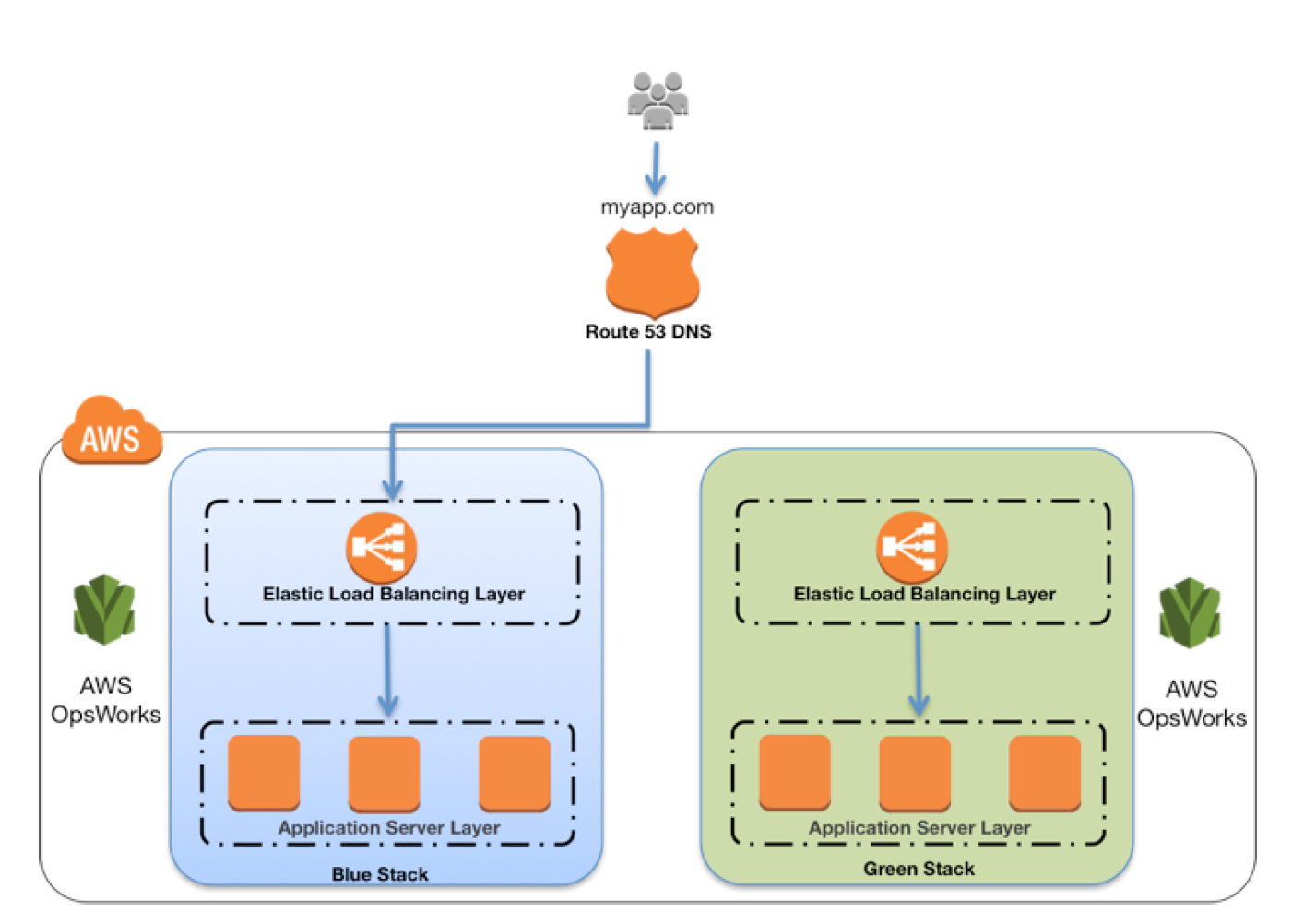
OpsWorks Blue Green Deployment

Modern Equivalent

  • Amazon ECS (Native) – Built-in blue/green deployments launched July 2025, no CodeDeploy dependency required
  • AWS CodeDeploy – Blue/green deployment for EC2, Lambda, and ECS with traffic shifting
  • Elastic Beanstalk – Blue/green via environment cloning and CNAME swap
  • Route 53 – Weighted routing policies for gradual traffic shifting
  • Application Load Balancer – Target group weighting for blue/green deployments

Modern AWS Deployment Strategies (2025-2026)

With OpsWorks deprecated, AWS now offers more powerful and integrated deployment capabilities across multiple services.

AWS CodeDeploy

  • Fully managed deployment service automating software deployments to EC2, Lambda, ECS, and on-premises servers
  • Deployment strategies: All-at-once, Rolling, Blue/Green, Canary, Linear
  • Automatic rollback on deployment failure or CloudWatch alarm triggers
  • Integration with CI/CD pipelines via CodePipeline
  • Lifecycle event hooks for custom validation at each deployment stage
  • For ECS, CodeDeploy is being superseded by ECS-native deployments for new workloads

Amazon ECS Native Deployments (New – 2025)

  • Built-in Blue/Green (July 2025) – ECS now supports blue/green deployments natively without requiring CodeDeploy
    • Deployment lifecycle hooks for custom testing during deployment
    • Dark Canary deployments for testing with production traffic shadows
    • Automatic rollback on CloudWatch alarm breaches
  • Canary Deployments (October 2025) – Route a small percentage of traffic (as low as 0.1%) to the new revision, monitor during bake time, then complete the shift
  • Linear Deployments (October 2025) – Shift traffic in equal increments (minimum 3%) with configurable bake time between each shift
  • Supports ALB and NLB (NLB support added February 2026)
  • Integrated with CloudWatch alarms for automatic deployment stop/rollback
  • ECS-native is now the recommended default for new ECS deployments over CodeDeploy

AWS Systems Manager

  • Unified interface for managing AWS resources – direct replacement for OpsWorks configuration management
  • State Manager for configuration management and compliance
  • Automation runbooks for common operational tasks
  • Patch Manager for automated OS and application patching
  • Run Command for executing commands across fleet of instances

Amazon EKS Deployment Strategies

  • Kubernetes native rolling updates with fine-grained control
  • Blue/green using service mesh (Istio, App Mesh successor) or ingress controller
  • Canary deployments with Argo Rollouts or Flagger
  • GitOps workflows with ArgoCD or Flux

AWS App Runner

  • Fully managed service for containerized web applications
  • Automatic deployments from source code or container images
  • Built-in load balancing, auto-scaling, and zero-downtime deployments
  • No infrastructure management required

Deployment Strategy Comparison

Strategy Downtime Rollback Speed Risk AWS Services
All at Once Yes (if failure) Slow High CodeDeploy, Elastic Beanstalk
Rolling No Medium Medium CodeDeploy, ECS, EKS, Beanstalk
Blue/Green No Fast Low CodeDeploy, ECS (native), Beanstalk, Route 53
Canary No Fast Lowest CodeDeploy, ECS (native), Lambda
Linear No Fast Low CodeDeploy, ECS (native), Lambda

AWS Certification Exam Practice Questions

⚠️ EXAM NOTE: AWS OpsWorks is still listed as an in-scope service for the DOP-C02 (DevOps Professional) exam as of 2026. However, questions are expected to focus on understanding the service’s deprecation and migration to modern alternatives. Focus study efforts on CodeDeploy, ECS deployment strategies, and Systems Manager.

  • Questions are collected from Internet and the answers are marked as per my knowledge and understanding (which might differ with yours).
  • AWS services are updated everyday and both the answers and questions might be outdated soon, so research accordingly.
  • AWS exam questions are not updated to keep up the pace with AWS updates, so even if the underlying feature has changed the question might not be updated
  • Open to further feedback, discussion and correction.

Historical OpsWorks Questions

  1. You company runs a complex customer relations management system that consists of around 10 different software components all backed by the same Amazon Relational Database (RDS) database. You adopted AWS OpsWorks to simplify management and deployment of that application and created an AWS OpsWorks stack with layers for each of the individual components. An internal security policy requires that all instances should run on the latest Amazon Linux AMI and that instances must be replaced within one month after the latest Amazon Linux AMI has been released. AMI replacements should be done without incurring application downtime or capacity problems. You decide to write a script to be run as soon as a new Amazon Linux AMI is released. Which solutions support the security policy and meet your requirements? Choose 2 answers
    1. Assign a custom recipe to each layer, which replaces the underlying AMI. Use AWS OpsWorks life-cycle events to incrementally execute this custom recipe and update the instances with the new AMI. (AMI cannot be updated using recipes)
    2. Create a new stack and layers with identical configuration, add instances with the latest Amazon Linux AMI specified as a custom AMI to the new layer, switch DNS to the new stack, and tear down the old stack. (Blue-Green Deployment)
    3. Identify all Amazon Elastic Compute Cloud (EC2) instances of your AWS OpsWorks stack, stop each instance, replace the AMI ID property with the ID of the latest Amazon Linux AMI ID, and restart the instance. To avoid downtime, make sure not more than one instance is stopped at the same time. (Instances cannot be updated by updating the AMI id and needs to be launched anew)
    4. Specify the latest Amazon Linux AMI as a custom AMI at the stack level, terminate instances of the stack and let AWS OpsWorks launch new instances with the new AMI. (Would result in downtime)
    5. Add new instances with the latest Amazon Linux AMI specified as a custom AMI to all AWS OpsWorks layers of your stack, and terminate the old ones. (Disposable Rolling deployment)
  2. A company has developed a Ruby on Rails content management platform. Currently, OpsWorks with several stacks for dev, staging, and production is being used to deploy and manage the application. Now the company wants to start using Python instead of Ruby. How should the company manage the new deployment?
    1. Update the existing stack with Python application code and deploy the application using the deploy life-cycle action to implement the application code.
    2. Create a new stack that contains a new layer with the Python code. To cut over to the new stack the company should consider using Blue/Green deployment
    3. Create a new stack that contains the Python application code and manage separate deployments of the application via the secondary stack using the deploy lifecycle action to implement the application code.
    4. Create a new stack that contains the Python application code and manages separate deployments of the application via the secondary stack

Modern Deployment Strategy Questions

  1. A company is migrating from AWS OpsWorks to a modern deployment solution. Their application runs on Amazon ECS with Fargate. They want to deploy updates with minimal risk, routing only 10% of traffic to the new version initially, monitoring for 10 minutes, then completing the shift. Which deployment strategy should they use?
    1. ECS rolling update with minimumHealthyPercent set to 90%
    2. ECS native canary deployment with a 10% initial traffic shift and 10-minute bake time
    3. AWS CodeDeploy blue/green deployment with a 10-minute wait time
    4. ECS native linear deployment with 10% increments

    Answer: B – ECS native canary deployment (launched October 2025) allows routing a small percentage of traffic to the new revision with a configurable bake time before completing the shift. This matches the requirement of 10% initial traffic with monitoring.

  2. A DevOps engineer needs to implement a deployment strategy for an ECS service that shifts traffic in 5 equal increments over 25 minutes. Which approach is most appropriate?
    1. AWS CodeDeploy with a custom linear deployment configuration
    2. ECS native linear deployment with 20% increments and 5-minute bake time
    3. ECS blue/green deployment with Route 53 weighted routing
    4. ECS rolling update with maximum percent set to 120%

    Answer: B – ECS native linear deployments (October 2025) shift traffic in equal increments with bake time between each shift. 5 increments of 20% with 5-minute bake times achieves the 25-minute gradual shift requirement. For new ECS deployments, ECS-native is preferred over CodeDeploy.

  3. A company previously managed configuration and deployments using AWS OpsWorks Stacks with custom Chef cookbooks. Now that OpsWorks has reached EOL, which combination of services provides equivalent functionality? (Choose 2)
    1. AWS Elastic Beanstalk with custom platform hooks
    2. AWS Systems Manager State Manager with custom SSM documents
    3. AWS Config rules with auto-remediation
    4. AWS CodeDeploy with AppSpec lifecycle hooks
    5. Amazon Inspector with automated patching

    Answers: B, D – Systems Manager State Manager replaces OpsWorks configuration management (cookbooks → SSM documents), and CodeDeploy replaces OpsWorks deployment commands with AppSpec lifecycle hooks providing similar customization to Chef recipes.

  4. An organization wants to implement blue/green deployments for their ECS services. They are evaluating ECS-native blue/green versus CodeDeploy-managed blue/green. Which statement is correct about ECS-native blue/green deployments?
    1. ECS-native blue/green requires a separate CodeDeploy application and deployment group
    2. ECS-native blue/green only supports ALB, not NLB
    3. ECS-native blue/green supports deployment lifecycle hooks for custom testing without requiring CodeDeploy
    4. ECS-native blue/green does not support automatic rollback on CloudWatch alarms

    Answer: C – ECS native blue/green (July 2025) operates entirely within ECS without CodeDeploy dependency. It supports lifecycle hooks for custom testing, CloudWatch alarm-based rollback, and both ALB and NLB (NLB support added February 2026).

References

AWS Management Tools Cheat Sheet

AWS Organizations

  • AWS Organizations is an account management service that enables consolidating multiple AWS accounts into an organization that can be created and centrally managed.
  • AWS Organizations enables you to
    • Automate AWS account creation and management, and provision resources with AWS CloudFormation Stacksets
    • Maintain a secure environment with policies and management of AWS security services
    • Govern access to AWS services, resources, and regions
    • Centrally manage policies across multiple AWS accounts
    • Audit your environment for compliance
    • View and manage costs with consolidated billing
    • Configure AWS services across multiple accounts
  • Resource Control Policies (RCPs) (launched Nov 2024)
    • RCPs are a new type of authorization policy to centrally restrict access to AWS resources across your organization.
    • Complement SCPs by setting the maximum available permissions on resources (SCPs control permissions on principals).
    • Help establish a data perimeter and restrict external access to resources at scale.
    • Only affect resources in member accounts, not the management account.
  • Declarative Policies (launched Dec 2024)
    • Help declare and enforce desired configuration for AWS services at scale across the organization.
    • Define the configuration once (e.g., “block public access for VPCs”) and AWS automatically enforces it across the multi-account environment.
    • Once set, configuration is maintained even as new features or APIs are added.
    • End users see custom error messages configured by administrators, directing them to internal resources or support channels.

CloudFormation

  • gives developers and systems administrators an easy way to create and manage a collection of related AWS resources
  • Resources can be updated, deleted, and modified in an orderly, controlled and predictable fashion, in effect applying version control to the AWS infrastructure as code done for software code
  • CloudFormation Template is an architectural diagram, in JSON or YAML format, and Stack is the end result of that diagram, which is actually provisioned
  • template can be used to set up the resources consistently and repeatedly over and over across multiple regions and consists of
    • List of AWS resources and their configuration values
    • An optional template file format version number
    • An optional list of template parameters (input values supplied at stack creation time)
    • An optional list of output values like public IP address using the Fn::GetAtt function
    • An optional list of data tables used to lookup static configuration values for e.g., AMI names per AZ
  • supports Chef & Puppet Integration to deploy and configure right down the application layer
  • supports Bootstrap scripts to install packages, files, and services on the EC2 instances by simply describing them in the CF template
  • automatic rollback on error feature is enabled, by default, which will cause all the AWS resources that CF created successfully for a stack up to the point where an error occurred to be deleted
  • provides a WaitCondition resource to block the creation of other resources until a completion signal is received from an external source
  • allows DeletionPolicy attribute to be defined for resources in the template
    • retain to preserve resources like S3 even after stack deletion
    • snapshot to backup resources like RDS after stack deletion
  • DependsOn attribute to specify that the creation of a specific resource follows another
  • Service role is an IAM role that allows AWS CloudFormation to make calls to resources in a stack on the user’s behalf
  • Nested stacks can separate out reusable, common components and create dedicated templates to mix and match different templates but use nested stacks to create a single, unified stack
  • Change Sets presents a summary or preview of the proposed changes that CloudFormation will make when a stack is updated
  • Drift detection enables you to detect whether a stack’s actual configuration differs, or has drifted, from its expected configuration.
  • Termination protection helps prevent a stack from being accidentally deleted.
  • Stack policy can prevent stack resources from being unintentionally updated or deleted during a stack update.
  • StackSets extends the functionality of stacks by enabling you to create, update, or delete stacks across multiple accounts and Regions with a single operation.
  • IaC Generator (launched Feb 2024)
    • Generates CloudFormation templates and AWS CDK apps for existing AWS resources that are not managed with CloudFormation.
    • Scans resources in an AWS account, identifies relationships, and generates templates.
    • Supports targeted resource scans for faster template generation.
    • Helps onboard existing resources to CloudFormation management.
  • Hooks
    • Extension points that invoke custom logic at specific points during stack operations for validation or enforcement.
    • Can be created using AWS Lambda, CloudFormation Guard rules, or the CFN-CLI.
    • Now supports managed proactive controls from AWS Control Tower Controls Catalog (2025).
    • Hooks Invocation Summary page provides centralized historical view of Hook activity.
  • Stack Refactoring (2025)
    • Enables reorganizing CloudFormation and CDK infrastructure without disrupting deployed resources.
    • Move resources between stacks, rename logical IDs, and decompose monolithic stacks.
  • Drift-Aware Change Sets (Nov 2025)
    • Provides three-way comparison between new template, last-deployed template, and actual infrastructure state.
    • Prevents unexpected overwrites of drift during stack updates.
    • During execution, recreates resources deleted outside of CloudFormation.
  • Pre-Deployment Validation (Nov 2025)
    • Validates templates during change set creation, catching errors before resource provisioning.
    • Checks for invalid property syntax, resource name conflicts, and S3 bucket emptiness constraints.
  • StackSets Deployment Ordering (2025)
    • Supports deployment ordering for auto-deployment mode with DependsOn parameter.
    • Enables defining the sequence in which stack instances deploy across accounts and regions.
    • Includes built-in cycle detection to prevent circular dependencies.

Elastic BeanStalk

  • makes it easier for developers to quickly deploy and manage applications in the AWS cloud.
  • automatically handles the deployment details of capacity provisioning, load balancing, auto-scaling and application health monitoring
  • CloudFormation supports ElasticBeanstalk
  • provisions resources to support
    • a web application that handles HTTP(S) requests or
    • a web application that handles background-processing (worker) tasks
  • supports Out Of the Box
    • Apache Tomcat for Java applications
    • Apache HTTP Server for PHP applications
    • Apache HTTP server for Python applications
    • Nginx or Apache HTTP Server for Node.js applications
    • Passenger for Ruby applications
    • Microsoft IIS for .NET applications
    • Single and Multi Container Docker
    • Go applications
  • supports custom AMI to be used
  • is designed to support multiple running environments such as one for Dev, QA, Pre-Prod and Production.
  • supports versioning and stores and tracks application versions over time allowing easy rollback to prior version
  • can provision RDS DB instance and connectivity information is exposed to the application by environment variables, but is NOT recommended for production setup as the RDS is tied up with the Elastic Beanstalk lifecycle and if deleted, the RDS instance would be deleted as well
  • Amazon Linux 2023 (AL2023) is the current recommended platform. Amazon Linux 2 (AL2) standard support ends June 30, 2026. Platform branches based on Amazon Linux AMI (AL1) are retired.
  • supports AI-powered log analysis using Amazon Nova for improved reliability in troubleshooting.

OpsWorks

⚠️ AWS OpsWorks — END OF LIFE

AWS OpsWorks Stacks reached End of Life (EOL) on May 26, 2024. The service has been disabled for both new and existing customers. The OpsWorks console, API, CLI, and CloudFormation resources have been discontinued in all AWS Regions.

Migration Options:

  • AWS Systems Manager — for configuration management, patching, and automation
  • AWS CloudFormation / CDK — for infrastructure as code provisioning
  • AWS Elastic Beanstalk — for application deployment and management
  • is a configuration management service that helps to configure and operate applications in a cloud enterprise by using Chef
  • helps deploy and monitor applications in stacks with multiple layers
  • supports preconfigured layers for Applications, Databases, Load Balancers, Caching
  • OpsWorks Stacks features is a set of lifecycle events – Setup, Configure, Deploy, Undeploy, and Shutdown – which automatically runs specified set of recipes at the appropriate time on each instance
  • Layers depend on Chef recipes to handle tasks such as installing packages on instances, deploying apps, running scripts, and so on
  • OpsWorks Stacks runs the recipes for each layer, even if the instance belongs to multiple layers
  • supports Auto Healing and Auto Scaling to monitor instance health, and provision new instances

CloudWatch

  • allows monitoring of AWS resources and applications in real time, collect and track pre configured or custom metrics and configure alarms to send notification or make resource changes based on defined rules
  • does not aggregate data across regions
  • stores the log data indefinitely, and the retention can be changed for each log group at any time
  • alarm history is stored for only 14 days
  • can be used an alternative to S3 to store logs with the ability to configure Alarms and generate metrics, however logs cannot be made public
  • Alarms exist only in the created region and the Alarm actions must reside in the same region as well
  • Application Signals (GA June 2024)
    • Provides a unified, application-centric view of applications, services, and dependencies.
    • Automatic instrumentation across Amazon ECS, EKS, Lambda, and EC2 — no custom code or dashboards needed.
    • Pre-built dashboards showing volume, availability, latency, faults, and errors.
    • Supports Service Level Objectives (SLOs) and health indicators.
    • Application map automatically discovers and visualizes application topology.
  • Network Monitoring
    • Internet Monitor — provides near-continuous internet measurements (availability and performance) tailored to your workload footprint on AWS.
    • Network Flow Monitor — tracks network metrics (data transferred, retransmissions, round-trip time) between compute resources using lightweight agents.
    • Network Synthetic Monitor — visualizes packet loss and latency of hybrid network connections.

CloudTrail

  • records access to API calls for the AWS account made from AWS management console, SDKs, CLI and higher level AWS service
  • support many AWS services and tracks who did, from where, what & when
  • is a global service — a trail can be applied to all regions or a single region. A region can include global services (like IAM, STS etc), is applicable to all the supported services within that region
  • log files from different regions can be sent to the same S3 bucket
  • can be integrated with SNS to notify logs availability, CloudWatch logs log group for notifications when specific API events occur
  • call history enables security analysis, resource change tracking, trouble shooting and compliance auditing
  • CloudTrail Lake
    • A managed data lake for capturing, storing, and analyzing AWS activity logs.
    • Supports enhanced event filtering, event enrichment, and expanded event size (2025).
    • AI-powered features for log analysis and pre-built dashboards (Nov 2024).
    • ⚠️ CloudTrail Lake is no longer open to new customers starting May 31, 2026. Existing customers can continue use. AWS recommends Amazon CloudWatch for similar capabilities going forward.

Beanstalk vs OpsWorks vs CloudFormation

⚠️ PARTIAL DEPRECATION NOTICE

AWS OpsWorks (all variants) reached End of Life (EOL) in 2024.

  • AWS OpsWorks for Puppet Enterprise – EOL March 31, 2024
  • AWS OpsWorks for Chef Automate – EOL May 5, 2024
  • AWS OpsWorks Stacks – EOL May 26, 2024

The OpsWorks services have been disabled for both new and existing customers. The comparison sections involving OpsWorks are maintained for historical reference.

Current Deployment & Management Options:

  • AWS CloudFormation – Infrastructure as Code (still actively supported and enhanced)
  • AWS Elastic Beanstalk – Simplified application deployment (still actively supported)
  • AWS CDK – Programmatic infrastructure definition using familiar languages
  • AWS Systems Manager – Configuration management and automation (OpsWorks replacement)
  • AWS CodeDeploy – Application deployment automation
  • AWS App Runner – Fully managed container application service

For OpsWorks migration guidance, refer to: AWS OpsWorks EOL Documentation

AWS Elastic Beanstalk vs CloudFormation vs CDK – Deployment & Management Services Comparison

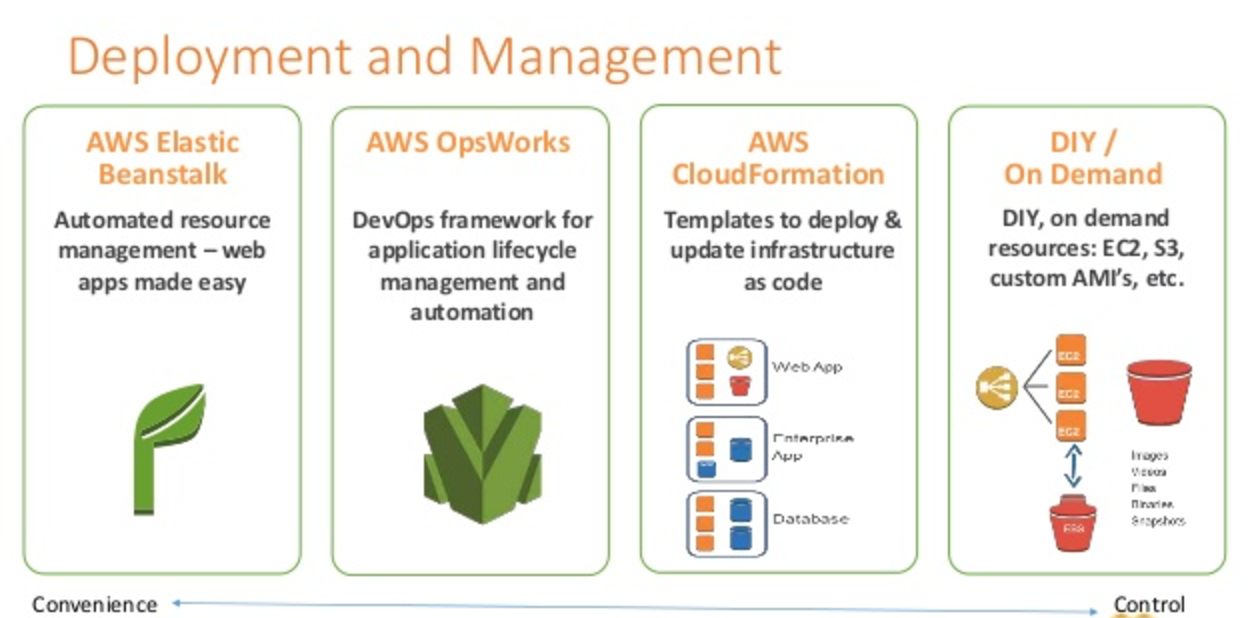
AWS offers multiple options for provisioning IT infrastructure and application deployment and management, varying from convenience & ease of setup to low-level granular control.
Deployment and Management - Elastic Beanstalk vs CloudFormation vs CDK

AWS Elastic Beanstalk

  • AWS Elastic Beanstalk is a higher-level service which allows you to quickly deploy with minimum management effort a web or worker-based environment using EC2, Docker using ECS, Elastic Load Balancing, Auto Scaling, RDS, CloudWatch, etc.
  • Elastic Beanstalk is the fastest and simplest way to get an application up and running on AWS, perfect for developers who want to deploy code and not worry about underlying infrastructure.
  • Elastic Beanstalk provides an environment to easily deploy and run applications in the cloud. It is integrated with developer tools and provides a one-stop experience for application lifecycle management.
  • Elastic Beanstalk requires minimal configuration and will help deploy, monitor, and handle the elasticity/scalability of the application.
  • A user doesn’t need to do much more than write application code and configure some settings on Elastic Beanstalk.
  • Supports platforms including Java, .NET, PHP, Node.js, Python, Ruby, Go, and Docker on Amazon Linux 2 and Amazon Linux 2023.
  • AI-Powered Environment Analysis (2026) – Elastic Beanstalk now offers AI-powered analysis that automatically diagnoses environment health issues, identifies root causes, and provides recommended solutions when health status is Warning, Degraded, or Severe.
  • Dual-Stack IPv6 Support (2025) – Supports dual-stack configuration for Application Load Balancers and Network Load Balancers, allowing environments to serve both IPv4 and IPv6 traffic.

AWS OpsWorks (Deprecated – EOL 2024)

⚠️ All AWS OpsWorks services reached End of Life in 2024 and have been disabled for all customers.
  • AWS OpsWorks was an application management service that simplified software configuration, application deployment, scaling, and monitoring using Chef or Puppet.
  • OpsWorks was recommended for managing infrastructure with a configuration management system such as Chef.
  • OpsWorks enabled writing custom Chef recipes, utilized self-healing, and worked with layers.
  • Although OpsWorks was a deployment management service that helped deploy applications with Chef recipes, it was not primarily meant to manage scaling out of the box and needed to be handled explicitly.
  • Migration Paths:
    • AWS Systems Manager – For configuration management and automation (recommended by AWS)
    • Chef SaaS – For customers who want to continue using Chef recipes
    • Puppet Enterprise – Self-hosted Puppet for existing Puppet users
    • AWS CodeDeploy – For application deployment workflows
    • Amazon ECS/EKS – For containerized workloads

AWS CloudFormation

  • AWS CloudFormation enables modeling, provisioning, and version-controlling of a wide range of AWS resources ranging from a single EC2 instance to a complex multi-tier, multi-region application.
  • CloudFormation is a low-level service and provides granular control to provision and manage stacks of AWS resources based on templates (JSON or YAML).
  • CloudFormation templates enable version control of the infrastructure and make deployment of environments easy and repeatable.
  • CloudFormation supports infrastructure needs of many different types of applications such as existing enterprise applications, legacy applications, applications built using a variety of AWS resources, and container-based solutions (including those built using AWS Elastic Beanstalk).
  • CloudFormation is not just an application deployment tool but can provision any kind of AWS resource.
  • CloudFormation is designed to complement Elastic Beanstalk and other AWS services.
  • CloudFormation with Elastic Beanstalk
    • CloudFormation supports Elastic Beanstalk application environments as one of the AWS resource types.
    • This allows you, for example, to create and manage an AWS Elastic Beanstalk–hosted application along with an RDS database to store the application data. In addition to RDS instances, any other supported AWS resource can be added to the group as well.
  • Key Updates (2024-2025):
    • Stack Refactoring (2025) – Move resources between stacks, rename logical IDs, and decompose monolithic templates into focused components without disrupting running infrastructure.
    • 40% Faster Deployments (2024) – Optimistic stabilization with CONFIGURATION_COMPLETE event enables parallel creation of dependent resources.
    • IaC Generator – Generate CloudFormation templates from existing AWS resources (reverse-engineer existing infrastructure into IaC).
    • Configuration Drift Management – Improved drift detection and remediation capabilities.
    • AI Integration – IaC context integrated with AI-powered development tools.

AWS Cloud Development Kit (AWS CDK)

  • AWS CDK is an open-source software development framework that allows you to define cloud infrastructure using familiar programming languages (TypeScript, JavaScript, Python, Java, C#/.NET, Go).
  • CDK synthesizes into CloudFormation templates, providing the reliability of CloudFormation with the expressiveness of general-purpose programming languages.
  • CDK provides high-level constructs (L2/L3) that encapsulate AWS best practices and reduce the amount of boilerplate code needed.
  • CDK is ideal for teams who prefer imperative programming over declarative YAML/JSON templates.
  • Same infrastructure that takes 500+ lines of CloudFormation YAML can be expressed in ~15 lines of CDK TypeScript.
  • CDK Refactoring (2025) – Refactor CDK code (rename constructs, move resources between stacks) while preserving deployed resources.
  • CDK Mixins (2026) – Add composable, reusable abstractions to any construct (L1, L2, or custom) without rebuilding existing infrastructure code.
  • CDK Aspects – Apply organization-wide policies (security rules, tagging standards, compliance requirements) across entire infrastructure.

AWS Serverless Application Model (AWS SAM)

  • AWS SAM is an open-source framework specifically designed for building serverless applications using infrastructure as code.
  • SAM extends CloudFormation with shorthand syntax to express Lambda functions, APIs, databases, and event source mappings with fewer lines of code.
  • During deployment, SAM transforms the SAM syntax into CloudFormation syntax, then CloudFormation provisions the resources.
  • SAM CLI provides local testing, debugging, packaging, and deployment capabilities.
  • SAM Accelerate – Speeds up local development and cloud testing.
  • WebSocket API Support (2026) – Define complete WebSocket APIs for API Gateway with minimal configuration.
  • SAM CLI integrates with AWS CDK and Terraform.

AWS App Runner

  • AWS App Runner is a fully managed container application service that lets you build, deploy, and run containerized web applications and API services without prior infrastructure or container experience.
  • App Runner connects directly to your code or image repository and provides an automatic CI/CD pipeline with fully managed operations, high performance, scalability, and security.
  • App Runner automatically handles load balancing, auto-scaling (including scale to zero), encryption, and health monitoring.
  • Ideal for web applications and APIs that need to deploy quickly from source code or container images without managing infrastructure.
  • Supports deployment from GitHub, Bitbucket, or Amazon ECR.

AWS Proton (Deprecated – EOL October 7, 2026)

⚠️ AWS Proton will reach End of Life on October 7, 2026. Plan migration accordingly.
  • AWS Proton was a fully managed deployment service that standardized how organizations deploy microservices and infrastructure from approved templates.
  • Proton sat on top of CloudFormation (or Terraform) and added self-service deployment, versioning, parameter validation, and standardization.
  • Designed for platform teams to provide standardized templates while giving developers self-service deployment speed.
  • After EOL, the Proton console, API, and pipeline management will be permanently unavailable, though deployed infrastructure will remain intact.

Comparison Summary

Service Level Best For Status
Elastic Beanstalk High-level PaaS Developers who want to deploy code without managing infrastructure ✅ Active
CloudFormation Low-level IaC Granular control over all AWS resources via declarative templates ✅ Active
AWS CDK High-level IaC Teams who prefer defining infrastructure in programming languages ✅ Active
AWS SAM Serverless IaC Serverless applications (Lambda, API Gateway, DynamoDB) ✅ Active
App Runner Fully Managed Container web apps/APIs without any infrastructure management ✅ Active
OpsWorks Configuration Mgmt Chef/Puppet based configuration management ❌ EOL (2024)
AWS Proton Template Orchestration Standardized microservice deployment templates ⚠️ EOL Oct 2026

AWS Certification Exam Practice Questions

  • Questions are collected from Internet and the answers are marked as per my knowledge and understanding (which might differ with yours).
  • AWS services are updated everyday and both the answers and questions might be outdated soon, so research accordingly.
  • AWS exam questions are not updated to keep up the pace with AWS updates, so even if the underlying feature has changed the question might not be updated
  • Open to further feedback, discussion and correction.
  1. Your team is excited about the use of AWS because now they have access to programmable infrastructure. You have been asked to manage your AWS infrastructure in a manner similar to the way you might manage application code. You want to be able to deploy exact copies of different versions of your infrastructure, stage changes into different environments, revert back to previous versions, and identify what versions are running at any particular time (development, test, QA, production). Which approach addresses this requirement?
    1. Use cost allocation reports and AWS OpsWorks to deploy and manage your infrastructure.
    2. Use AWS CloudWatch metrics and alerts along with resource tagging to deploy and manage your infrastructure.
    3. Use AWS Elastic Beanstalk and a version control system like GIT to deploy and manage your infrastructure.
    4. Use AWS CloudFormation and a version control system like GIT to deploy and manage your infrastructure.
  2. An organization is planning to use AWS for their production roll out. The organization wants to implement automation for deployment such that it will automatically create a LAMP stack, download the latest PHP installable from S3 and setup the ELB. Which of the below mentioned AWS services meets the requirement for making an orderly deployment of the software?
    1. AWS Elastic Beanstalk
    2. AWS CloudFront
    3. AWS CloudFormation
    4. AWS DevOps
  3. You are working with a customer who is using Chef configuration management in their data center. Which service is designed to let the customer leverage existing Chef recipes in AWS?
    Note: AWS OpsWorks reached EOL in 2024. For Chef-based configuration management on AWS, customers should now use Chef SaaS or AWS Systems Manager with Chef recipes via Application Manager.
    1. Amazon Simple Workflow Service
    2. AWS Elastic Beanstalk
    3. AWS CloudFormation
    4. AWS OpsWorks (Historical answer – service now deprecated)
  4. A company wants to define their infrastructure using a programming language like TypeScript instead of writing YAML templates. They want the same reliability as CloudFormation but with less boilerplate code. Which AWS service should they use?
    1. AWS Elastic Beanstalk
    2. AWS Cloud Development Kit (CDK)
    3. AWS SAM
    4. AWS App Runner
  5. A startup wants to deploy a containerized web application with minimal infrastructure management. They want automatic scaling, load balancing, and a CI/CD pipeline connected to their GitHub repository. Which AWS service provides the simplest solution?
    1. Amazon ECS with Fargate
    2. AWS Elastic Beanstalk
    3. AWS App Runner
    4. AWS CloudFormation
  6. A team is building a serverless application using Lambda functions, API Gateway, and DynamoDB. They want to define their infrastructure using a simplified template syntax with built-in local testing capabilities. Which tool is most appropriate?
    1. AWS CloudFormation
    2. AWS CDK
    3. AWS SAM
    4. AWS Elastic Beanstalk
  7. An organization has a large monolithic CloudFormation stack that they want to split into smaller, focused stacks without recreating their existing infrastructure. Which CloudFormation feature enables this?
    1. CloudFormation StackSets
    2. CloudFormation Change Sets
    3. CloudFormation Stack Refactoring
    4. CloudFormation Nested Stacks

References

AWS OpsWorks

⚠️ AWS OpsWorks — ALL VARIANTS DEPRECATED (End of Life 2024)

All AWS OpsWorks services have reached End of Life and are fully disabled:

  • OpsWorks for Puppet Enterprise — EOL March 31, 2024
  • OpsWorks for Chef Automate — EOL May 5, 2024
  • OpsWorks Stacks — EOL May 26, 2024

The OpsWorks console, API, CLI, and CloudFormation resources have been discontinued in all AWS Regions for both new and existing customers.

Migration Options:

This content is maintained for historical reference and AWS certification exam preparation.

AWS OpsWorks

  • AWS OpsWorks was a configuration management service that helped configure and operate applications in a cloud enterprise by using Chef or Puppet
  • OpsWorks offered three variants: OpsWorks Stacks, OpsWorks for Chef Automate, and OpsWorks for Puppet Enterprise
  • All OpsWorks services reached End of Life in 2024 and have been replaced by AWS Systems Manager Application Manager

OpsWorks Variants (Historical)

  • OpsWorks Stacks — Used Chef cookbooks for configuration management with a simplified layer-based architecture (EOL May 26, 2024)
  • OpsWorks for Chef Automate — Fully managed Chef Automate server for running Chef cookbooks and compliance automation (EOL May 5, 2024)
  • OpsWorks for Puppet Enterprise — Fully managed Puppet Enterprise server for Puppet-based configuration management (EOL March 31, 2024)

Migration to AWS Systems Manager

  • AWS recommends migrating OpsWorks workloads to AWS Systems Manager Application Manager
  • Systems Manager provides equivalent or superior functionality for all OpsWorks Stacks features:
OpsWorks Feature Systems Manager Equivalent
Chef Runs Systems Manager Run Command (AWS-ApplyChefRecipes)
Chef Parameters SSM Parameter Store
EC2 Instance Configuration EC2 Launch Templates
Auto Scaling (load/time-based) EC2 Auto Scaling Groups
Instance Life Cycle Events Auto Scaling Groups Life Cycle Events
Load Balancing Application Load Balancer / Classic Load Balancer
Infrastructure Provisioning AWS CloudFormation
Chef Client Logs Amazon S3 / CloudWatch Logs

OpsWorks Stacks (Historical Reference)

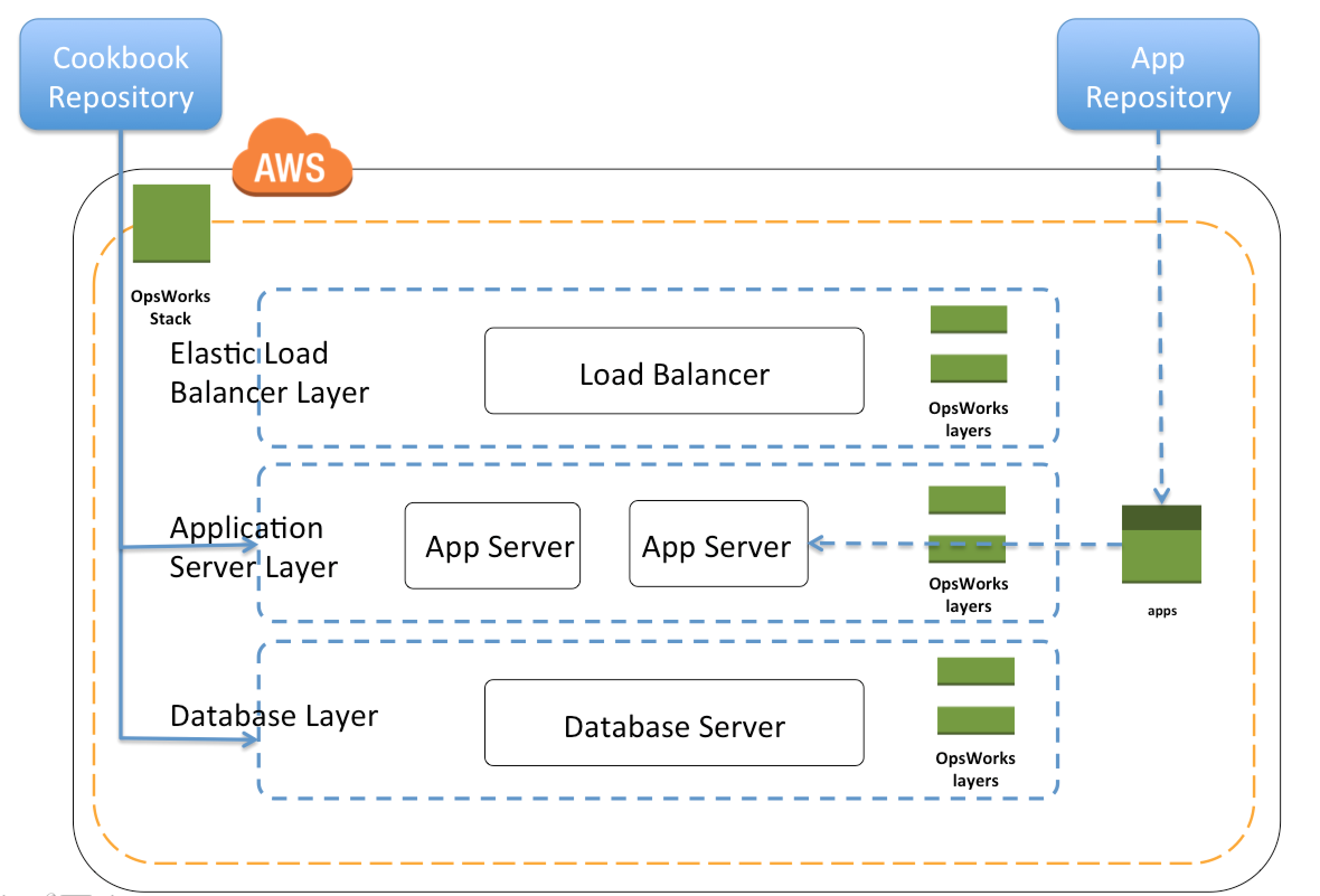
AWS OpsWorks Stacks

  • OpsWorks Stacks provided a simple and flexible way to create and manage stacks, groups of AWS resources like load balancers, web, application and database servers, and application deployed on them
  • OpsWorks Stacks helped deploy and monitor applications in the stacks.
  • Unlike OpsWorks for Chef Automate, OpsWorks Stacks did not require or create Chef servers; and performed some of the work of a Chef server itself
  • OpsWorks Stacks monitored instance health, and provisioned new instances, when necessary, by using Auto Healing and Auto Scaling
  • OpsWorks Stacks integrated with IAM to control how users can interact with stacks, what stacks can do on the users behalf, what AWS resources an app can access etc
  • OpsWorks Stacks integrated with CloudWatch and CloudTrail to enable monitoring and logging
  • OpsWorks Stacks could be accessed globally and used to create and manage instances globally

Stacks

  • Stack was the core AWS OpsWorks Stacks component.
  • Stack was a container for AWS resources like EC2, RDS instances etc that had a common purpose and should be logically managed together
  • Stack helped manage the resources as a group and also defined some default configuration settings, such as the instances’ OS and AWS region
  • Stacks could also be run in VPC to be isolated from direct user interaction
  • Separate Stacks could be created for different environments like Dev, QA etc

Layers

  • Stacks helped manage cloud resources in specialized groups called layers.
  • A layer represented a set of EC2 instances that served a particular purpose, such as serving applications or hosting a database server.
  • Layers depended on Chef recipes to handle tasks such as installing packages on instances, deploying apps, and running scripts
  • Custom recipes and related files were packaged in one or more cookbooks and stored in a cookbook repository such S3 or Git

Recipes and LifeCycle Events

  • Layers depended on Chef recipes to handle tasks such as installing packages on instances, deploying apps, running scripts, and so on.
  • OpsWorks Stacks ran the recipes for each layer, even if the instance belonged to multiple layers for e.g. instance hosting both the application and the mysql server
  • AWS OpsWorks Stacks featured a set of lifecycle events – Setup, Configure, Deploy, Undeploy, and Shutdown – which automatically ran specified set of recipes at the appropriate time on each instance
    • Setup
      • Once a new instance had booted, OpsWorks triggered the Setup event, which ran recipes to set up the instance according to the layer configuration for e.g. installation of apache, PHP packages
      • Once setup was complete, AWS OpsWorks triggered a Deploy event, which ran recipes to deploy the application to the new instance.
    • Configure
      • Whenever an instance entered or left the online state, AWS OpsWorks triggered a Configure event on all instances in the stack.
      • Event ran each layer’s configure recipes to update configuration to reflect the current set of online instances for e.g. the HAProxy layer’s Configure recipes can modify the load balancer configuration to reflect any added or removed application server instances.
    • Deploy
      • OpsWorks triggered a Deploy event when the Deploy command was executed, to deploy the application to a set of application servers.
      • Event ran recipes on the application servers to deploy application and any related files from its repository to the layer’s instances.
    • Undeploy
      • OpsWorks triggered an Undeploy event when an app was deleted or Undeploy command was executed to remove an app from a set of application servers.
      • Event ran recipes to remove all application versions and perform any additional cleanup tasks.
    • Shutdown
      • OpsWorks triggered a Shutdown event when an instance was being shut down, but before the underlying EC2 instance was actually terminated.
      • Event ran recipes to perform cleanup tasks such as shutting down services.
      • OpsWorks allowed Shutdown recipes a configurable amount of time to perform their tasks, and then terminated the instance.

Instance

  • An instance represented a single computing resource for e.g. EC2 instance and defined the resource’s basic configuration, such as OS and size
  • OpsWorks Stacks created instances and added them to a layer.
  • When the instance was started, OpsWorks Stacks launched an EC2 instance using the configuration settings specified by the instance and its layer.
  • After the EC2 instance finished booting, OpsWorks Stacks installed an agent that handled communication between the instance and the service and ran the appropriate recipes in response to lifecycle events
  • OpsWorks Stacks supported instance auto-healing, whereby if an agent stopped communicating with the service, OpsWorks Stacks automatically stopped and restarted the instance
  • OpsWorks Stacks supported the following instance types
    • 24/7 instances – launched and stopped manually
    • Time based instances – run on scheduled time
    • Load based instances – automatically started and stopped based on configurable load metrics
  • Linux based computing resources created outside of the OpsWorks stacks for e.g. console or CLI could be added, incorporated and controlled through OpsWorks

Apps

  • An AWS OpsWorks Stacks app represented code to run on an application server residing in the app repository like S3
  • App contained the information required to deploy the code to the appropriate application server instances.
  • When an app was deployed, AWS OpsWorks Stacks triggered a Deploy event, which ran the Deploy recipes on the stack’s instances.
  • OpsWorks supported the ability to deploy multiple apps per stack and per layer

OpsWorks Deployment Strategies

Refer to OpsWorks Deployment Strategies blog post for details

AWS Certification Exam Practice Questions

  • Questions are collected from Internet and the answers are marked as per my knowledge and understanding (which might differ with yours).
  • AWS services are updated everyday and both the answers and questions might be outdated soon, so research accordingly.
  • AWS exam questions are not updated to keep up the pace with AWS updates, so even if the underlying feature has changed the question might not be updated
  • Open to further feedback, discussion and correction.
  • NOTE: AWS OpsWorks reached End of Life in 2024. These questions are maintained for historical reference. Current AWS exams may still reference OpsWorks concepts in the context of migration scenarios.
  1. You are working with a customer who is using Chef configuration management in their data center. Which service is designed to let the customer leverage existing Chef recipes in AWS?
    1. Amazon Simple Workflow Service
    2. AWS Elastic Beanstalk
    3. AWS CloudFormation
    4. AWS OpsWorks (NOTE: OpsWorks reached EOL in 2024. The current alternative is AWS Systems Manager with the AWS-ApplyChefRecipes Run Command document.)
  2. Your mission is to create a lights-out datacenter environment, and you plan to use AWS OpsWorks to accomplish this. First you created a stack and added an App Server layer with an instance running in it. Next you added an application to the instance, and now you need to deploy a MySQL RDS database instance. Which of the following answers accurately describe how to add a backend database server to an OpsWorks stack? Choose 3 answers
    1. Add a new database layer and then add recipes to the deploy actions of the database and App Server layers. (Refer link)
    2. Use OpsWorks’ “Clone Stack” feature to create a second RDS stack in another Availability Zone for redundancy in the event of a failure in the Primary AZ. To switch to the secondary RDS instance, set the [:database] attributes to values that are appropriate for your server which you can do by using custom JSON.
    3. The variables that characterize the RDS database connection—host, user, and so on—are set using the corresponding values from the deploy JSON’s [:deploy][:app_name][:database] attributes. (Refer link)
    4. Cookbook attributes are stored in a repository, so OpsWorks requires that the “password”: “your_password” attribute for the RDS instance must be encrypted using at least a 256-bit key.
    5. Set up the connection between the app server and the RDS layer by using a custom recipe. The recipe configures the app server as required, typically by creating a configuration file. The recipe gets the connection data such as the host and database name from a set of attributes in the stack configuration and deployment JSON that AWS OpsWorks installs on every instance. (Refer link)
  3. You are tasked with the migration of a highly trafficked node.js application to AWS. In order to comply with organizational standards Chef recipes must be used to configure the application servers that host this application and to support application lifecycle events. Which deployment option meets these requirements while minimizing administrative burden?
    1. Create a new stack within Opsworks add the appropriate layers to the stack and deploy the application (NOTE: With OpsWorks EOL, the current equivalent would be using AWS Systems Manager Application Manager with Chef recipes via Run Command.)
    2. Create a new application within Elastic Beanstalk and deploy this application to a new environment (need to comply with chef recipes)
    3. Launch a Node JS server from a community AMI and manually deploy the application to the launched EC2 instance
    4. Launch and configure Chef Server on an EC2 instance and leverage the AWS CLI to launch application servers and configure those instances using Chef.
  4. A web-startup runs its very successful social news application on Amazon EC2 with an Elastic Load Balancer, an Auto-Scaling group of Java/Tomcat application-servers, and DynamoDB as data store. The main web application best runs on m2.xlarge instances since it is highly memory- bound. Each new deployment requires semi-automated creation and testing of a new AMI for the application servers which takes quite a while and is therefore only done once per week. Recently, a new chat feature has been implemented in node.js and waits to be integrated in the architecture. First tests show that the new component is CPU bound Because the company has some experience with using Chef, they decided to streamline the deployment process and use AWS OpsWorks as an application life cycle tool to simplify management of the application and reduce the deployment cycles. What configuration in AWS OpsWorks is necessary to integrate the new chat module in the most cost-efficient and flexible way?
    1. Create one AWS Ops Works stack, create one AWS Ops Works layer, create one custom recipe
    2. Create one AWS Ops Works stack, create two AWS Ops Works layers create one custom recipe (Single environment stack, two layers for java and node.js application using built-in recipes and custom recipe for DynamoDB connectivity only as other configuration. Refer link)
    3. Create two AWS Ops Works stacks, create two AWS Ops Works layers create one custom recipe
    4. Create two AWS Ops Works stacks, create two AWS Ops Works layers create two custom recipe
  5. You company runs a complex customer relations management system that consists of around 10 different software components all backed by the same Amazon Relational Database (RDS) database. You adopted AWS OpsWorks to simplify management and deployment of that application and created an AWS OpsWorks stack with layers for each of the individual components. An internal security policy requires that all instances should run on the latest Amazon Linux AMI and that instances must be replaced within one month after the latest Amazon Linux AMI has been released. AMI replacements should be done without incurring application downtime or capacity problems. You decide to write a script to be run as soon as a new Amazon Linux AMI is released. Which solutions support the security policy and meet your requirements? Choose 2 answers
    1. Assign a custom recipe to each layer, which replaces the underlying AMI. Use AWS OpsWorks life-cycle events to incrementally execute this custom recipe and update the instances with the new AMI.
    2. Create a new stack and layers with identical configuration, add instances with the latest Amazon Linux AMI specified as a custom AMI to the new layer, switch DNS to the new stack, and tear down the old stack. (Blue-Green Deployment)
    3. Identify all Amazon Elastic Compute Cloud (EC2) instances of your AWS OpsWorks stack, stop each instance, replace the AMI ID property with the ID of the latest Amazon Linux AMI ID, and restart the instance. To avoid downtime, make sure not more than one instance is stopped at the same time.
    4. Specify the latest Amazon Linux AMI as a custom AMI at the stack level, terminate instances of the stack and let AWS OpsWorks launch new instances with the new AMI. (Will lead to downtime)
    5. Add new instances with the latest Amazon Linux AMI specified as a custom AMI to all AWS OpsWorks layers of your stack, and terminate the old ones.
  6. When thinking of AWS OpsWorks, which of the following is not an instance type you can allocate in a stack layer?
    1. 24/7 instances (24/7 instances are supported and started manually and run until you stop them)
    2. Spot instances (OpsWorks did not support spot instances directly but they could be used with auto scaling)
    3. Time-based instances (Time-based instances are run by AWS OpsWorks on a specified daily and weekly schedule)
    4. Load-based instances (Load-based instances are automatically started and stopped by AWS OpsWorks, based on specified load metrics, such as CPU utilization)
  7. Which of the following tools does not directly support AWS OpsWorks, for monitoring your stacks?
    1. AWS Config (Refer link)
    2. Amazon CloudWatch Metrics (AWS OpsWorks used CloudWatch to provide thirteen custom metrics with detailed monitoring for each instance in the stack)
    3. AWS CloudTrail (AWS OpsWorks integrated with CloudTrail to log every AWS OpsWorks API call and store the data in an S3 bucket)
    4. Amazon CloudWatch Logs (Amazon CloudWatch Logs could be used to monitor stack’s system, application, and custom logs.)
  8. When thinking of AWS OpsWorks, which of the following is true?
    1. Stacks have many layers, layers have many instances.
    2. Instances have many stacks, stacks have many layers.
    3. Layers have many stacks, stacks have many instances.
    4. Layers have many instances, instances have many stacks.

References