AWS Developer Tools
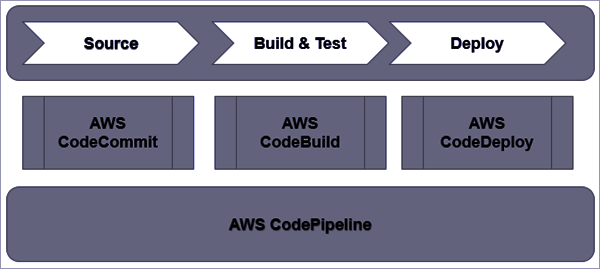
- AWS Developer Tools provide a set of services designed to enable developers and IT operations professionals practicing DevOps to rapidly and safely deliver software.
- AWS Developer Tools help securely store and version control the application’s source code and automatically build, test, and deploy the application to AWS or the on-premises environment.
- Core Developer Tools include CodeCommit (source control), CodeBuild (build), CodeDeploy (deployment), CodePipeline (CI/CD orchestration), and CodeArtifact (artifact management).
📢 Major Developer Tools Changes (2024-2025)
- AWS CodeStar — Discontinued on July 31, 2024. No longer accessible.
- AWS CodeCommit — Was de-emphasized (no new customers) in July 2024, but returned to full General Availability on Nov 24, 2025. Git LFS support planned.
- Amazon CodeCatalyst — Closed to new customers as of Nov 7, 2025. No new features planned.
- AWS CodePipeline — Introduced V2 pipeline type with triggers, execution modes, and new deploy actions.
- AWS CodeBuild — Added Docker Server capability, test splitting/parallelism, reserved capacity fleets, and Lambda compute.
- Amazon Q Developer — Now the primary AI-powered development assistant, replacing CodeWhisperer.
AWS CodeCommit
- CodeCommit is a secure, scalable, fully-managed source control service that helps to host secure and highly scalable private Git repositories.
- eliminates the need to operate your own source control system or worry about scaling its infrastructure.
- can be used to securely store anything from source code to binaries, and it works seamlessly with your existing Git tools.
- provide high availability as it is built on highly scalable, redundant, and durable AWS services such as S3 and DynamoDB.
- is designed for collaborative software development and it manages batches of changes across multiple files, offers parallel branching, and includes version differencing.
- automatically encrypts the files in transit and at rest.
- is integrated with AWS Identity and Access Management (IAM), allowing you to assign user-specific permissions to your repositories.
- supports resource-level permissions at the repository level. Permissions can specify which users can perform which actions including MFA.
- supports HTTPS or SSH or both communication protocols.
- supports repository triggers, to send notifications and create HTTP webhooks with SNS or invoke Lambda functions.
- provides deep IAM integration, VPC endpoint support, and CloudTrail logging, making it ideal for regulated industries.
- integrates seamlessly with CodePipeline and CodeBuild for CI/CD workflows within AWS boundaries.
⚠️ CodeCommit Status Update: In July 2024, AWS de-emphasized CodeCommit and stopped onboarding new customers. However, on November 24, 2025, AWS reversed this decision and returned CodeCommit to full General Availability. New customers can sign up again (fully open as of Feb 14, 2026). Git Large File Storage (LFS) support was announced for Q1 2026, with regional expansion planned for Q3 2026.
AWS CodeBuild
- AWS CodeBuild is a fully managed continuous integration service that compiles source code, runs tests, and produces software packages that are ready to deploy.
- helps provision, manage, and scale the build servers.
- scales continuously and processes multiple builds concurrently, so the builds are not left waiting in a queue.
- provides prepackaged build environments or the creation of custom build environments that use your own build tools.
- supports AWS CodeCommit, S3, GitHub, GitHub Enterprise, Bitbucket, and GitLab to pull source code for builds.
- provides security and separation at the infrastructure and execution levels.
- runs the build in fresh environments isolated from other users and discards each build environment upon completion.
CodeBuild Compute Options
- On-demand — Default compute; builds run on fresh, isolated environments and are discarded upon completion.
- Reserved Capacity Fleets — Pre-provisioned machines that are always running, enabling instant build starts and reduced build times. Supports Linux x86, Arm, GPU, Windows, and macOS environments.
- Lambda Compute — Run builds in AWS Lambda for faster startup times. Supports Node 22, Python 3.13, Go 1.24, and Ruby 3.4 in both x86_64 and aarch64 architectures.
CodeBuild Key Features (2024-2025)
- Docker Server Capability (May 2025) — Provides a persistent Docker server with consistent caching, dramatically reducing Docker image build times (demonstrated 98% reduction — from 24 minutes to 16 seconds).
- Test Splitting and Parallelism (Jan 2025) — Split tests across multiple parallel compute environments based on a sharding strategy for faster test execution.
- Batch Builds with Reserved Capacity & Lambda (Jan 2025) — Select a mix of on-demand, reserved capacity fleets, or Lambda compute for batch builds.
- Managed Webhooks for GitHub Enterprise (Feb 2025) — Simplified webhook management for GitHub Enterprise source providers.
- EC2 Instance Type Selection (Apr 2025) — Select specific EC2 instance types and configure storage size for reserved capacity fleets.
- Pull Request Build Policies — Additional control over builds triggered by pull requests.
AWS CodeDeploy
- AWS CodeDeploy helps automate code deployments to any instance, including EC2 instances and instances running on-premises.
- helps to rapidly release new features, avoid downtime during application deployment, and handles the complexity of updating the applications.
- helps automate software deployments, eliminating the need for error-prone manual operations.
- scales with the infrastructure and can be used to easily deploy from one instance or thousands.
- performs a deployment with the following parameters
- Revision – what to deploy
- Deployment group – where to deploy
- Deployment configuration – how to deploy
- Deployment group is an entity for grouping EC2 instances or Lambda functions in deployment and supports instances by specifying a tag, an Auto Scaling group.
- AppSpec file provides the instructions and is a configuration file that specifies the files to be copied and scripts to be executed.
- supports both in-place deployments, where rolling updates are performed, and blue/green deployments.
- supports deployment to EC2/On-premises instances, Lambda functions, and Amazon ECS services.
📢 Amazon ECS Native Blue/Green Deployments (July 2025): Amazon ECS launched built-in blue/green deployments directly within the ECS service, removing the need for CodeDeploy integration. In October 2025, ECS added canary and linear deployment strategies, achieving feature parity with CodeDeploy. For new ECS deployments, consider using ECS native blue/green instead of CodeDeploy. AWS provides migration guidance for existing CodeDeploy-based ECS deployments.
AWS CodePipeline
- AWS CodePipeline is a fully managed continuous delivery service that helps automate the release pipelines for fast and reliable application and infrastructure updates.
- automates the builds, tests, and deploys the code every time there is a code change, based on the defined release process models.
- enables rapid and reliable delivery of features and updates.
- can be integrated with third-party services such as GitHub, Bitbucket, GitLab, or with your own custom plugin.
- pay per use with no upfront fees or long-term commitments.
- supports resource-level permissions. Permissions can specify which users can perform what action on a pipeline.
CodePipeline Pipeline Types
- CodePipeline supports two pipeline types: V1 (original) and V2 (recommended for new pipelines).
- V2 type pipelines support advanced features including:
- Triggers — Configure pipelines to start on specific events (push, pull request) with filtering on branches, file paths, or Git tags.
- Execution Modes — SUPERSEDED (default, replaces waiting executions), QUEUED (executes in order), and PARALLEL (runs independently/simultaneously).
- Commands Action — Run build commands directly in the pipeline without needing a separate CodeBuild project.
- EC2 Deploy Action — Deploy directly to EC2 instances from the pipeline (V2 only).
- Lambda Deploy Action (May 2025) — Deploy to Lambda functions with traffic-shifting strategies (AllAtOnce, Canary, Linear).
CodePipeline Concepts
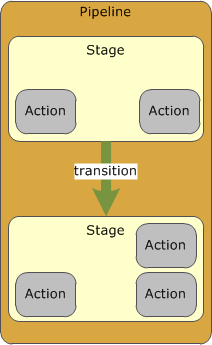
- A Pipeline describes how software changes go through a release process.
- A revision is a change made to the source location defined for the pipeline.
- Pipeline is a sequence of stages and actions.
- A stage is a group of one or more actions. A pipeline can have two or more stages.
- An action is a task performed on a revision.
- Pipeline actions occur in a specified order, in serial or in parallel, as determined in the stage configuration.
- Stages are connected by transitions.
- Transitions can be disabled or enabled between stages.
- A pipeline can have multiple revisions flowing through it at the same time.
- Action acts upon a file or set of files are called artifacts. These artifacts can be worked upon by later actions in the pipeline.
- Source connections (via AWS CodeConnections, formerly CodeStar Connections) support GitHub, Bitbucket, GitLab, and Azure DevOps.
AWS CodeArtifact
- AWS CodeArtifact is a fully managed artifact repository service that makes it easy for organizations of any size to securely store, publish, and share software packages used in their software development process.
- CodeArtifact can be configured to automatically fetch software packages and dependencies from public artifact repositories so developers have access to the latest versions.
- CodeArtifact works with commonly used package managers and build tools like Maven, Gradle, npm, yarn, twine, pip, and NuGet making it easy to integrate into existing development workflows.
- Supports eight package formats: npm, PyPI, Maven, NuGet, Swift, Ruby (Apr 2024), Cargo/Rust (Jun 2024), and generic packages.
- Integrates with AWS IAM for access control, AWS KMS for encryption, and CloudTrail for audit logging.
- Supports upstream repositories to chain multiple repositories and automatically resolve dependencies.
AWS CodeStar (Discontinued)
⚠️ AWS CodeStar was discontinued on July 31, 2024. You can no longer access the CodeStar console or create new projects. Existing AWS resources created by CodeStar (repositories, pipelines, builds) continue to function independently.
Alternatives:
- AWS CodePipeline + CodeBuild — For CI/CD pipeline setup
- Amazon Q Developer — For AI-assisted development and code generation
Note: AWS CodeStar Connections has been renamed to AWS CodeConnections (March 2024) and continues to function for connecting pipelines to GitHub, Bitbucket, GitLab, and Azure DevOps.
Amazon Q Developer
- Amazon Q Developer is a generative AI-powered software development assistant that integrates with IDEs and the AWS Management Console.
- Provides inline code suggestions, code generation, code explanations, debugging, optimization, and refactoring capabilities.
- Supports agentic capabilities — can autonomously implement features, document code, generate tests, review and refactor code, and perform software upgrades.
- Integrates with VS Code, JetBrains IDEs, Visual Studio, and Eclipse.
- Previously known as Amazon CodeWhisperer (rebranded to Amazon Q Developer in 2024).
- Available in Free and Pro tiers.
AWS Certification Exam Practice Questions
- Questions are collected from Internet and the answers are marked as per my knowledge and understanding (which might differ with yours).
- AWS services are updated everyday and both the answers and questions might be outdated soon, so research accordingly.
- AWS exam questions are not updated to keep up the pace with AWS updates, so even if the underlying feature has changed the question might not be updated
- Open to further feedback, discussion and correction.
- Which AWS service’s PRIMARY purpose is to provide a fully managed continuous delivery service?
- Amazon CodeStar
- Amazon CodePipeline
- Amazon Cognito
- AWS CodeCommit
- Which AWS service’s PRIMARY purpose is quickly develop, build, and deploy applications on AWS? [Note: AWS CodeStar was discontinued July 31, 2024]
- Amazon CodeStar
- AWS Command Line Interface (AWS CLI)
- Amazon Cognito
- AWS CodeCommit
- Which AWS service’s PRIMARY purpose is software version control?
- Amazon CodeStar
- AWS Command Line Interface (AWS CLI)
- Amazon Cognito
- AWS CodeCommit
- Which of the following services could be used to deploy an application to servers running on-premises?
- AWS Elastic Beanstalk
- AWS CodeDeploy
- AWS Batch
- AWS X-Ray
- A company wants to automate its CI/CD pipeline and needs to support branch-based triggers, parallel execution of pipelines, and the ability to run build commands without a separate build project. Which CodePipeline feature should they use?
- CodePipeline V1 type with manual approvals
- CodePipeline V2 type with triggers and Commands action
- CodePipeline with Jenkins integration
- CodePipeline with CodeBuild batch builds
- A team needs to significantly reduce their Docker image build times in AWS CodeBuild. They currently spend 24 minutes building Docker images. Which CodeBuild feature should they enable?
- Reserved capacity fleets with larger instance types
- Lambda compute for Docker builds
- Docker Server capability with persistent caching
- Batch builds across multiple environments
- Which package formats does AWS CodeArtifact support? (Select THREE)
- npm
- Docker images
- Cargo (Rust)
- Maven
- Helm charts
- A company uses CodeDeploy for blue/green deployments to Amazon ECS. They want to simplify their architecture and reduce service dependencies. What should they consider? (Select the BEST answer)
- Switch to CodeDeploy in-place deployments
- Migrate to Amazon ECS native blue/green deployments
- Use AWS CodePipeline Lambda deploy action
- Switch to EC2-based deployments