AWS CloudFormation

AWS CloudFormation

  • AWS CloudFormation gives developers and systems administrators an easy way to create and manage a collection of related AWS resources, provision and update them in an orderly and predictable fashion.
  • CloudFormation consists of
    • Template
      • is an architectural diagram and provides logical resources
      • a JSON or YAML-format, text-based file that describes all the AWS resources needed to deploy and run the application.
    • Stack
      • is the end result of that diagram and provisions physical resources mapped to the logical resources.
      • is the set of AWS resources that are created and managed as a single unit when CloudFormation instantiates a template.
  • CloudFormation template can be used to set up the resources consistently and repeatedly over and over across multiple regions.
  • Resources can be updated, deleted, and modified in a controlled and predictable way, in effect applying version control to the infrastructure as done for software code
  • AWS CloudFormation Template consists of elements:-
    • List of AWS resources and their configuration values
    • An optional template file format version number
    • An optional list of template parameters (input values supplied at stack creation time)
    • An optional list of output values like public IP address using the Fn:GetAtt function
    • An optional list of data tables used to lookup static configuration values for e.g., AMI names per AZ
  • CloudFormation supports Chef & Puppet Integration to deploy and configure right down the application layer
  • CloudFormation provides a set of application bootstrapping scripts that enable you to install packages, files, and services on the EC2 instances by simply describing them in the CloudFormation template
  • By default, automatic rollback on error feature is enabled, which will cause all the AWS resources that CloudFormation created successfully for a stack up to the point where an error occurred to be deleted.
  • CloudFormation supports Optimistic Stabilization (2024) delivering up to 40% faster stack creation times by beginning parallel creation of dependent resources once a dependency reaches CONFIGURATION_COMPLETE state.
  • CloudFormation supports Early Validation that validates templates during change set creation, catching invalid property syntax and resource name conflicts before resource provisioning begins.
  • In case of automatic rollback, charges would still be applied for the resources, the time they were up and running
  • CloudFormation provides a WaitCondition resource that acts as a barrier, blocking the creation of other resources until a completion signal is received from an external source e.g. application or management system
  • CloudFormation allows deletion policies to be defined for resources in the template for e.g. resources to be retained or snapshots can be created before deletion useful for preserving S3 buckets when the stack is deleted

AWS CloudFormation Concepts

AWS CloudFormation, you work with templates and stacks

Templates

  • act as blueprints for building AWS resources.
  • is a JSON or YAML formatted text file, saved with any extension, such as .json, .yaml, .template, or .txt.
  • have additional capabilities to build complex sets of resources and reuse those templates in multiple contexts for e.g. using input parameters to create generic and reusable templates
  • Name used for a resource within the template is a logical name but when CloudFormation creates the resource, it generates a physical name that is based on the combination of the logical name, the stack name, and a unique ID

Stacks

  • Stacks manage related resources as a single unit,
  • Collection of resources can be created, updated, and deleted by creating, updating, and deleting stacks.
  • All the resources in a stack are defined by the stack’s AWS CloudFormation template
  • CloudFormation makes underlying service calls to AWS to provision and configure the resources in the stack and can perform only actions that the users have permission to do.

Change Sets

  • Change Sets presents a summary or preview of the proposed changes that CloudFormation will make when a stack is updated.
  • Change Sets help check how the changes might impact running resources, especially critical resources, before implementing them.
  • CloudFormation makes the changes to the stack only when the change set is executed, allowing you to decide whether to proceed with the proposed changes or explore other changes by creating another change set.
  • Change sets don’t indicate whether AWS CloudFormation will successfully update a stack for e.g. if account limits are hit or the user does not have permission.
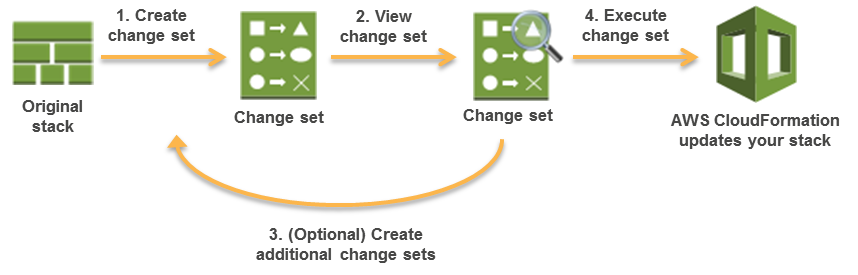
CloudFormation Change Sets

Custom Resources

  • Custom resources help write custom provisioning logic in templates that CloudFormation runs anytime the stacks are created, updated, or deleted.
  • Custom resources help include resources that aren’t available as AWS CloudFormation resource types and can still be managed in a single stack.
  • Custom resources support a ServiceTimeout property (2024) allowing custom timeout values instead of the fixed one-hour timeout, accelerating development feedback loops.
  • AWS recommends using CloudFormation Registry instead.

Nested Stacks

  • Nested stacks are stacks created as part of other stacks.
  • A nested stack can be created within another stack by using the AWS::CloudFormation::Stack resource.
  • Nested stacks can be used to define common, repeated patterns and components and create dedicated templates which then can be called from other stacks.
  • Root stack is the top-level stack to which all the nested stacks ultimately belong. Nested stacks can themselves contain other nested stacks, resulting in a hierarchy of stacks.
  • In addition, each nested stack has an immediate parent stack. For the first level of nested stacks, the root stack is also the parent stack.
  • Certain stack operations, such as stack updates, should be initiated from the root stack rather than performed directly on nested stacks themselves.

Drift Detection

  • Drift detection enables you to detect whether a stack’s actual configuration differs, or has drifted, from its expected configuration.
  • Drift detection help identify stack resources to which configuration changes have been made outside of CloudFormation management
  • Drift detection can detect drift on an entire stack or individual resources
  • Corrective action can be taken to make sure the stack resources are again in sync with the definitions in the stack template, such as updating the drifted resources directly so that they agree with their template definition
  • Resolving drift helps to ensure configuration consistency and successful stack operations.
  • CloudFormation detects drift on those AWS resources that support drift detection. Resources that don’t support drift detection are assigned a drift status of NOT_CHECKED.
  • Drift detection can be performed on stacks with the following statuses: CREATE_COMPLETEUPDATE_COMPLETEUPDATE_ROLLBACK_COMPLETE, and UPDATE_ROLLBACK_FAILED.
  • CloudFormation does not detect drift on any nested stacks that belong to that stack. Instead, you can initiate a drift detection operation directly on the nested stack.

CloudFormation Template Anatomy

  • Resources (required)
    • Specifies the stack resources and their properties, such as an EC2 instance or an S3 bucket that would be created.
    • Resources can be referred to in the Resources and Outputs sections
  • Parameters (optional)
    • Pass values to the template at runtime (during stack creation or update)
    • Parameters can be referred from the Resources and Outputs sections
    • Can be referred using Fn::Ref or !Ref
  • Mappings (optional)
    • A mapping of keys and associated values that used to specify conditional parameter values, similar to a lookup table.
    • Can be referred using Fn::FindInMap or !FindInMap
  • Outputs (optional)
    • Describes the values that are returned whenever you view your stack’s properties.
  • Format Version (optional)
    • AWS CloudFormation template version that the template conforms to.
  • Description (optional)
    • A text string that describes the template. This section must always follow the template format version section.
  • Metadata (optional)
    • Objects that provide additional information about the template.
  • Rules (optional)
    • Validates a parameter or a combination of parameters passed to a template during stack creation or stack update.
  • Conditions (optional)
    • Conditions control whether certain resources are created or whether certain resource properties are assigned a value during stack creation or update.
  • Transform (optional)
    • For serverless applications (also referred to as Lambda-based applications), specifies the version of the AWS Serverless Application Model (AWS SAM) to use.
    • When you specify a transform, you can use AWS SAM syntax to declare resources in the template. The model defines the syntax that you can use and how it’s processed.
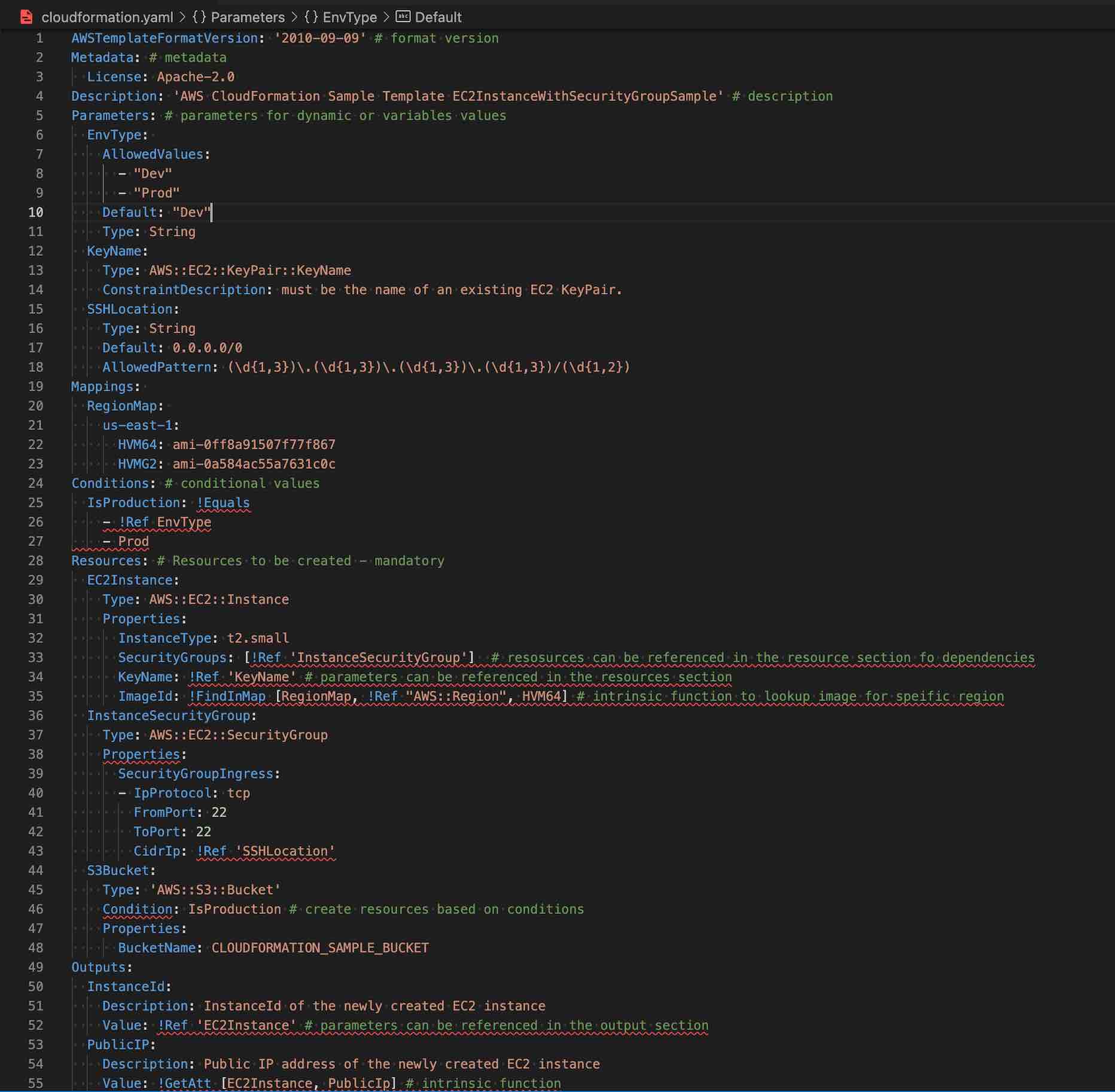
CloudFormation Template Sample

CloudFormation Access Control

  • IAM
    • IAM can be applied with CloudFormation to access control for users whether they can view stack templates, create stacks, or delete stacks
    • IAM permissions need to be provided for the user to the AWS services and resources provisioned when the stack is created
    • Before a stack is created, AWS CloudFormation validates the template to check for IAM resources that it might create
  • Service Role
    • A service role is an AWS IAM role that allows AWS CloudFormation to make calls to resources in a stack on the user’s behalf
    • By default, AWS CloudFormation uses a temporary session that it generates from the user credentials for stack operations.
    • For a service role, AWS CloudFormation uses the role’s credentials.
    • When a service role is specified, AWS CloudFormation always uses that role for all operations that are performed on that stack.

Template Resource Attributes

  • CreationPolicy Attribute
    • is invoked during the associated resource creation.
    • can be associated with a resource to prevent its status from reaching create complete until CloudFormation receives a specified number of success signals or the timeout period is exceeded.
    • helps to wait on resource configuration actions before stack creation proceeds for e.g. software installation on an EC2 instance
  • DeletionPolicy Attribute
    • preserve or (in some cases) backup a resource when its stack is deleted
    • CloudFormation deletes the resource if a resource has no DeletionPolicy attribute, by default.
    • To keep a resource when its stack is deleted,
      • default, Delete where the resources would be deleted.
      • specify Retain for that resource, to prevent deletion.
      • specify Snapshot to create a snapshot before deleting the resource, if the snapshot capability is supported e.g. RDS, EC2 volume, etc.
  • DependsOn Attribute
    • helps determine dependency order and specify that the creation of a specific resource follows another.
    • the resource is created only after the creation of the resource specified in the DependsOn attribute.
  • Metadata Attribute
    • enables association of structured data with a resource
  • UpdatePolicy Attribute
    • Defines how AWS CloudFormation handles updates to the resources
    • For AWS::AutoScaling::AutoScalingGroup resources, CloudFormation invokes one of three update policies depending on the type of change or whether a scheduled action is associated with the Auto Scaling group.
      • The AutoScalingReplacingUpdate and AutoScalingRollingUpdate policies apply only when you do one or more of the following:
        • Change the Auto Scaling group’s AWS::AutoScaling::LaunchConfiguration
        • Change the Auto Scaling group’s VPCZoneIdentifier property
        • Change the Auto Scaling group’s LaunchTemplate property
        • Update an Auto Scaling group that contains instances that don’t match the current LaunchConfiguration.
      • The AutoScalingScheduledAction policy applies when you update a stack that includes an Auto Scaling group with an associated scheduled action.
    • For AWS::Lambda::Alias resources, CloudFormation performs a CodeDeploy deployment when the version changes on the alias.

CloudFormation Termination Protection

  • Termination protection helps prevent a stack from being accidentally deleted.
  • Termination protection on stacks is disabled by default.
  • Termination protection can be enabled on a stack creation
  • Termination protection can be set on a stack with any status except DELETE_IN_PROGRESS or DELETE_COMPLETE
  • Enabling or disabling termination protection on a stack sets it for any nested stacks belonging to that stack as well. You can’t enable or disable termination protection directly on a nested stack.
  • If a user attempts to directly delete a nested stack belonging to a stack that has termination protection enabled, the operation fails and the nested stack remains unchanged.
  • If a user performs a stack update that would delete the nested stack, AWS CloudFormation deletes the nested stack accordingly.

CloudFormation Stack Policy

  • Stack policy can prevent stack resources from being unintentionally updated or deleted during a stack update.
  • By default, all update actions are allowed on all resources and anyone with stack update permissions can update all of the resources in the stack.
  • During an update, some resources might require an interruption or be completely replaced, resulting in new physical IDs or completely new storage and hence need to be prevented.
  • A stack policy is a JSON document that defines the update actions that can be performed on designated resources.
  • After you set a stack policy, all of the resources in the stack are protected by default.
  • Updates on specific resources can be added using an explicit Allow statement for those resources in the stack policy.
  • Only one stack policy can be defined per stack, but multiple resources can be protected within a single policy.
  • A stack policy applies to all CloudFormation users who attempt to update the stack. You can’t associate different stack policies with different users
  • A stack policy applies only during stack updates. It doesn’t provide access controls like an IAM policy.

CloudFormation StackSets

  • CloudFormation StackSets extends the functionality of stacks by enabling you to create, update, or delete stacks across multiple accounts and Regions with a single operation.
  • Using an administrator account, an AWS CloudFormation template can be defined, managed, and used as the basis for provisioning stacks into selected target accounts across specified AWS Regions.
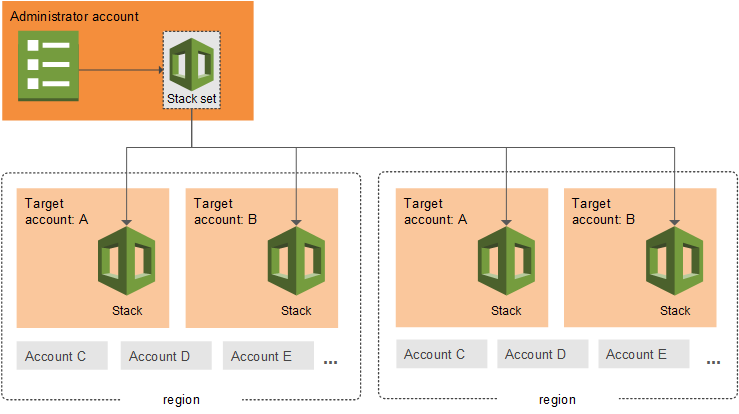
CloudFormation StackSets

CloudFormation Registry

  • CloudFormation registry helps manage extensions, both public and private, such as resources, modules, and hooks that are available for use in your AWS account.
  • CloudFormation registry offers several advantages over custom resources
    • Supports the modeling, provisioning, and managing of third-party application resources
    • Supports the CreateReadUpdateDelete, and List (CRUDL) operations
    • Supports drift detection on private and third-party resource types

CloudFormation IaC Generator

  • IaC Generator (launched Feb 2024) helps generate CloudFormation templates for existing AWS resources that were created outside of CloudFormation.
  • Supports over 600 AWS resource types and provides recommendations for related resources.
  • Works in three steps: scan resources in your account, select resources for template generation, and generate a CloudFormation template.
  • Generated templates can be used to import resources into CloudFormation stacks, download for deployment, or convert to CDK apps.
  • Supports targeted resource scans (March 2025) to scan specific resources rather than entire accounts.
  • Integrates with AWS Infrastructure Composer for visual architecture review before stack creation.

CloudFormation Stack Refactoring

  • Stack Refactoring (Feb 2025) enables reorganization of CloudFormation resources across stacks without disrupting deployed resources.
  • Allows moving resources from one stack to another, splitting monolithic stacks into smaller components, and renaming logical IDs.
  • Maintains resource stability and operational state during reorganization.
  • Available via AWS CLI, Console, and CDK.

CloudFormation Drift-Aware Change Sets

  • Drift-Aware Change Sets (Nov 2025) provide a three-way comparison between the new template, last-deployed template, and actual infrastructure state.
  • Helps prevent unexpected overwrites of configuration drift made via Console, SDK, or CLI.
  • During execution, CloudFormation matches resource properties with template values and recreates resources deleted outside of CloudFormation.
  • Enables systematic drift reversion to keep infrastructure in sync with templates.

CloudFormation Hooks

  • CloudFormation Hooks enable proactive validation of resource configurations before provisioning.
  • Hooks can be authored using:
    • CloudFormation Guard DSL – Write rules using Guard domain-specific language stored as S3 objects
    • AWS Lambda functions – Implement custom validation logic in Lambda
    • Managed Proactive Controls – Select controls from AWS Control Tower Controls Catalog
  • Support stack and change set target invocation points for validating entire templates and resource relationships.
  • Extended to support AWS Cloud Control API (CCAPI) resource configurations for tool-agnostic control evaluation.
  • Can run in warn mode to test controls without blocking deployments.

CloudFormation Git Sync

  • Git Sync enables automatic stack deployments triggered by changes to templates in a Git repository.
  • Supports pull request workflows (Sept 2024) – CloudFormation posts change set information as PR comments for review.
  • Publishes sync status changes as events to Amazon EventBridge for event-driven automation.
  • Uses AWS CodeConnections to connect Git providers to CloudFormation.

AWS Infrastructure Composer

  • AWS Infrastructure Composer (previously known as AWS Application Composer, renamed Oct 2024) helps visually compose and configure applications backed by IaC.
  • Integrated into the CloudFormation console for visual stack architecture review.
  • Allows drag-and-drop resource composition with automatic IaC template generation.

CloudFormation Language Extensions

  • The AWS::LanguageExtensions transform enhances the core CloudFormation language with additional intrinsic functions:
    • Fn::ForEach – Loop over collections to create multiple resources or outputs from a single definition
    • Fn::ToJsonString – Convert an object or array to its corresponding JSON string
    • Fn::Length – Return the number of elements in an array
  • Must include AWS::LanguageExtensions in the Transform section to use these functions.

CloudFormation Helper Scripts

Refer blog Post @ CloudFormation Helper Scripts

CloudFormation Best Practices

Refer blog Post @ CloudFormation Best Practices

AWS Certification Exam Practice Questions

  • Questions are collected from Internet and the answers are marked as per my knowledge and understanding (which might differ with yours).
  • AWS services are updated everyday and both the answers and questions might be outdated soon, so research accordingly.
  • AWS exam questions are not updated to keep up the pace with AWS updates, so even if the underlying feature has changed the question might not be updated
  • Open to further feedback, discussion and correction.
  1. What does Amazon CloudFormation provide?
    1. The ability to setup Autoscaling for Amazon EC2 instances.
    2. A templated resource creation for Amazon Web Services.
    3. A template to map network resources for Amazon Web Services
    4. None of these
  2. A user is planning to use AWS CloudFormation for his automatic deployment requirements. Which of the below mentioned components are required as a part of the template?
    1. Parameters
    2. Outputs
    3. Template version
    4. Resources
  3. In regard to AWS CloudFormation, what is a stack?
    1. Set of AWS templates that are created and managed as a template
    2. Set of AWS resources that are created and managed as a template
    3. Set of AWS resources that are created and managed as a single unit
    4. Set of AWS templates that are created and managed as a single unit
  4. A large enterprise wants to adopt CloudFormation to automate administrative tasks and implement the security principles of least privilege and separation of duties. They have identified the following roles with the corresponding tasks in the company: (i) network administrators: create, modify and delete VPCs, subnets, NACLs, routing tables, and security groups (ii) application operators: deploy complete application stacks (ELB, Auto -Scaling groups, RDS) whereas all resources must be deployed in the VPCs managed by the network administrators (iii) Both groups must maintain their own CloudFormation templates and should be able to create, update and delete only their own CloudFormation stacks. The company has followed your advice to create two IAM groups, one for applications and one for networks. Both IAM groups are attached to IAM policies that grant rights to perform the necessary task of each group as well as the creation, update and deletion of CloudFormation stacks. Given setup and requirements, which statements represent valid design considerations? Choose 2 answers [PROFESSIONAL]
    1. Network stack updates will fail upon attempts to delete a subnet with EC2 instances (Subnets cannot be deleted with instances in them)
    2. Unless resource level permissions are used on the CloudFormation: DeleteStack action, network administrators could tear down application stacks (Network administrators themselves need permission to delete resources within the application stack & CloudFormation makes calls to create, modify, and delete those resources on their behalf)
    3. The application stack cannot be deleted before all network stacks are deleted (Application stack can be deleted before network stack)
    4. Restricting the launch of EC2 instances into VPCs requires resource level permissions in the IAM policy of the application group (IAM permissions need to be given explicitly to launch instances )
    5. Nesting network stacks within application stacks simplifies management and debugging, but requires resource level permissions in the IAM policy of the network group (Although stacks can be nested, Network group will need to have all the application group permissions)
  5. Your team is excited about the use of AWS because now they have access to programmable infrastructure. You have been asked to manage your AWS infrastructure in a manner similar to the way you might manage application code. You want to be able to deploy exact copies of different versions of your infrastructure, stage changes into different environments, revert back to previous versions, and identify what versions are running at any particular time (development, test, QA, production). Which approach addresses this requirement?
    1. Use cost allocation reports and AWS Opsworks to deploy and manage your infrastructure.
    2. Use AWS CloudWatch metrics and alerts along with resource tagging to deploy and manage your infrastructure.
    3. Use AWS Beanstalk and a version control system like GIT to deploy and manage your infrastructure.
    4. Use AWS CloudFormation and a version control system like GIT to deploy and manage your infrastructure.
  6. A user is usingCloudFormation to launch an EC2 instance and then configure an application after the instance is launched. The user wants the stack creation of ELB and AutoScaling to wait until the EC2 instance is launched and configured properly. How can the user configure this?
    1. It is not possible that the stack creation will wait until one service is created and launched
    2. The user can use the HoldCondition resource to wait for the creation of the other dependent resources
    3. The user can use the DependentCondition resource to hold the creation of the other dependent resources
    4. The user can use the WaitCondition resource to hold the creation of the other dependent resources
  7. A user has created a CloudFormation stack. The stack creates AWS services, such as EC2 instances, ELB, AutoScaling, and RDS. While creating the stack it created EC2, ELB and AutoScaling but failed to create RDS. What will CloudFormation do in this scenario?
    1. CloudFormation can never throw an error after launching a few services since it verifies all the steps before launching
    2. It will warn the user about the error and ask the user to manually create RDS
    3. Rollback all the changes and terminate all the created services
    4. It will wait for the user’s input about the error and correct the mistake after the input
  8. A user is planning to use AWS CloudFormation. Which of the below mentioned functionalities does not help him to correctly understand CloudFormation?
    1. CloudFormation follows the DevOps model for the creation of Dev & Test
    2. AWS CloudFormation does not charge the user for its service but only charges for the AWS resources created with it
    3. CloudFormation works with a wide variety of AWS services, such as EC2, EBS, VPC, IAM, S3, RDS, ELB, etc
    4. CloudFormation provides a set of application bootstrapping scripts which enables the user to install Software
  9. A customer is using AWS for Dev and Test. The customer wants to setup the Dev environment with CloudFormation. Which of the below mentioned steps are not required while using CloudFormation?
    1. Create a stack
    2. Configure a service
    3. Create and upload the template
    4. Provide the parameters configured as part of the template
  10. A marketing research company has developed a tracking system that collects user behavior during web marketing campaigns on behalf of their customers all over the world. The tracking system consists of an auto-scaled group of Amazon Elastic Compute Cloud (EC2) instances behind an elastic load balancer (ELB), and the collected data is stored in Amazon DynamoDB. After the campaign is terminated, the tracking system is torn down and the data is moved to Amazon Redshift, where it is aggregated, analyzed and used to generate detailed reports. The company wants to be able to instantiate new tracking systems in any region without any manual intervention and therefore adopted AWS CloudFormation. What needs to be done to make sure that the AWS CloudFormation template works in every AWS region? Choose 2 answers [PROFESSIONAL]
    1. IAM users with the right to start AWS CloudFormation stacks must be defined for every target region. (IAM users are global)
    2. The names of the Amazon DynamoDB tables must be different in every target region. (DynamoDB names should be unique only within a region)
    3. Use the built-in function of AWS CloudFormation to set the AvailabilityZone attribute of the ELB resource.
    4. Avoid using DeletionPolicies for EBS snapshots. (Don’t want the data to be retained)
    5. Use the built-in Mappings and FindInMap functions of AWS CloudFormation to refer to the AMI ID set in the ImageId attribute of the Auto Scaling::LaunchConfiguration resource.
  11. A gaming company adopted AWS CloudFormation to automate load -testing of their games. They have created an AWS CloudFormation template for each gaming environment and one for the load -testing stack. The load – testing stack creates an Amazon Relational Database Service (RDS) Postgres database and two web servers running on Amazon Elastic Compute Cloud (EC2) that send HTTP requests, measure response times, and write the results into the database. A test run usually takes between 15 and 30 minutes. Once the tests are done, the AWS CloudFormation stacks are torn down immediately. The test results written to the Amazon RDS database must remain accessible for visualization and analysis. Select possible solutions that allow access to the test results after the AWS CloudFormation load -testing stack is deleted. Choose 2 answers. [PROFESSIONAL]
    1. Define a deletion policy of type Retain for the Amazon QDS resource to assure that the RDS database is not deleted with the AWS CloudFormation stack.
    2. Define a deletion policy of type Snapshot for the Amazon RDS resource to assure that the RDS database can be restored after the AWS CloudFormation stack is deleted.
    3. Define automated backups with a backup retention period of 30 days for the Amazon RDS database and perform point -in -time recovery of the database after the AWS CloudFormation stack is deleted. (as the environment is required for limited time the automated backup will not serve the purpose)
    4. Define an Amazon RDS Read-Replica in the load-testing AWS CloudFormation stack and define a dependency relation between master and replica via the DependsOn attribute. (read replica not needed and will be deleted when the stack is deleted)
    5. Define an update policy to prevent deletion of the Amazon RDS database after the AWS CloudFormation stack is deleted. (UpdatePolicy does not apply to RDS)
  12. When working with AWS CloudFormation Templates what is the maximum number of stacks that you can create?
    1. 5000
    2. 500
    3. 2000 (Refer link – The limit keeps on changing to check for the latest)
    4. 100
  13. What happens, by default, when one of the resources in a CloudFormation stack cannot be created?
    1. Previously created resources are kept but the stack creation terminates
    2. Previously created resources are deleted and the stack creation terminates
    3. Stack creation continues, and the final results indicate which steps failed
    4. CloudFormation templates are parsed in advance so stack creation is guaranteed to succeed.
  14. You need to deploy an AWS stack in a repeatable manner across multiple environments. You have selected CloudFormation as the right tool to accomplish this, but have found that there is a resource type you need to create and model, but is unsupported by CloudFormation. How should you overcome this challenge? [PROFESSIONAL]
    1. Use a CloudFormation Custom Resource Template by selecting an API call to proxy for create, update, and delete actions. CloudFormation will use the AWS SDK, CLI, or API method of your choosing as the state transition function for the resource type you are modeling.
    2. Submit a ticket to the AWS Forums. AWS extends CloudFormation Resource Types by releasing tooling to the AWS Labs organization on GitHub. Their response time is usually 1 day, and they complete requests within a week or two.
    3. Instead of depending on CloudFormation, use Chef, Puppet, or Ansible to author Heat templates, which are declarative stack resource definitions that operate over the OpenStack hypervisor and cloud environment.
    4. Create a CloudFormation Custom Resource Type by implementing create, update, and delete functionality, either by subscribing a Custom Resource Provider to an SNS topic, or by implementing the logic in AWS Lambda. (Refer link)
  15. What is a circular dependency in AWS CloudFormation?
    1. When a Template references an earlier version of itself.
    2. When Nested Stacks depend on each other.
    3. When Resources form a DependOn loop. (Refer link, to resolve a dependency error, add a DependsOn attribute to resources that depend on other resources in the template. Some cases for e.g. EIP and VPC with IGW where EIP depends on IGW need explicitly declaration for the resources to be created in correct order)
    4. When a Template references a region, which references the original Template.
  16. You need to run a very large batch data processing job one time per day. The source data exists entirely in S3, and the output of the processing job should also be written to S3 when finished. If you need to version control this processing job and all setup and teardown logic for the system, what approach should you use?
    1. Model an AWS EMR job in AWS Elastic Beanstalk. (cannot directly model EMR Clusters)
    2. Model an AWS EMR job in AWS CloudFormation. (EMR cluster can be modeled using CloudFormation. Refer link)
    3. Model an AWS EMR job in AWS OpsWorks. (cannot directly model EMR Clusters)
    4. Model an AWS EMR job in AWS CLI Composer. (does not exist)
  17. Your company needs to automate 3 layers of a large cloud deployment. You want to be able to track this deployment’s evolution as it changes over time, and carefully control any alterations. What is a good way to automate a stack to meet these requirements? [PROFESSIONAL]
    1. Use OpsWorks Stacks with three layers to model the layering in your stack.
    2. Use CloudFormation Nested Stack Templates, with three child stacks to represent the three logical layers of your cloud. (CloudFormation allows source controlled, declarative templates as the basis for stack automation and Nested Stacks help achieve clean separation of layers while simultaneously providing a method to control all layers at once when needed)
    3. Use AWS Config to declare a configuration set that AWS should roll out to your cloud.
    4. Use Elastic Beanstalk Linked Applications, passing the important DNS entries between layers using the metadata interface.
  18. You have been asked to de-risk deployments at your company. Specifically, the CEO is concerned about outages that occur because of accidental inconsistencies between Staging and Production, which sometimes cause unexpected behaviors in Production even when Staging tests pass. You already use Docker to get high consistency between Staging and Production for the application environment on your EC2 instances. How do you further de-risk the rest of the execution environment, since in AWS, there are many service components you may use beyond EC2 virtual machines? [PROFESSIONAL]
    1. Develop models of your entire cloud system in CloudFormation. Use this model in Staging and Production to achieve greater parity. (Only CloudFormation’s JSON Templates allow declarative version control of repeatedly deployable models of entire AWS clouds. Refer link)
    2. Use AWS Config to force the Staging and Production stacks to have configuration parity. Any differences will be detected for you so you are aware of risks.
    3. Use AMIs to ensure the whole machine, including the kernel of the virual machines, is consistent, since Docker uses Linux Container (LXC) technology, and we need to make sure the container environment is consistent.
    4. Use AWS ECS and Docker clustering. This will make sure that the AMIs and machine sizes are the same across both environments.
  19. Which code snippet below returns the URL of a load balanced web site created in CloudFormation with an AWS::ElasticLoadBalancing::LoadBalancer resource name “ElasticLoad Balancer”? [Developer]
    1. “Fn::Join” : [“”, [ “http://”, {“Fn::GetAtt” : [ “ElasticLoadBalancer”,”DNSName”]}]] (Refer link)
    2. “Fn::Join” : [“”,[ “http://”, {“Fn::GetAtt” : [ “ElasticLoadBalancer”,”Url”]}]]
    3. “Fn::Join” : [“”, [ “http://”, {“Ref” : “ElasticLoadBalancerUrl”}]]
    4. “Fn::Join” : [“”, [ “http://”, {“Ref” : “ElasticLoadBalancerDNSName”}]]
  20. For AWS CloudFormation, which stack state refuses UpdateStack calls? [Developer]
    1. <code>UPDATE_ROLLBACK_FAILED</code> (Refer link)
    2. <code>UPDATE_ROLLBACK_COMPLETE</code>
    3. <code>UPDATE_COMPLETE</code>
    4. <code>CREATE_COMPLETE</code>
  21. Which of these is not a Pseudo Parameter in AWS CloudFormation? [Developer]
    1. AWS::StackName
    2. AWS::AccountId
    3. AWS::StackArn (Refer link)
    4. AWS::NotificationARNs
  22. Which of these is not an intrinsic function in AWS CloudFormation? [Developer]
    1. Fn::SplitValue (Refer link)
    2. Fn::FindInMap
    3. Fn::Select
    4. Fn::GetAZs
  23. Which of these is not a CloudFormation Helper Script? [Developer]
    1. cfn-signal
    2. cfn-hup
    3. cfn-request (Refer link)
    4. cfn-get-metadata
  24. What method should I use to author automation if I want to wait for a CloudFormation stack to finish completing in a script? [Developer]
    1. Event subscription using SQS.
    2. Event subscription using SNS.
    3. Poll using <code>ListStacks</code> / <code>list-stacks</code>. (Only polling will make a script wait to complete. ListStacks / list-stacks is a real method. Refer link)
    4. Poll using <code>GetStackStatus</code> / <code>get-stack-status</code>. (GetStackStatus / get-stack-status does not exist)
  25. Which status represents a failure state in AWS CloudFormation? [Developer]
    1. <code>UPDATE_COMPLETE_CLEANUP_IN_PROGRESS</code> (UPDATE_COMPLETE_CLEANUP_IN_PROGRESS means an update was successful, and CloudFormation is deleting any replaced, no longer used resources)
    2. <code>DELETE_COMPLETE_WITH_ARTIFACTS</code> (DELETE_COMPLETE_WITH_ARTIFACTS does not exist)
    3. <code>ROLLBACK_IN_PROGRESS</code> (ROLLBACK_IN_PROGRESS means an UpdateStack operation failed and the stack is in the process of trying to return to the valid, pre-update state Refer link)
    4. <code>ROLLBACK_FAILED</code> (ROLLBACK_FAILED is not a CloudFormation state but UPDATE_ROLLBACK_FAILED is)
  26. Which of these is not an intrinsic function in AWS CloudFormation? [Developer]
    1. Fn::Equals
    2. Fn::If
    3. Fn::Not
    4. Fn::Parse (Complete list of Intrinsic Functions: Fn::Base64, Fn::And, Fn::Equals, Fn::If, Fn::Not, Fn::Or, Fn::FindInMap, Fn::GetAtt, Fn::GetAZs, Fn::Join, Fn::Select, Refer link)
  27. You need to create a Route53 record automatically in CloudFormation when not running in production during all launches of a Template. How should you implement this? [Developer]
    1. Use a <code>Parameter</code> for <code>environment</code>, and add a <code>Condition</code> on the Route53 <code>Resource</code> in the template to create the record only when <code>environment</code> is not <code>production</code>. (Best way to do this is with one template, and a Condition on the resource. Route53 does not allow null strings for Refer link)
    2. Create two templates, one with the Route53 record value and one with a null value for the record. Use the one without it when deploying to production.
    3. Use a <code>Parameter</code> for <code>environment</code>, and add a <code>Condition</code> on the Route53 <code>Resource</code> in the template to create the record with a null string when <code>environment</code> is <code>production</code>.
    4. Create two templates, one with the Route53 record and one without it. Use the one without it when deploying to production.
  28. A company has hundreds of existing AWS resources created manually via the console. They want to bring these under CloudFormation management without recreating them. What is the most efficient approach?
    1. Manually write CloudFormation templates for each resource and use resource import
    2. Use CloudFormation IaC Generator to scan the account, select resources, and generate templates for import into stacks
    3. Use AWS Config to export resource configurations as CloudFormation templates
    4. Recreate all resources using CloudFormation and delete the originals
  29. A team needs to reorganize their monolithic CloudFormation stack into multiple smaller stacks without downtime or resource recreation. Which feature should they use?
    1. Delete the stack with Retain deletion policy and create new stacks with resource import
    2. Use nested stacks to logically separate resources
    3. Use CloudFormation Stack Refactoring to move resources between stacks
    4. Export stack outputs and create new stacks referencing them
  30. An organization wants to enforce that all S3 buckets created via CloudFormation have encryption enabled, without relying on post-deployment checks. What should they use?
    1. AWS Config rules to detect non-compliant resources
    2. CloudFormation stack policies to prevent unencrypted buckets
    3. CloudFormation Hooks with Guard rules to validate resource properties before provisioning
    4. IAM policies to deny CreateBucket without encryption parameters
  31. A developer notices that an EC2 instance managed by CloudFormation had its security group changed via the console. They want to detect and restore the template-defined configuration in the next deployment. Which feature addresses this?
    1. Standard Change Sets
    2. Drift-Aware Change Sets
    3. Stack Policies
    4. CloudFormation Guard
  32. A team wants to automatically deploy CloudFormation stack updates when they push template changes to GitHub, with pull request review. Which feature should they use?
    1. AWS CodePipeline with a CloudFormation deploy action
    2. GitHub Actions with AWS CLI commands
    3. CloudFormation Git Sync with pull request workflow support
    4. AWS CodeDeploy with CloudFormation hooks
  33. Which intrinsic function requires the AWS::LanguageExtensions transform in the template?
    1. Fn::Select
    2. Fn::Sub
    3. Fn::ForEach
    4. Fn::GetAZs
  34. A DevOps engineer wants to deploy a networking stack before an application stack across 50 accounts using StackSets with auto-deployment. Which feature enables this ordering?
    1. Use nested stacks with DependsOn attributes
    2. Use StackSets deployment ordering with the DependsOn parameter in AutoDeployment configuration
    3. Create separate StackSets and deploy them sequentially via a script
    4. Use stack policies to control deployment sequence
References

AWS CloudFormation Best Practices

AWS CloudFormation Best Practices

  • AWS CloudFormation Best Practices are based on real-world experience from current AWS CloudFormation customers
  • AWS CloudFormation Best Practices help provide guidelines on
    • how to plan and organize stacks,
    • create templates that describe resources and the software applications that run on them,
    • and manage stacks and their resources

Required Mainly for Developer, SysOps Associate & DevOps Professional Exam

Planning and Organizing

Shorten the Feedback Loop to Improve Development Velocity

  • Adopt practices and tools that help shorten the feedback loop for infrastructure described with CloudFormation templates.
  • Perform early linting and testing of templates in your workstation to discover potential syntax and configuration issues before submitting to a source code repository.
  • Use CloudFormation Linter (cfn-lint) to validate templates against the CloudFormation Resource Specification, including checking valid values for resource properties and best practices.
  • Use TaskCat to test templates by programmatically creating stacks in the AWS Regions you choose, generating pass/fail reports per Region.
  • Integrate cfn-lint in your source code repository for pre-commit validation of templates.
  • Use the CloudFormation Language Server (launched 2025) in your IDE via AWS Toolkit for context-aware auto-completion, built-in validation, and drift-aware deployment views.

Organize Your Stacks By Lifecycle and Ownership

  • Use the lifecycle and ownership of the AWS resources to help you decide what resources should go in each stack.
  • By grouping resources with common lifecycles and ownership, owners can make changes to their set of resources by using their own process and schedule without affecting other resources.
  • Use two common frameworks for organizing stacks: a multi-layered architecture (horizontal layers with dependencies) or a service-oriented architecture (SOA) (self-contained services wired together).
  • For e.g. Consider an Application using Web and Database instances. Both the Web and Database have a different lifecycle and usually the ownership lies with different teams. Maintaining both in a single stack would need communication and co-ordination between different teams introducing complexity. It would be best to have different stacks owned by the respective teams, so that they can update their resources without impacting each other’s stack.

Use Cross-Stack References to Export Shared Resources

  • With multiple stacks, there is usually a need to refer values and resources across stacks.
  • Use cross-stack references to export resources from a stack so that other stacks can use them.
  • CloudFormation provides two approaches:
    • Fn::ImportValue – Import values that another stack has explicitly exported. Creates a strong reference within the same account and Region. CloudFormation prevents deleting the exporting stack while other stacks depend on its exports.
    • Fn::GetStackOutput – Reference any stack output directly, including outputs from stacks in other AWS accounts or Regions, without requiring explicit exports. Creates a weak reference resolved at create or update time.
  • For e.g. Web stack would always need resources from the Network stack like VPC, Subnets etc.

Use CloudFormation StackSets for Multi-Account and Multi-Region Deployments

  • CloudFormation StackSets extend the capability of stacks by enabling you to create, update, or delete stacks across multiple accounts and Regions with a single operation.
  • Use StackSets for deploying common infrastructure components, compliance controls, or shared services across your organization.
  • Implement service-managed permissions with AWS Organizations for simplified permission management without manually configuring IAM roles in each account.
  • StackSets Deployment Ordering (2025): Supports defining the sequence in which stack instances automatically deploy across accounts and regions using the DependsOn parameter (up to 10 dependencies per stack instance).

Use IAM to Control Access

  • Use IAM to control access to
    • what AWS CloudFormation actions users can perform, such as viewing stack templates, creating stacks, or deleting stacks
    • what actions CloudFormation can perform on resources on their behalf
  • Remember, having access to CloudFormation does not provide user with access to AWS resources. That needs to be provided separately.
  • To separate permissions between a user and the AWS CloudFormation service, use a service role. AWS CloudFormation uses the service role’s policy to make calls instead of the user’s policy.
  • Apply the principle of least privilege – Grant only the permissions necessary for the intended functionality, and avoid using wildcard permissions.
  • Use IAM Access Analyzer to review permissions granted to CloudFormation service roles and identify unused permissions.

Verify Quotas for All Resource Types

  • Ensure that stack can create all the required resources without hitting the AWS account limits.
  • By default, you can only launch 2000 CloudFormation stacks per Region in your AWS account.

Reuse Templates to Replicate Stacks in Multiple Environments

  • Reuse templates to replicate infrastructure in multiple environments
  • Use parameters, mappings, and conditions sections to customize and make templates reusable
  • for e.g. creating the same stack in development, staging and production environment with different instance types, instance counts etc.

Use Nested Stacks to Reuse Common Template Patterns

  • Nested stacks are stacks that create other stacks.
  • Nested stacks separate out the common patterns and components to create dedicated templates for them, preventing copy pasting across stacks.
  • for e.g. a standard load balancer configuration can be created as nested stack and just used by other stacks

Use Modules to Reuse Resource Configurations

  • Modules allow packaging resource configurations for inclusion across stack templates in a transparent, manageable, and repeatable way.
  • Modules can encapsulate common service configurations and best practices as modular, customizable building blocks.
  • Modules can be for a single resource (e.g., best practices for an EC2 instance) or multiple resources (common application architecture patterns).
  • Modules can be nested into other modules for higher-level building blocks.
  • Available in the CloudFormation registry and can be used like a native resource.
  • When using a module, the template is expanded into the consuming template, allowing access to resources inside using Ref or Fn::GetAtt.

Adopt Infrastructure as Code Practices

  • Treat CloudFormation templates as code by implementing Infrastructure as Code (IaC) practices.
  • Store templates in version control systems, implement code reviews, and use automated testing.
  • Implement CI/CD pipelines using AWS CodePipeline, CodeBuild, and CodeDeploy for automated infrastructure deployments.
  • Use CloudFormation Git Sync to automatically trigger deployments whenever a tracked Git repository is updated, with support for Pull Request review workflows (2024).

Creating Templates

Do Not Embed Credentials in Your Templates

  • Use dynamic references in your stack template rather than embedding sensitive information.
  • Dynamic references provide a compact way to reference external values stored in other services:
    • AWS Systems Manager Parameter Store – for configuration data and secure strings
    • AWS Secrets Manager – for passwords, database credentials, API keys, and other secrets with rotation support
  • CloudFormation retrieves the value of the dynamic reference during stack and change set operations but never stores the actual reference value.
  • Use the NoEcho property to obfuscate parameter values if using input parameters. Note that NoEcho doesn’t prevent values from being logged if passed to other services.

Use AWS-Specific Parameter Types

  • For existing AWS-specific values, such as existing Virtual Private Cloud IDs or an EC2 key pair name, use AWS-specific parameter types.
  • AWS CloudFormation can quickly validate values for AWS-specific parameter types before creating your stack.
  • The CloudFormation console shows a drop-down list of valid values, eliminating the need to look up or memorize IDs.

Use Parameter Constraints

  • Use Parameter constraints to describe allowed input values so that CloudFormation catches any invalid values before creating a stack.
  • Set constraints such as minimum length, maximum length, and allowed patterns.
  • For e.g. constraints for database user name with min and max length

Use Pseudo Parameters to Promote Portability

  • Use pseudo parameters (AWS::Partition, AWS::Region, AWS::AccountId, AWS::StackName) as arguments for intrinsic functions to increase template portability across Regions and accounts.
  • Instead of hard-coding ARN values, use !Sub 'arn:${AWS::Partition}:ssm:${AWS::Region}:${AWS::AccountId}:parameter/MySampleParameter'.
  • Use AWS::StackName as a prefix for exports to help ensure unique export names.

Use AWS::CloudFormation::Init to Deploy Software Applications on Amazon EC2 Instances

  • Use AWS::CloudFormation::Init resource and the cfn-init helper script to install and configure software applications on EC2 instances.
  • Describe desired configurations rather than scripting procedural steps.
  • Configurations can be updated without recreating instances.

Use the Latest Helper Scripts

  • Helper scripts are updated periodically. Include yum install -y aws-cfn-bootstrap in the UserData property before calling helper scripts.

Validate Templates Before Using Them

  • Validate templates before creating or updating a stack.
  • Validating a template helps catch syntax and some semantic errors, such as circular dependencies, before AWS CloudFormation creates any resources.
  • During validation, AWS CloudFormation first checks if the template is valid JSON or a valid YAML. If both checks fail, AWS CloudFormation returns a template validation error.
  • Use AWS CloudFormation Guard (cfn-guard) for policy-as-code validation to ensure templates comply with organizational policies, security best practices, and governance requirements.
  • Pre-deployment Validation (2025): CloudFormation now validates templates during change set creation, catching common errors like invalid property syntax, resource name conflicts, and S3 bucket constraints before resource provisioning begins.

Use YAML or JSON for Template Authoring

  • Use YAML when you prioritize human readability, want to include comments, or work with complex nested structures.
  • Use JSON when integrating with tools that prefer JSON, working with programmatic template generation, or requiring strict data validation.
  • YAML is generally recommended for manual template authoring due to readability and comment support.

Implement a Comprehensive Tagging Strategy

  • Implement a consistent tagging strategy for all resources created by CloudFormation templates.
  • Tags help with resource organization, cost allocation, access control, and automation.
  • Include tags for environment, owner, cost center, application, and purpose.
  • Use the stack’s Tags property to apply tags to all supported resources automatically.

Leverage Template Macros for Advanced Transformations

  • CloudFormation macros enable custom processing on templates, from find-and-replace operations to complex transformations that generate additional resources.
  • The AWS Serverless Application Model (SAM) is an example of a macro that simplifies serverless application development.

Managing Stacks

Manage All Stack Resources Through AWS CloudFormation

  • After launching the stack, any further updates should be done through CloudFormation only.
  • Doing changes outside the stack can create a mismatch between the stack’s template and the current state of the stack resources (known as drift), which can cause errors if you update or delete the stack.

Create Change Sets Before Updating Your Stacks

  • Change sets provide a preview of how the proposed changes to a stack might impact the running resources before you implement them.
  • CloudFormation doesn’t make any changes to the stack until you execute the change set, allowing you to decide whether to proceed with the proposed changes or create another change set.
  • Drift-Aware Change Sets (2025): Provides a three-way comparison between your new template, last-deployed template, and actual infrastructure state to prevent unexpected overwrites of drift and help keep infrastructure in sync with templates.

Use Stack Policies

  • Stack policies help protect critical stack resources from unintentional updates that could cause resources to be interrupted or even replaced.
  • During a stack update, you must explicitly specify the protected resources that you want to update; otherwise, no changes are made to protected resources.

Use AWS CloudTrail to Log AWS CloudFormation Calls

  • AWS CloudTrail tracks anyone making AWS CloudFormation API calls in the AWS account.
  • API calls are logged whenever anyone uses the AWS CloudFormation API, the AWS CloudFormation console, a back-end console, or AWS CloudFormation AWS CLI commands.
  • Enable logging and specify an Amazon S3 bucket to store the logs.

Use Code Reviews and Revision Controls to Manage Your Templates

  • Using code reviews and revision controls help track changes between different versions of your templates and changes to stack resources.
  • Maintaining history can help revert the stack to a certain version of the template.

Use Drift Detection Regularly

  • Regularly use the CloudFormation drift detection feature to identify resources that have been modified outside of CloudFormation management.
  • Detecting and resolving drift helps maintain the integrity of your infrastructure as code approach.
  • Consider implementing automated drift detection using AWS Lambda functions triggered by Amazon EventBridge rules to periodically check for drift and notify your team.
  • Use drift-aware change sets to systematically revert drift and keep infrastructure in sync with templates.

Configure Rollback Triggers for Automatic Recovery

  • Use rollback triggers to specify Amazon CloudWatch alarms that CloudFormation monitors during stack creation and update operations.
  • If any specified alarm goes into the ALARM state, CloudFormation automatically rolls back the entire stack operation.
  • Configure rollback triggers for critical metrics such as application error rates, resource utilization, or custom business metrics.

Implement Effective Stack Refactoring Strategies

  • Stack Refactoring (2025) enables reorganizing CloudFormation and CDK infrastructure without disrupting deployed resources.
  • Move resources between stacks, rename logical IDs, and decompose monolithic stacks into focused components while maintaining resource stability.
  • Use cases:
    • Splitting monolithic stacks into smaller, manageable stacks
    • Consolidating related resources from multiple stacks
    • Extracting reusable components into modules or nested stacks
    • Improving resource organization to reflect relationships and dependencies

Use CloudFormation Hooks for Lifecycle Management

  • CloudFormation Hooks provide code that proactively inspects the configuration of AWS resources before provisioning.
  • Hooks check if resources, stacks, and change sets are compliant with your organization’s security, operational, and cost optimization needs.
  • Can provide warnings before provisioning or fail the operation and stop it altogether.
  • Violations and warnings are logged in Amazon CloudWatch for visibility.
  • Managed Proactive Controls (2025): Hooks now supports managed proactive controls from the AWS Control Tower Controls Catalog, eliminating the need to write custom Hooks logic. Controls can run in warn mode for testing before enforcement.

Authoring Tools

Use IaC Generator to Create Templates from Existing Resources

  • IaC Generator (launched 2024) helps create CloudFormation templates from existing AWS resources that are managed outside CloudFormation.
  • Useful for replicating existing infrastructure, documenting manually created resources, or bringing unmanaged resources under CloudFormation management.
  • Targeted Resource Scans (2025): Supports scanning specific resource types instead of all resources, simplifying the template generation process.
  • Works with resource types supported by the Cloud Control API in your Region.

Use AWS Infrastructure Composer for Visual Template Design

  • AWS Infrastructure Composer (formerly AWS Application Composer) is a visual builder that helps create, visualize, and modify CloudFormation templates using drag-and-drop.
  • Useful for architecture planning, template modernization, training, and stakeholder communication.
  • Available in the CloudFormation console and as a VS Code extension via the AWS Toolkit.
  • Maintains a visual representation in sync with your IaC – changes in the visual canvas are reflected in the template and vice versa.

Consider Using AWS Cloud Development Kit (AWS CDK)

  • For complex infrastructure, use AWS CDK to define cloud resources using programming languages like TypeScript, Python, Java, and .NET.
  • AWS CDK generates CloudFormation templates from your code, combining CloudFormation capabilities with high-level programming constructs.
  • Provides high-level constructs that encapsulate best practices and simplify common infrastructure patterns.

Use the AWS IaC MCP Server for AI-Powered Development

  • AWS IaC MCP Server (2025) bridges AI assistants with AWS infrastructure development workflows using the Model Context Protocol (MCP).
  • Enables AI assistants to search CloudFormation and CDK documentation, validate templates, troubleshoot deployments, and follow best practices.
  • Provides remote documentation search tools and local validation/troubleshooting tools (cfn-lint, CloudFormation Guard, CloudTrail integration).

Security and Compliance

Implement Policy as Code with AWS CloudFormation Guard

  • AWS CloudFormation Guard (cfn-guard) is an open-source policy-as-code tool that allows defining and enforcing rules for CloudFormation templates.
  • Ensures templates comply with organizational policies, security best practices, and governance requirements.
  • Integrate cfn-guard into CI/CD pipelines to automatically validate templates against policy rules before deployment.
  • Includes a rulegen feature to extract rules from existing compliant CloudFormation templates.
  • Can be used with CloudFormation Hooks for proactive enforcement during provisioning.

Secure Sensitive Parameters

  • Use AWS Systems Manager Parameter Store or AWS Secrets Manager for sensitive information instead of embedding in templates.
  • Use dynamic references to securely retrieve values during stack operations:
    • {{resolve:ssm:parameter-name}} – for SSM Parameter Store values
    • {{resolve:ssm-secure:parameter-name}} – for SSM SecureString parameters
    • {{resolve:secretsmanager:secret-id}} – for Secrets Manager values
  • CloudFormation never stores the actual resolved secret value when using dynamic references.

AWS Certification Exam Practice Questions

  • Questions are collected from Internet and the answers are marked as per my knowledge and understanding (which might differ with yours).
  • AWS services are updated everyday and both the answers and questions might be outdated soon, so research accordingly.
  • AWS exam questions are not updated to keep up the pace with AWS updates, so even if the underlying feature has changed the question might not be updated
  • Open to further feedback, discussion and correction.
  1. A company has deployed their application using CloudFormation. They want to update their stack. However, they want to understand how the changes will affect running resources before implementing the updated. How can the company achieve the same?
    1. Use CloudFormation Validate Stack feature
    2. Use CloudFormation Dry Run feature
    3. Use CloudFormation Stage feature
    4. Use CloudFormation Change Sets feature
  2. You have multiple similar three-tier applications and have decided to use CloudFormation to maintain version control and achieve automation. How can you best use CloudFormation to keep everything agile and maintain multiple environments while keeping cost down?
    1. Create multiple templates in one CloudFormation stack.
    2. Combine all resources into one template for version control and automation.
    3. Use CloudFormation custom resources to handle dependencies between stacks
    4. Create separate templates based on functionality, create nested stacks with CloudFormation.
  3. You are working as an AWS DevOps admins for your company. You are in-charge of building the infrastructure for the company’s development teams using CloudFormation. The template will include building the VPC and networking components, installing a LAMP stack and securing the created resources. As per the AWS best practices what is the best way to design this template?
    1. Create a single CloudFormation template to create all the resources since it would be easier from the maintenance perspective.
    2. Create multiple CloudFormation templates based on the number of VPC’s in the environment.
    3. Create multiple CloudFormation templates based on the number of development groups in the environment.
    4. Create multiple CloudFormation templates for each set of logical resources, one for networking, and the other for LAMP stack creation.
  4. A team wants to ensure that all CloudFormation templates in their CI/CD pipeline comply with company security policies before deployment. Which approach should they use?
    1. Use CloudFormation drift detection before each deployment
    2. Manually review each template before deployment
    3. Integrate AWS CloudFormation Guard (cfn-guard) into the CI/CD pipeline to validate templates against policy rules
    4. Use CloudFormation Change Sets to validate compliance
  5. A DevOps engineer needs to detect and remediate configuration changes made to CloudFormation-managed resources outside of CloudFormation. What is the most effective approach introduced in 2025?
    1. Use standard Change Sets and manually compare with actual state
    2. Delete and recreate the stack
    3. Use Drift-Aware Change Sets that provide a three-way comparison between the new template, last-deployed template, and actual infrastructure state
    4. Use AWS Config rules to detect drift
  6. A company has manually created resources in their AWS account and wants to bring them under CloudFormation management. What is the recommended approach?
    1. Delete and recreate all resources using CloudFormation templates
    2. Use CloudFormation resource import only
    3. Use the IaC Generator to scan existing resources and generate CloudFormation templates, then import the resources
    4. Manually write CloudFormation templates for each resource
  7. An organization wants to enforce security controls on CloudFormation resource configurations before they are provisioned, without writing custom code. Which feature should they use?
    1. CloudFormation Stack Policies
    2. AWS Config rules in proactive mode
    3. CloudFormation Change Sets
    4. CloudFormation Hooks with managed proactive controls from the AWS Control Tower Controls Catalog

References

AWS Management Tools Cheat Sheet

AWS Organizations

  • AWS Organizations is an account management service that enables consolidating multiple AWS accounts into an organization that can be created and centrally managed.
  • AWS Organizations enables you to
    • Automate AWS account creation and management, and provision resources with AWS CloudFormation Stacksets
    • Maintain a secure environment with policies and management of AWS security services
    • Govern access to AWS services, resources, and regions
    • Centrally manage policies across multiple AWS accounts
    • Audit your environment for compliance
    • View and manage costs with consolidated billing
    • Configure AWS services across multiple accounts

CloudFormation

  • gives developers and systems administrators an easy way to create and manage a collection of related AWS resources
  • Resources can be updated, deleted, and modified in an orderly, controlled and predictable fashion, in effect applying version control to the AWS infrastructure as code done for software code
  • CloudFormation Template is an architectural diagram, in JSON format, and Stack is the end result of that diagram, which is actually provisioned
  • template can be used to set up the resources consistently and repeatedly over and over across multiple regions and consists of
    • List of AWS resources and their configuration values
    • An optional template file format version number
    • An optional list of template parameters (input values supplied at stack creation time)
    • An optional list of output values like public IP address using the Fn::GetAtt function
    • An optional list of data tables used to lookup static configuration values for e.g., AMI names per AZ
  • supports Chef & Puppet Integration to deploy and configure right down the application layer
  • supports Bootstrap scripts to install packages, files, and services on the EC2 instances by simply describing them in the CF template
  • automatic rollback on error feature is enabled, by default, which will cause all the AWS resources that CF created successfully for a stack up to the point where an error occurred to be deleted
  • provides a WaitCondition resource to block the creation of other resources until a completion signal is received from an external source
  • allows DeletionPolicy attribute to be defined for resources in the template
    • retain to preserve resources like S3 even after stack deletion
    • snapshot to backup resources like RDS after stack deletion
  • DependsOn attribute to specify that the creation of a specific resource follows another
  • Service role is an IAM role that allows AWS CloudFormation to make calls to resources in a stack on the user’s behalf
  • Nested stacks can separate out reusable, common components and create dedicated templates to mix and match different templates but use nested stacks to create a single, unified stack
  • Change Sets presents a summary or preview of the proposed changes that CloudFormation will make when a stack is updated
  • Drift detection enables you to detect whether a stack’s actual configuration differs, or has drifted, from its expected configuration.
  • Termination protection helps prevent a stack from being accidentally deleted.
  • Stack policy can prevent stack resources from being unintentionally updated or deleted during a stack update.
  • StackSets extends the functionality of stacks by enabling you to create, update, or delete stacks across multiple accounts and Regions with a single operation.

Elastic BeanStalk

  • makes it easier for developers to quickly deploy and manage applications in the AWS cloud.
  • automatically handles the deployment details of capacity provisioning, load balancing, auto-scaling and application health monitoring
  • CloudFormation supports ElasticBeanstalk
  • provisions resources to support
    • a web application that handles HTTP(S) requests or
    • a web application that handles background-processing (worker) tasks
  • supports Out Of the Box
    • Apache Tomcat for Java applications
    • Apache HTTP Server for PHP applications
    • Apache HTTP server for Python applications
    • Nginx or Apache HTTP Server for Node.js applications
    • Passenger for Ruby applications
    • MicroSoft IIS 7.5 for .Net applications
    • Single and Multi Container Docker
  • supports custom AMI to be used
  • is designed to support multiple running environments such as one for Dev, QA, Pre-Prod and Production.
  • supports versioning and stores and tracks application versions over time allowing easy rollback to prior version
  • can provision RDS DB instance and connectivity information is exposed to the application by environment variables, but is NOT recommended for production setup as the RDS is tied up with the Elastic Beanstalk lifecycle and if deleted, the RDS instance would be deleted as well

OpsWorks

  • is a configuration management service that helps to configure and operate applications in a cloud enterprise by using Chef
  • helps deploy and monitor applications in stacks with multiple layers
  • supports preconfigured layers for Applications, Databases, Load Balancers, Caching
  • OpsWorks Stacks features is a set of lifecycle events – Setup, Configure, Deploy, Undeploy, and Shutdown – which automatically runs specified set of recipes at the appropriate time on each instance
  • Layers depend on Chef recipes to handle tasks such as installing packages on instances, deploying apps, running scripts, and so on
  • OpsWorks Stacks runs the recipes for each layer, even if the instance belongs to multiple layers
  • supports Auto Healing and Auto Scaling to monitor instance health, and provision new instances

CloudWatch

  • allows monitoring of AWS resources and applications in real time, collect and track pre configured or custom metrics and configure alarms to send notification or make resource changes based on defined rules
  • does not aggregate data across regions
  • stores the log data indefinitely, and the retention can be changed for each log group at any time
  • alarm history is stored for only 14 days
  • can be used an alternative to S3 to store logs with the ability to configure Alarms and generate metrics, however logs cannot be made public
  • Alarms exist only in the created region and the Alarm actions must reside in the same region as well

CloudTrail

  • records access to API calls for the AWS account made from AWS management console, SDKs, CLI and higher level AWS service
  • support many AWS services and tracks who did, from where, what & when
  • can be enabled per-region basis, a region can include global services (like IAM, STS etc), is applicable to all the supported services within that region
  • log files from different regions can be sent to the same S3 bucket
  • can be integrated with SNS to notify logs availability, CloudWatch logs log group for notifications when specific API events occur
  • call history enables security analysis, resource change tracking, trouble shooting and compliance auditing

AWS Elastic Beanstalk vs OpsWorks vs CloudFormation – Certification

⚠️ PARTIAL DEPRECATION NOTICE

AWS OpsWorks (all variants) reached End of Life (EOL) in 2024.

  • AWS OpsWorks for Puppet Enterprise – EOL March 31, 2024
  • AWS OpsWorks for Chef Automate – EOL May 5, 2024
  • AWS OpsWorks Stacks – EOL May 26, 2024

The OpsWorks services have been disabled for both new and existing customers. The comparison sections involving OpsWorks are maintained for historical reference.

Current Deployment & Management Options:

  • AWS CloudFormation – Infrastructure as Code (still actively supported and enhanced)
  • AWS Elastic Beanstalk – Simplified application deployment (still actively supported)
  • AWS CDK – Programmatic infrastructure definition using familiar languages
  • AWS Systems Manager – Configuration management and automation (OpsWorks replacement)
  • AWS CodeDeploy – Application deployment automation
  • AWS App Runner – Fully managed container application service

For OpsWorks migration guidance, refer to: AWS OpsWorks EOL Documentation

AWS Elastic Beanstalk vs CloudFormation vs CDK – Deployment & Management Services Comparison

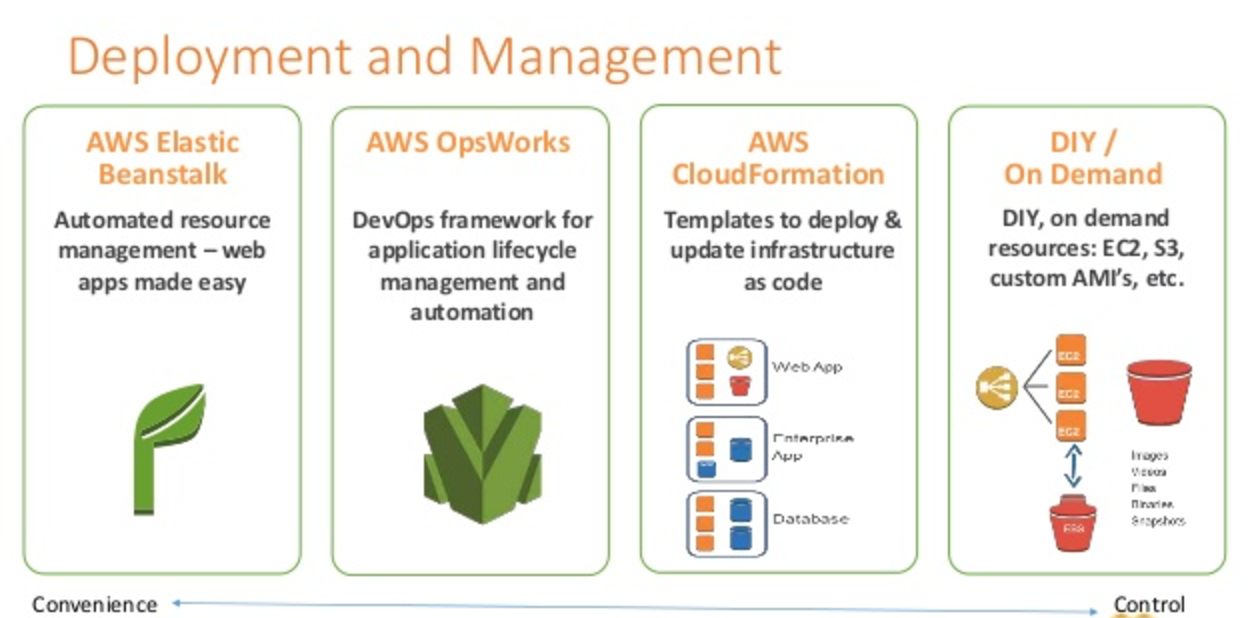
AWS offers multiple options for provisioning IT infrastructure and application deployment and management, varying from convenience & ease of setup to low-level granular control.
Deployment and Management - Elastic Beanstalk vs CloudFormation vs CDK

AWS Elastic Beanstalk

  • AWS Elastic Beanstalk is a higher-level service which allows you to quickly deploy with minimum management effort a web or worker-based environment using EC2, Docker using ECS, Elastic Load Balancing, Auto Scaling, RDS, CloudWatch, etc.
  • Elastic Beanstalk is the fastest and simplest way to get an application up and running on AWS, perfect for developers who want to deploy code and not worry about underlying infrastructure.
  • Elastic Beanstalk provides an environment to easily deploy and run applications in the cloud. It is integrated with developer tools and provides a one-stop experience for application lifecycle management.
  • Elastic Beanstalk requires minimal configuration and will help deploy, monitor, and handle the elasticity/scalability of the application.
  • A user doesn’t need to do much more than write application code and configure some settings on Elastic Beanstalk.
  • Supports platforms including Java, .NET, PHP, Node.js, Python, Ruby, Go, and Docker on Amazon Linux 2 and Amazon Linux 2023.
  • AI-Powered Environment Analysis (2026) – Elastic Beanstalk now offers AI-powered analysis that automatically diagnoses environment health issues, identifies root causes, and provides recommended solutions when health status is Warning, Degraded, or Severe.
  • Dual-Stack IPv6 Support (2025) – Supports dual-stack configuration for Application Load Balancers and Network Load Balancers, allowing environments to serve both IPv4 and IPv6 traffic.

AWS OpsWorks (Deprecated – EOL 2024)

⚠️ All AWS OpsWorks services reached End of Life in 2024 and have been disabled for all customers.
  • AWS OpsWorks was an application management service that simplified software configuration, application deployment, scaling, and monitoring using Chef or Puppet.
  • OpsWorks was recommended for managing infrastructure with a configuration management system such as Chef.
  • OpsWorks enabled writing custom Chef recipes, utilized self-healing, and worked with layers.
  • Although OpsWorks was a deployment management service that helped deploy applications with Chef recipes, it was not primarily meant to manage scaling out of the box and needed to be handled explicitly.
  • Migration Paths:
    • AWS Systems Manager – For configuration management and automation (recommended by AWS)
    • Chef SaaS – For customers who want to continue using Chef recipes
    • Puppet Enterprise – Self-hosted Puppet for existing Puppet users
    • AWS CodeDeploy – For application deployment workflows
    • Amazon ECS/EKS – For containerized workloads

AWS CloudFormation

  • AWS CloudFormation enables modeling, provisioning, and version-controlling of a wide range of AWS resources ranging from a single EC2 instance to a complex multi-tier, multi-region application.
  • CloudFormation is a low-level service and provides granular control to provision and manage stacks of AWS resources based on templates (JSON or YAML).
  • CloudFormation templates enable version control of the infrastructure and make deployment of environments easy and repeatable.
  • CloudFormation supports infrastructure needs of many different types of applications such as existing enterprise applications, legacy applications, applications built using a variety of AWS resources, and container-based solutions (including those built using AWS Elastic Beanstalk).
  • CloudFormation is not just an application deployment tool but can provision any kind of AWS resource.
  • CloudFormation is designed to complement Elastic Beanstalk and other AWS services.
  • CloudFormation with Elastic Beanstalk
    • CloudFormation supports Elastic Beanstalk application environments as one of the AWS resource types.
    • This allows you, for example, to create and manage an AWS Elastic Beanstalk–hosted application along with an RDS database to store the application data. In addition to RDS instances, any other supported AWS resource can be added to the group as well.
  • Key Updates (2024-2025):
    • Stack Refactoring (2025) – Move resources between stacks, rename logical IDs, and decompose monolithic templates into focused components without disrupting running infrastructure.
    • 40% Faster Deployments (2024) – Optimistic stabilization with CONFIGURATION_COMPLETE event enables parallel creation of dependent resources.
    • IaC Generator – Generate CloudFormation templates from existing AWS resources (reverse-engineer existing infrastructure into IaC).
    • Configuration Drift Management – Improved drift detection and remediation capabilities.
    • AI Integration – IaC context integrated with AI-powered development tools.

AWS Cloud Development Kit (AWS CDK)

  • AWS CDK is an open-source software development framework that allows you to define cloud infrastructure using familiar programming languages (TypeScript, JavaScript, Python, Java, C#/.NET, Go).
  • CDK synthesizes into CloudFormation templates, providing the reliability of CloudFormation with the expressiveness of general-purpose programming languages.
  • CDK provides high-level constructs (L2/L3) that encapsulate AWS best practices and reduce the amount of boilerplate code needed.
  • CDK is ideal for teams who prefer imperative programming over declarative YAML/JSON templates.
  • Same infrastructure that takes 500+ lines of CloudFormation YAML can be expressed in ~15 lines of CDK TypeScript.
  • CDK Refactoring (2025) – Refactor CDK code (rename constructs, move resources between stacks) while preserving deployed resources.
  • CDK Mixins (2026) – Add composable, reusable abstractions to any construct (L1, L2, or custom) without rebuilding existing infrastructure code.
  • CDK Aspects – Apply organization-wide policies (security rules, tagging standards, compliance requirements) across entire infrastructure.

AWS Serverless Application Model (AWS SAM)

  • AWS SAM is an open-source framework specifically designed for building serverless applications using infrastructure as code.
  • SAM extends CloudFormation with shorthand syntax to express Lambda functions, APIs, databases, and event source mappings with fewer lines of code.
  • During deployment, SAM transforms the SAM syntax into CloudFormation syntax, then CloudFormation provisions the resources.
  • SAM CLI provides local testing, debugging, packaging, and deployment capabilities.
  • SAM Accelerate – Speeds up local development and cloud testing.
  • WebSocket API Support (2026) – Define complete WebSocket APIs for API Gateway with minimal configuration.
  • SAM CLI integrates with AWS CDK and Terraform.

AWS App Runner

  • AWS App Runner is a fully managed container application service that lets you build, deploy, and run containerized web applications and API services without prior infrastructure or container experience.
  • App Runner connects directly to your code or image repository and provides an automatic CI/CD pipeline with fully managed operations, high performance, scalability, and security.
  • App Runner automatically handles load balancing, auto-scaling (including scale to zero), encryption, and health monitoring.
  • Ideal for web applications and APIs that need to deploy quickly from source code or container images without managing infrastructure.
  • Supports deployment from GitHub, Bitbucket, or Amazon ECR.

AWS Proton (Deprecated – EOL October 7, 2026)

⚠️ AWS Proton will reach End of Life on October 7, 2026. Plan migration accordingly.
  • AWS Proton was a fully managed deployment service that standardized how organizations deploy microservices and infrastructure from approved templates.
  • Proton sat on top of CloudFormation (or Terraform) and added self-service deployment, versioning, parameter validation, and standardization.
  • Designed for platform teams to provide standardized templates while giving developers self-service deployment speed.
  • After EOL, the Proton console, API, and pipeline management will be permanently unavailable, though deployed infrastructure will remain intact.

Comparison Summary

Service Level Best For Status
Elastic Beanstalk High-level PaaS Developers who want to deploy code without managing infrastructure ✅ Active
CloudFormation Low-level IaC Granular control over all AWS resources via declarative templates ✅ Active
AWS CDK High-level IaC Teams who prefer defining infrastructure in programming languages ✅ Active
AWS SAM Serverless IaC Serverless applications (Lambda, API Gateway, DynamoDB) ✅ Active
App Runner Fully Managed Container web apps/APIs without any infrastructure management ✅ Active
OpsWorks Configuration Mgmt Chef/Puppet based configuration management ❌ EOL (2024)
AWS Proton Template Orchestration Standardized microservice deployment templates ⚠️ EOL Oct 2026

AWS Certification Exam Practice Questions

  • Questions are collected from Internet and the answers are marked as per my knowledge and understanding (which might differ with yours).
  • AWS services are updated everyday and both the answers and questions might be outdated soon, so research accordingly.
  • AWS exam questions are not updated to keep up the pace with AWS updates, so even if the underlying feature has changed the question might not be updated
  • Open to further feedback, discussion and correction.
  1. Your team is excited about the use of AWS because now they have access to programmable infrastructure. You have been asked to manage your AWS infrastructure in a manner similar to the way you might manage application code. You want to be able to deploy exact copies of different versions of your infrastructure, stage changes into different environments, revert back to previous versions, and identify what versions are running at any particular time (development, test, QA, production). Which approach addresses this requirement?
    1. Use cost allocation reports and AWS OpsWorks to deploy and manage your infrastructure.
    2. Use AWS CloudWatch metrics and alerts along with resource tagging to deploy and manage your infrastructure.
    3. Use AWS Elastic Beanstalk and a version control system like GIT to deploy and manage your infrastructure.
    4. Use AWS CloudFormation and a version control system like GIT to deploy and manage your infrastructure.
  2. An organization is planning to use AWS for their production roll out. The organization wants to implement automation for deployment such that it will automatically create a LAMP stack, download the latest PHP installable from S3 and setup the ELB. Which of the below mentioned AWS services meets the requirement for making an orderly deployment of the software?
    1. AWS Elastic Beanstalk
    2. AWS CloudFront
    3. AWS CloudFormation
    4. AWS DevOps
  3. You are working with a customer who is using Chef configuration management in their data center. Which service is designed to let the customer leverage existing Chef recipes in AWS?
    Note: AWS OpsWorks reached EOL in 2024. For Chef-based configuration management on AWS, customers should now use Chef SaaS or AWS Systems Manager with Chef recipes via Application Manager.
    1. Amazon Simple Workflow Service
    2. AWS Elastic Beanstalk
    3. AWS CloudFormation
    4. AWS OpsWorks (Historical answer – service now deprecated)
  4. A company wants to define their infrastructure using a programming language like TypeScript instead of writing YAML templates. They want the same reliability as CloudFormation but with less boilerplate code. Which AWS service should they use?
    1. AWS Elastic Beanstalk
    2. AWS Cloud Development Kit (CDK)
    3. AWS SAM
    4. AWS App Runner
  5. A startup wants to deploy a containerized web application with minimal infrastructure management. They want automatic scaling, load balancing, and a CI/CD pipeline connected to their GitHub repository. Which AWS service provides the simplest solution?
    1. Amazon ECS with Fargate
    2. AWS Elastic Beanstalk
    3. AWS App Runner
    4. AWS CloudFormation
  6. A team is building a serverless application using Lambda functions, API Gateway, and DynamoDB. They want to define their infrastructure using a simplified template syntax with built-in local testing capabilities. Which tool is most appropriate?
    1. AWS CloudFormation
    2. AWS CDK
    3. AWS SAM
    4. AWS Elastic Beanstalk
  7. An organization has a large monolithic CloudFormation stack that they want to split into smaller, focused stacks without recreating their existing infrastructure. Which CloudFormation feature enables this?
    1. CloudFormation StackSets
    2. CloudFormation Change Sets
    3. CloudFormation Stack Refactoring
    4. CloudFormation Nested Stacks

References